All Categories
- ATEN
- EPSON
- HISENSE
-
AV Signal Distribution
In AV Signal Distribution
- JK
-
Screens
In Screens
-
Projector
-
Cables
In Cables
- DTECH
- Business
- VISION
-
Projector Bracket
In Projector Bracket
-
Digital Signage Solutions
In Digital Signage Solutions
Brands
-
Audio
In Audio














All Categories
- ATEN
- EPSON
- HISENSE
-
AV Signal Distribution
In AV Signal Distribution
- JK
-
Screens
In Screens
-
Projector
-
Cables
In Cables
- DTECH
- Business
- VISION
-
Projector Bracket
In Projector Bracket
-
Digital Signage Solutions
In Digital Signage Solutions
Brands
-
Audio
In Audio

BROWSE CATEGORIES
Help
JK
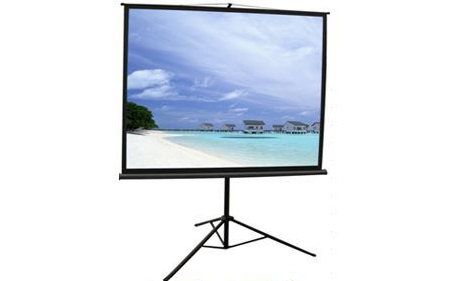
JK Tripod Screen, 100″, 4:3 Aspect Ratio, Matt White Fabric – T4100
R3,215.52
The middle size of JK's three 4:3 tripod screens, with 100" of matt white for schools and training venues that move one screen between rooms.
- Viewing area 2030 x 1520 mm, 100" (254 cm) diagonal
- 2220 mm case with carry handle, 15.5 kg packed
- Lens 3.00 to 3.59 m away for an Epson EB-X49
- Same picture size as JK's 100" 4:3 pull-down
- Brand :JK
- SKU :JK-T4100
- Category :JK
- Availability :
 In Stock
1 in stock
The JK-T4 100 (our code T4100) sits in the middle of JK’s three 4:3 tripod screens: 100″ (254 cm) diagonal, with a matt white picture area of 2030 x 1520 mm. Its 2.22 m case and 15.5 kg packed weight fall between those of the 84 and 120 inch models, and a 4:3 projector fills the surface exactly.
84, 100 or 120 inches: how JK’s 4:3 tripods compare
The JK-T4 84 has 2.19 square metres of surface in a 1880 mm case at 13.6 kg packed. This model has 3.09 square metres, about 41% more, for 340 mm more case and 1.9 kg more weight. The JK-T4 120 adds another 45% of area, to 4.47 square metres, in a 2610 mm case at 18 kg. Each step up needs more lumens for the same picture brightness.
If the screen will stay in one room, JK’s JK-M4 100 (M4100) manual pull-down has an identical 2030 x 1520 mm viewing area and no tripod legs in front of the audience.
Projector distance for a 2.03 m wide picture
The Epson EB-X49 is a 4:3 XGA projector, so it fills this screen without spare fabric. At Epson’s 1.48 to 1.77 throw ratio, the lens goes 3.00 to 3.59 m from the surface. A 16:10 projector across the same 2030 mm gives a picture 1269 mm tall, about 94″, leaving 251 mm of white unused.
Tilting the screen or using the projector’s keystone correction
Aim a table-top projector up at a raised screen and the top of the picture spreads wider than the bottom. There are two ways to square it up. The keystone eliminator at the top of the tripod tilts the screen’s head towards the room so the surface faces the beam; JK gives no angle for it. The other is the projector’s own correction: Epson lists automatic vertical and manual horizontal keystone correction for the EB-X49, each up to 30 degrees either way.
Projector correction is digital. It reshapes the image on the panel using fewer of its pixels, so a 1024 x 768 picture loses some resolution, while tilting the screen keeps every pixel in use. The tilt only works top to bottom, though: a projector set off to one side of the screen still needs the horizontal correction.
Key specifications of the JK-T4 100
| Manufacturer model | JK-T4 100 |
|---|---|
| Our code | T4100 |
| Width and height of picture | 2030 x 1520 mm |
| Screen size | 100″ (254 cm) diagonal, 4:3 |
| Surface finish | Matt white |
| Case | 2220 mm long |
| Total height of the screen, tripod excluded (JK) | 1760 mm |
| Black drop | 60 mm |
| Shipping carton | 2315 x 216 x 165 mm |
| Packed weight | 15.5 kg |
Questions about the JK-T4 100
Does the JK-T4 100 need a power point?
No. JK lists no motor, power input or remote control for its tripod screens. You raise the screen by hand and the tripod’s safety lock button holds it, so it can stand wherever there is floor for the legs, with no cable to a wall socket.
Will an overhead projector work with the JK-T4 100?
Yes, with blank margins at the sides. An OHP’s image is square, so the 1520 mm height limits it to about 1520 x 1520 mm, leaving roughly 255 mm unused on the left and right. For mostly OHP work, the square JK-T1 84 takes the full image at 2130 x 2130 mm.
Does 16:9 video on the JK-T4 100 match a 100 inch widescreen?
No. A 16:9 projector filling the 2030 mm width draws 2030 x 1142 mm, about 92″ diagonal, with 378 mm of the height unused. A true 100″ 16:9 screen is about 2214 x 1245 mm, so where widescreen material dominates, compare against a 16:9 screen before choosing a 4:3 tripod.
Is the 100 inches the picture or the whole screen?
The picture. JK states that its tripod sizes are viewing sizes, and the 2030 x 1520 mm white area measures 2536 mm, or 100″, corner to corner. The border and case add to that: JK’s total height of 1760 mm, for the screen without its tripod, is 240 mm more than the picture.
You must be logged in to post a review.
You may also like these

JK
In Stock
JK Fixed Thin Frame Screen, 133", 16:9 Aspect Ratio, Matt Grey Fabric - F9133TFG
R10,593.08
F9133TFG In Stock
JK
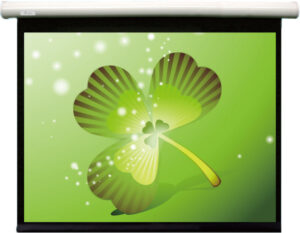
JK Electric Screen, 100", 4:3 Aspect Ratio, Matt White Fabric - E4100
R6,835.57
E4100 Out of Stock
JK
Low stock (2 left)
JK Fixed Thin Frame Screen, 119", 16:9 Aspect Ratio, Matt Grey Fabric - F9119TFG
R9,403.44
F9119TFG Low stock (2 left)




Hisense
Hisense Ambient Light Rejection Frame Screen, 150", 16:9 Aspect Ratio - DLT150B
R69,484.80
DLT150B Out of Stock
JK
Low stock (1 left)
JK Electric HD Tab Screen, 150", 16:9 Aspect Ratio, Matt White Fabric - E9150HDT
R27,411.31
E9150HDT Low stock (1 left)
Reviews
There are no reviews yet.