All Categories
- ATEN
- EPSON
- HISENSE
-
AV Signal Distribution
In AV Signal Distribution
- JK
-
Screens
In Screens
-
Projector
-
Cables
In Cables
- DTECH
- Business
- VISION
-
Projector Bracket
In Projector Bracket
-
Digital Signage Solutions
In Digital Signage Solutions
Brands
-
Audio
In Audio














All Categories
- ATEN
- EPSON
- HISENSE
-
AV Signal Distribution
In AV Signal Distribution
- JK
-
Screens
In Screens
-
Projector
-
Cables
In Cables
- DTECH
- Business
- VISION
-
Projector Bracket
In Projector Bracket
-
Digital Signage Solutions
In Digital Signage Solutions
Brands
-
Audio
In Audio

BROWSE CATEGORIES
Help
EPSON
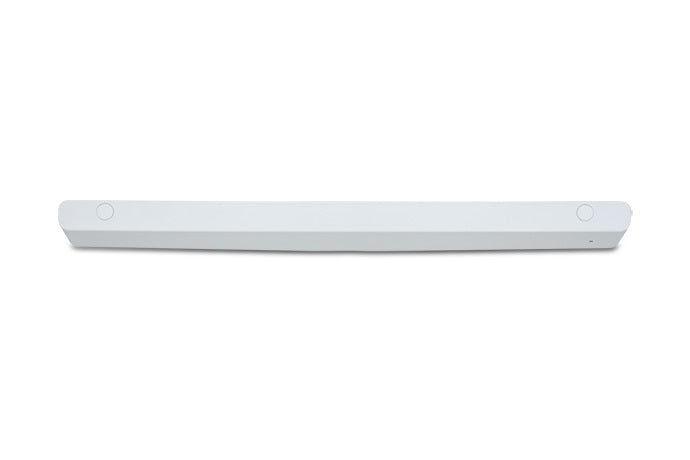
Epson Finger touch unit – ELPFT01
R6,221.48
Infrared laser touch unit that adds finger touch to Epson interactive projectors, including the EB-760Wi and EB-770Fi.
- Laser curtain over the board; the projector's camera reads finger positions
- Powered by the projector over the supplied 1.8 m cable
- Mounts with built-in magnets or two M4 screws (not supplied)
- Eight infrared deflectors and two setup markers in the box
- Brand :Epson
- SKU :EPSON-ELPFT01
- Category :EPSON
- Availability :Out of Stock
Out of stock
The Epson ELPFT01 adds finger touch to Epson’s interactive projectors. Fixed to the board above the image, it spreads an infrared laser curtain just over the surface. A finger touching the surface reflects the laser, and the projector’s infrared camera reads its position.
The unit takes its power from the projector through the supplied 1.8 m cable, so it works only with the interactive Epson models listed below.
Projectors that take the ELPFT01
Epson UK lists five compatible projectors: the EB-725Wi, EB-735Fi, EB-1480Fi, Epson EB-760Wi and Epson EB-770Fi. The EB-770F and EB-775F are not on that list. Epson’s installation guide for the EB-760Wi and EB-770Fi warns that connected to other projectors or devices the unit could malfunction or emit laser light above normal intensity, so use it only with a listed model.
Mounting the ELPFT01 above the image
On a magnetic board the unit holds with its built-in magnets. Otherwise it is fixed with two M4 screws, which are not supplied, marked out with the supplied template sheet; the unit’s screw holes are 20.4 mm deep.
Epson’s guide puts the bottom of the unit 16.4 to 50 mm above the top of the image on the EB-760Wi and 19.2 to 50 mm on the EB-770Fi, with tighter ranges in the EB-770Fi’s 16:6 and 21:9 modes. The board must be flat to within 5 mm and projected onto from the front: finger touch does not work with rear projection. Where the unit cannot sit on the projection surface itself, Epson’s answer is the Epson ELPMB63 touch unit bracket, for boards whose face stands 15 to 50 mm off the wall.
A tray or frame along the bottom edge reflects the laser and throws off detection, so the supplied infrared deflector strips go along it. On a wall with several touch units, deflectors also serve as partitions between boards. Because of the unit’s powerful magnet, Epson warns anyone using a pacemaker or similar medical equipment to keep away from it.
Setting up and calibrating finger touch
Epson’s order is to mount the projector and square the image, calibrate the pens, then fit and adjust the touch unit. Plug the cable into the unit’s TCH port and set Installation, Touch Unit, Power to On; from then on the unit starts with the projector. Touch Unit Setup (Auto) uses the two supplied markers to set the laser angle, with a manual routine on the remote’s number keys as the fallback. Touch Calibration comes last: touch the centre of each dot with a fingertip until all have gone.
The box holds the touch unit, the 1.8 m cable, two markers with 12 strips of tape, eight infrared deflectors of about 28.5 cm, three spacers for the screw holes, four labels and the template sheet.
Key specifications
| Epson part number | V12H007A24 (Epson UK), V12H007A23 (Epson US) |
|---|---|
| Detection | Infrared laser curtain, Class 1 laser product |
| Laser wavelength | 932 to 952 nm |
| Power | 5 V DC, 0.65 A, supplied by the projector |
| Mounting | Built-in magnets or 2 x M4 screws (not supplied) |
| Mass | Approx. 0.6 kg |
| Length | 422 mm |
| Operating temperature | 0 to 40 °C |
| Interactive image (EB-760Wi, EB-770Fi) | Up to 100 inches (254 cm); 110 inches (279 cm) on the EB-770Fi at 16:6 and 21:9 |
Questions about the Epson ELPFT01
Does the ELPFT01 need its own power supply?
No. The projector supplies 5 V DC at 0.65 A through the 1.8 m cable, so the board needs no mains socket. That one cable must reach from the top of the image to the projector, so plan its route first.
How large can the touch area be?
Up to 100 inches (254 cm) on the EB-760Wi and EB-770Fi, or 110 inches on the EB-770Fi in its 16:6 and 21:9 modes. The other listed models give their limits in their own guides.
How many infrared deflectors does a board need?
Where the board has a tray or frame along its bottom edge, Epson’s table asks for four to eight on the EB-760Wi and EB-770Fi in 16:9, 16:10 and 4:3, which the eight in the box cover. The EB-770Fi’s 16:6 and 21:9 modes need nine or ten from about 95 inches up; Epson says to get extras from a dealer or its service centre.
What laser class is the ELPFT01?
Class 1, to IEC/EN 60825-1:2014. Its warning label adds that opening the marked section releases Class 3B invisible laser radiation, so the housing must stay closed.
You must be logged in to post a review.
You may also like these
Epson
 Low stock (2 left)
Epson Business Projector, 6200 Ansi Lumens, 3LCD WUXGA resolution, 16:10 Aspect Ratio - EBL695SU
R89,519.84
EBL695SU Low stock (2 left)
Epson
Epson Business Projector, 4200 Ansi Lumens, 4KE resolution, 16:9 Aspect Ratio - EB780E
R55,290.75
EB780E Out of Stock
Epson
Reviews
There are no reviews yet.