All Categories
- ATEN
- EPSON
- HISENSE
-
AV Signal Distribution
In AV Signal Distribution
- JK
-
Screens
In Screens
-
Projector
-
Cables
In Cables
- DTECH
- Business
- VISION
-
Projector Bracket
In Projector Bracket
-
Digital Signage Solutions
In Digital Signage Solutions
Brands
-
Audio
In Audio














All Categories
- ATEN
- EPSON
- HISENSE
-
AV Signal Distribution
In AV Signal Distribution
- JK
-
Screens
In Screens
-
Projector
-
Cables
In Cables
- DTECH
- Business
- VISION
-
Projector Bracket
In Projector Bracket
-
Digital Signage Solutions
In Digital Signage Solutions
Brands
-
Audio
In Audio

BROWSE CATEGORIES
Help
AV Signal Distribution
Dtech Extender, HDMI Over IP, Transmitter – 7043S
R933.80
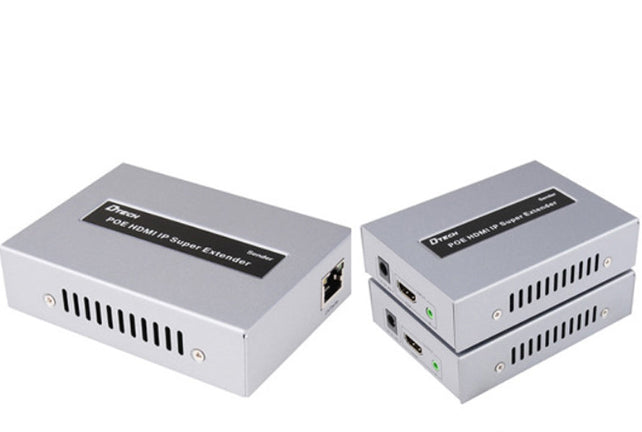
The transmitter for Dtech's DT-7043 HDMI over IP system: one per source, sending a 1080p picture to one screen or many over Cat 6 cable.
- Transmitter only; DT-7043R receivers sold separately
- 120 m on a direct Cat 6 run
- Up to 253 receivers through a network switch
- 1920 x 1080 at 60 Hz, with HDMI audio
- Power supply in the box
- Brand :Dtech
- SKU :DTECH-7043S
- Category :AV Signal Distribution
- Availability :
 In Stock
47 in stock
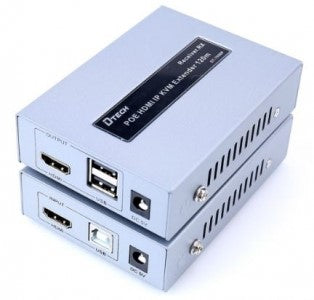
The Dtech DT-7043S (our code 7043S) is the transmitter of a two-part HDMI over IP system, sold without a receiver. It takes HDMI from a computer, media player or decoder at up to 1080p 60 Hz, compresses it and sends it over Cat cable to Dtech DT-7043R receivers.
One cable straight to a single receiver can run 120 m. Through a network switch, one DT-7043S feeds up to 253 receivers, each driving its own screen.
What a working DT-7043 link needs
- One DT-7043S per source. It has a single HDMI input, so each computer or player you want to send needs its own transmitter.
- One Dtech DT-7043R receiver per display. The receiver decodes the stream and connects to the TV, monitor or projector by HDMI.
- A network switch once there is more than one receiver, with a port for the transmitter and one per receiver. A single screen can be cabled straight from transmitter to receiver.
- Cat 5e or Cat 6 cable for each run, unshielded (UTP) or shielded.
- A plug point beside the source for the transmitter’s power supply, which comes in the box.
- HDMI leads from the source to the transmitter and from each receiver to its display, such as those in our HDMI copper cable range.
Going past 120 m, and the load on your network
A switch or router in the path relays the signal, and Dtech’s 2019 DT-7043 sheet gives 240 m for a link relayed that way. It does not say how the 240 m divides between the cable into the switch and the cable out of it, so keep each of those cables within the 120 m direct rating.
Dtech publishes no bandwidth, multicast or switch-setting figures for the DT-7043, which leaves no way to judge the load on a shared office or school network. Give the system a switch of its own, or at least its own VLAN.
Picture, sound and compression
The DT-7043S accepts 1920 x 1080 at 60 Hz and lower resolutions. Set a 4K source or a 1920 x 1200 laptop to 1920 x 1080 before connecting it. Sound embedded in the HDMI signal travels with the picture to every receiver.
Compressing the video at the transmitter and decoding it at each receiver adds some delay, and Dtech gives no latency figure. Try the link with your own source before using it for gaming or a touch screen, where delay shows most.
DT-7043 system or DT-7058 kit
Dtech’s DT-7058 HDMI over IP kit is also a 1080p extender that runs direct or through a switch. Four differences decide between them:
- How it is bought: the DT-7043S and DT-7043R are sold one by one, so one source and five screens is one transmitter and five receivers. The DT-7058 comes as a transmitter and one receiver.
- One cable: 120 m for the DT-7043, 150 m for the DT-7058.
- Monitor at the source: the DT-7058 transmitter has an HDMI loop-out. The DT-7043S has a single HDMI socket and no loop-out.
- IR remote control: documented for the DT-7058, not confirmed for the DT-7043 units in our photos.
Dtech does not list the two as compatible, so keep each system to its own transmitters and receivers.
Key specifications of the Dtech DT-7043S
| Unit | Transmitter only; DT-7043R receiver sold separately |
|---|---|
| Input | 1 x HDMI; no loop-out |
| Video input | 1920 x 1080 at 60 Hz and lower |
| Audio | Embedded HDMI audio, carried with the video |
| Cable | Cat 5e or Cat 6, UTP or shielded |
| Direct distance | 120 m to one receiver |
| Through a switch or router | 240 m in total; up to 253 receivers |
| Power | DC 5 V adapter, supplied |
| In the box | Transmitter and power supply |
Questions about the Dtech DT-7043S
Can two DT-7043S transmitters share one network switch?
Plan on a separate switch for each transmitter. Dtech describes one transmitter feeding many receivers but gives no way to pick a transmitter at the receiver, and no channel or ID selector is visible on the units in our photos. Two sources on different screens means two separate DT-7043 systems.
Is the DT-7043S powered over Ethernet?
Plan on the supplied adapter. The label in our product photo reads “POE HDMI IP Super Extender”, but Dtech’s 2019 sheet says only that PoE-enabled models in the range can run from a PoE switch, without naming the DT-7043 or giving a PoE standard or wattage. Even on those models the power comes from the switch, so a direct cable to one receiver would still need adapters.
Does the DT-7043 pass IR remote control?
Treat IR as unconfirmed for the units we sell. Published DT-7043 sheets show an IR send socket on the transmitter and an IR receive socket on the receiver, for a remote used at the screen end, but no IR socket is visible in our photos and the datasheet lists no IR leads in the box.
Will Cat 5e cable do for a 120 m run?
Cat 5e is within Dtech’s rating, but pull Cat 6 for a new run at full length. Dtech’s 2019 sheet gives the 120 m on Cat 5e or Cat 6, while our datasheet quotes it on Cat 6 and recommends quality Cat 6 for HDMI links. Test an existing Cat 5e run end to end before relying on it.
You must be logged in to post a review.
Reviews
There are no reviews yet.