n
e
x
m
a
r
t

All Categories
-
AV Signal Distribution
In AV Signal Distribution
-
Screens
In Screens
-
Projector
-
Cables
In Cables
- Business
-
Digital Signage Solutions
In Digital Signage Solutions
Brands
-
Projector Bracket
In Projector Bracket
-
Audio
In Audio
-
Professional
Brands
-
Flat Panel Bracket
In Flat Panel Bracket
-
Home Cinema
Brands
-
Wireless Presentation Systems
In Wireless Presentation Systems
Brands
-
Interactive Panels
In Interactive Panels
Brands
-
Visualisers
In Visualisers
Brands
All Categories
-
AV Signal Distribution
In AV Signal Distribution
-
Screens
In Screens
-
Projector
-
Cables
In Cables
- Business
-
Digital Signage Solutions
In Digital Signage Solutions
Brands
-
Projector Bracket
In Projector Bracket
-
Audio
In Audio
-
Professional
Brands
-
Flat Panel Bracket
In Flat Panel Bracket
-
Home Cinema
Brands
-
Wireless Presentation Systems
In Wireless Presentation Systems
Brands
-
Interactive Panels
In Interactive Panels
Brands
-
Visualisers
In Visualisers
Brands
KVM Signal Distribution
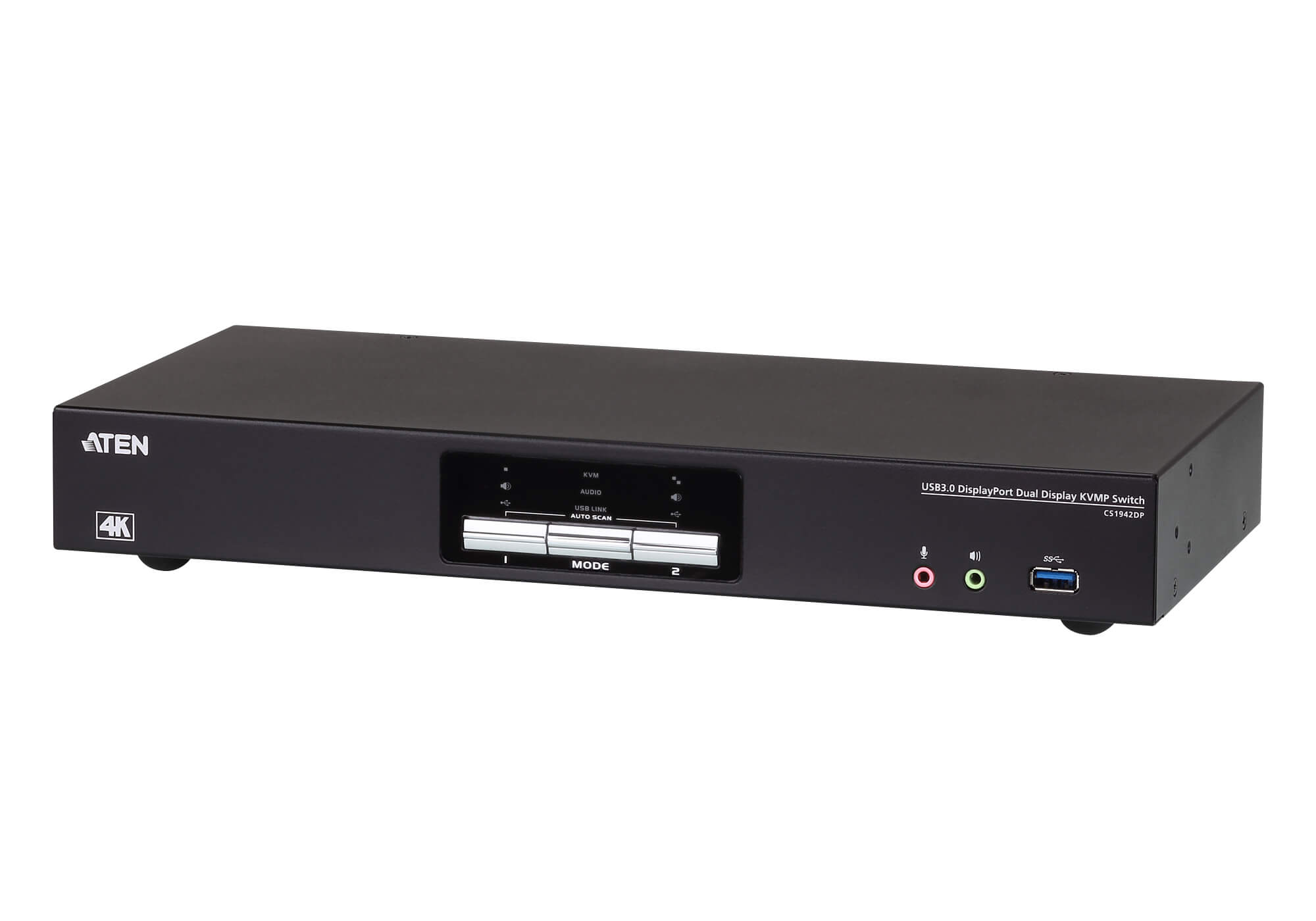
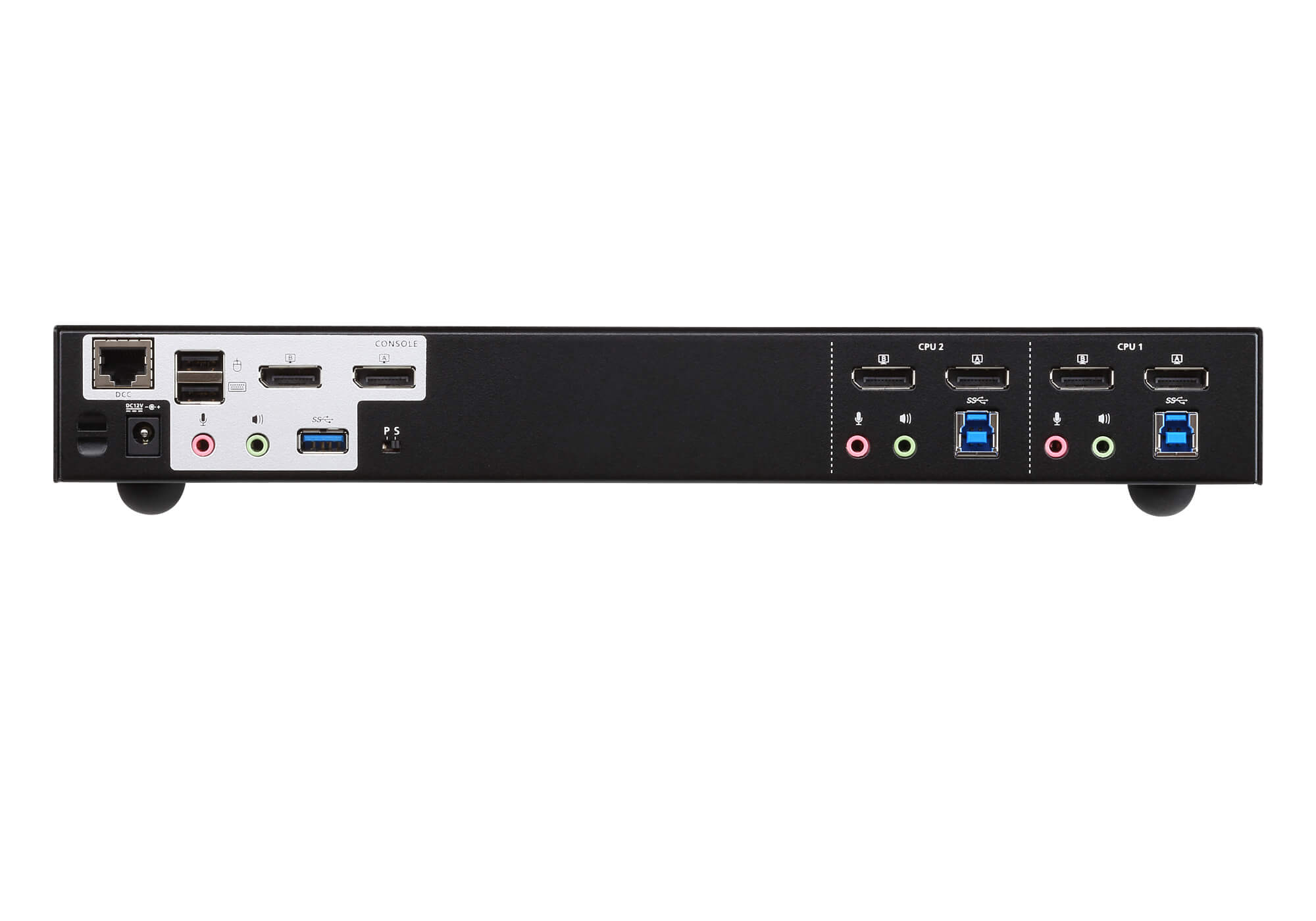
Aten DisplayPort KVMP Switch, USB 3.0, 2 Port – CS1942DP
R8,689.28
• Superior video quality – 4096 x 2160 @ 60Hz and 3840 x 2160 @ 60Hz; 2-Port USB 3.1 Gen 1 hub with SuperSpeed 5 Gbps data transfer rates
• Quad-Display – Easily connect two CS1942DP units for a second dual-screen setup controlled through a single connection
• Multi-Stream Transport (MST) allows multiple monitors through a single DisplayPort connector2
• DisplayPort Dual-Mode technology (DP++) supports HDMI and DVI signals via a DisplayPort-to-HDMI/DVI DP++ adapter1
- Brand :Aten
- SKU :ATEN-CS1942DP
- Category :KVM Signal Distribution
- Availability :Out of Stock
Out of stock
Description
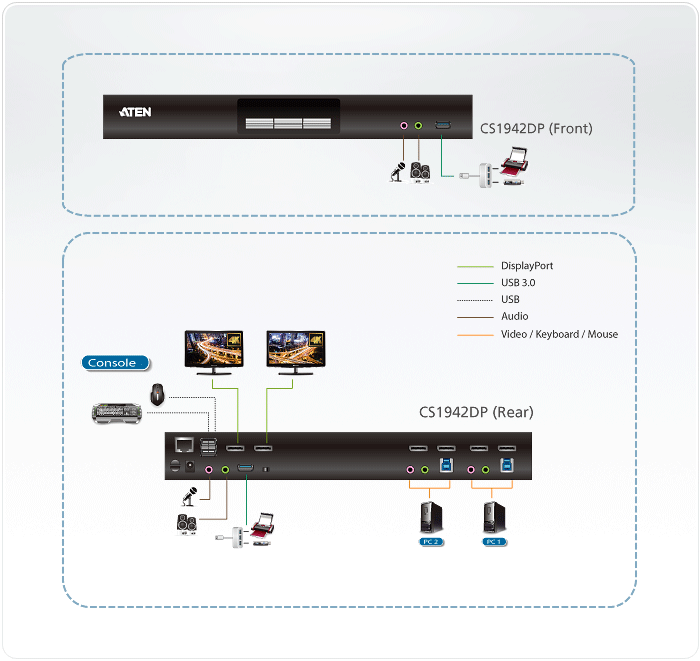
The ATEN CS1942DP desktop KVM switch helps organize your desktop. Especially when managing a multimedia workstation at a large organization, CS1942DP provides you with instant access to two or four computers, all through a single USB keyboard, USB mouse and two DisplayPort monitors.
Advanced video support provides a better-defined DisplayPort connection with video resolutions up to 4K (4096 x 2160 / 3840 x 2160 @ 60 Hz). Incorporating dual display capability, you are allowed to enjoy a wider screen and easily switch between two or four DisplayPort systems. In addition, featuring a built-in USB 3.1 Gen 1 hub, the CS1942DP delivers unprecedented data transfer rates up to 5 Gbps, allowing you to maximize multimedia operations.
Engineered to meet the ever-increasing demand for dual display, ultra-fast data transmission rates, and lossless 4K video resolution, the CS1942DP is specifically designed for where multitasking is needed such as design, financial trading, and video post-production.
Note:
As is common with DisplayPort KVM switches, switching between KVM ports in an Extended Desktop setup may cause windows open on the extended desktop to be resized/repositioned back to a default configuration on the main display. This is due to the nature of the DisplayPort protocol and may require a manual readjustment.
Package Contents
- 1x 2-Port USB 3.0 4K DisplayPort Dual Display KVMP™ Switch
- 4x DisplayPort 1.2 Cables
- 2x USB 3.0 Cables
- 4x Audio Cables
- 1x Power Adapter
- 1x User Instructions
| Computer Connections | 2 |
|---|---|
| Port Selection | Hotkey, Pushbutton, Mouse, RS-232 Commands |
Connectors
| Console Ports | 2 x USB Type A Female 2 x DisplayPort Female (Black) 2 x 3.5mm Audio Jack Female (Green; 1 x front, 1 x rear) 2 x 3.5mm Audio Jack Female (Pink; 1 x front, 1 x rear) |
|---|---|
| KVM (Computer) Ports | 2 x USB3.1 Gen1 Type B Female (Blue) 4 x DisplayPort Female (Black) 2 x 3.5mm Audio Jack Female (Green) 2 x 3.5mm Audio Jack Female (Pink) |
| Daisy Chain Ports | 1 x RJ-45 Female |
| Power | 1 x DC Jack |
| USB Hub | 2 x USB3.1 Gen1 Type A Female (Blue; 1 x front; 1 x rear) |
LEDs
| KVM | 3 (Orange) |
|---|---|
| Audio | 3 (Green) |
| USB Link | 3 (Green) |
Switches
| Selected | 3 x Pushbutton |
|---|---|
| Station Selection | 1 x Slide Switch |
Emulation
| Keyboard / Mouse | USB |
|---|---|
| Video | Up to 4096 x 2160 @ 60Hz, 2560 x 1440 @ 144Hz |
| Scan Interval | 1-99 seconds (default: 5 seconds) |
| Power Consumption | DC12V:3.48W:73BTU |
Environmental
| Operating Temperature | 0–50°C |
|---|---|
| Storage Temperature | 20–60°C |
| Humidity | 0-80% RH, Non-condensing |
Physical Properties
| Housing | Metal |
|---|---|
| Weight | 1.54 kg ( 3.39 lb ) |
| Dimensions (L x W x H) | 33.50 x 15.66 x 4.40 cm (13.19 x 6.17 x 1.73 in.) |
| Note | For some of rack mount products, please note that the standard physical dimensions of WxDxH are expressed using a LxWxH format. |
You must be logged in to post a review.
CS1942DP Datasheet PDF
 Low stock (1 left)
Reviews
There are no reviews yet.