All Categories
- ATEN
- EPSON
- HISENSE
-
AV Signal Distribution
In AV Signal Distribution
- JK
-
Screens
In Screens
-
Projector
-
Cables
In Cables
- DTECH
- Business
- VISION
-
Projector Bracket
In Projector Bracket
-
Digital Signage Solutions
In Digital Signage Solutions
Brands
-
Audio
In Audio














All Categories
- ATEN
- EPSON
- HISENSE
-
AV Signal Distribution
In AV Signal Distribution
- JK
-
Screens
In Screens
-
Projector
-
Cables
In Cables
- DTECH
- Business
- VISION
-
Projector Bracket
In Projector Bracket
-
Digital Signage Solutions
In Digital Signage Solutions
Brands
-
Audio
In Audio

BROWSE CATEGORIES
Help
Cables
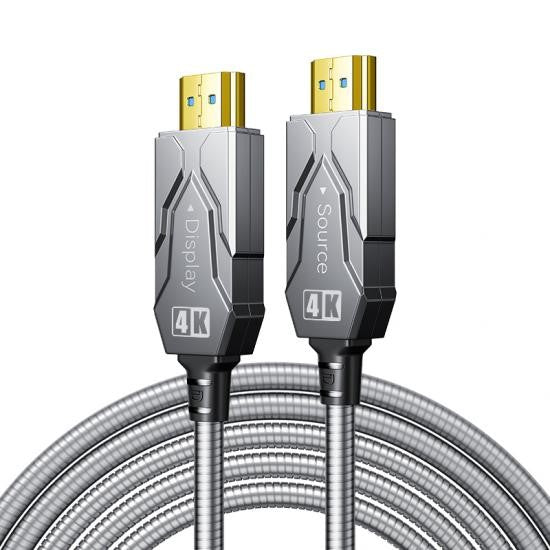
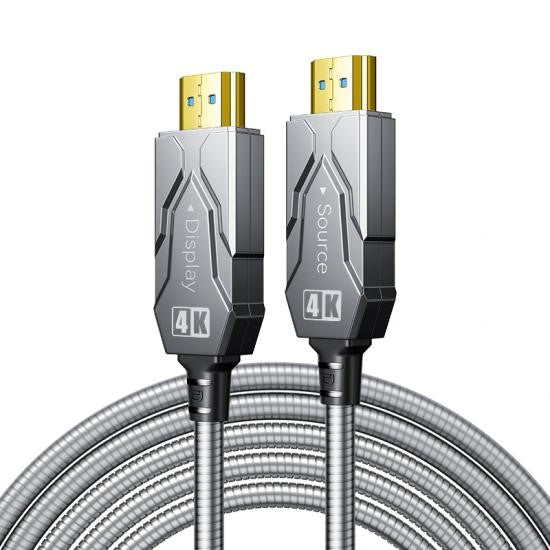
Dtech Armoured Fibre Cable, 50.0m, HDMI, V2.0, 4K resolution – HF2050K
R2,643.70
Dtech's 50 m armoured fibre HDMI cable for exposed routes to signage, venue screens and outdoor displays that need 4K at 60 Hz.
- Rated HDMI 2.0 at 18 Gbps for 4K 60 Hz
- Steel armour Dtech lists as waterproof and bite-resistant
- No IP rating published: keep the plugs under cover
- Source and Display ends, signal one way
- Brand :Dtech
- SKU :DTECH-HF2050K
- Category :Cables
- Availability :
 In Stock
11 in stock
The Dtech HF2050K puts 50 m of HDMI 2.0 fibre cable inside threaded steel armour, for a long route to a screen that crosses a venue floor, runs along an outside wall or goes out to signage. Dtech’s table for its armoured 4K cables gives 18 Gbps and 4096 x 2160 at 60 Hz. Signal flows from the Source plug to the Display plug and not back.
Outdoor screens: what Dtech claims and what it does not rate
Dtech’s page for the armoured series lists waterproofing and outdoor use among its properties, but publishes no IP rating and no operating temperature range for the armoured cable, and the two plugs are ordinary HDMI connectors with open contacts. Its manual for HDMI 2.0 fibre cables, which does not single out the armoured version, warns against letting the cable get wet. For an outdoor LED screen or billboard, run the exposed part in a sleeve or duct where you can, and make both connections indoors: inside the screen cabinet at one end and the control room at the other.
Choosing between 40 m, 50 m and 100 m
Measure the real route, every rise and drop included, and choose the shortest cable that covers it with a little spare, because a Dtech fibre cable cannot be cut and re-terminated. A route comfortably under 40 m suits the Dtech HF2040K. Beyond 50 m, the armoured choice is the 100 m Dtech HF2100K, which Dtech says carries HDMI 2.0 over its full length. On a protected route inside a building, the unarmoured Dtech HF2050 covers the same 50 m.
Ends, power and sound at 50 m
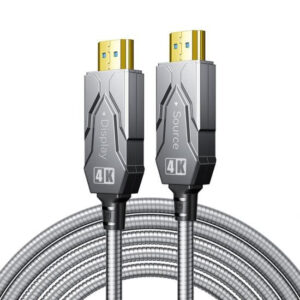
Decide the direction before the pull. The Source plug belongs at the player, PC or signage media box; the Display plug goes to the screen or the HDMI input of an LED controller. Dtech wants the run tested before construction. No power supply is fitted at either end, because Dtech’s fibre HDMI manual describes the cables as port-powered. Sound travels with the picture towards the display, but the display cannot send it back: Dtech supports audio return on its fibre cables only up to 8 m.
4K at 60 Hz or the 8K HF8050K
The HF2050K reaches 4K at 60 Hz, and Dtech lists 120 Hz only at 2K resolution. If the screen at the far end accepts 4K at 120 Hz, or the source is 8K, the Dtech HF8050K is the armoured 50 m cable that Dtech lists for HDMI 2.1 and 48 Gbps. Its listing makes no waterproof claim, so for an outdoor screen that needs only 4K at 60 Hz the HF2050K is the better documented choice.
Key specifications
| Model | Dtech HF2050K |
|---|---|
| Length | 50 m |
| HDMI version | 2.0 |
| Bandwidth | 18 Gbps |
| Highest 4K mode | 4096 x 2160, 60 Hz |
| High refresh | 2K at 120 Hz |
| Armour | Stainless steel, transparent PVC cover |
| Dtech environment claims | Waterproof, outdoor, anti-bite, anti-sun exposure |
| IP rating | Not published |
| Power | Port-powered, no external supply |
| Direction | One way, Source to Display |
Questions about the Dtech HF2050K
Can the HF2050K run in direct sun on an outside wall?
Dtech lists sun-exposure resistance for the armour, but backs it with no UV test and no temperature range for the armoured series. The only operating range Dtech gives for its HDMI 2.0 fibre cables is 0 to 55 °C, in the manual for the plain version. Where the route crosses a wall or roof in full afternoon sun, run it in conduit or on the shaded side, and keep both plugs inside.
Where should the spare length go on an outdoor run?
Indoors, at one end: coil it loosely in the screen cabinet, control room or ceiling void rather than leaving it outside. Dtech’s manual for its fibre HDMI cables forbids 180 degree bends and asks for a bend radius over 20 mm, with no separate figure for the armoured version. A coil around 300 mm across clears that limit many times over.
Will the HF2050K work with a signage player that outputs 1080p?
Yes. Dtech lists the armoured 4K series as compatible with HDMI 2.0 and earlier versions, and its manual for HDMI 2.0 fibre cables names 1080p, 720p and 480p among the formats carried alongside 4K.
Does the armour stop rodents chewing the HF2050K?
Dtech says it resists bites, without a test or standard behind the claim. Its listing names bites outdoors as one of the weaknesses of plain fibre HDMI cables that it added the steel layer to address.
You must be logged in to post a review.
You may also like these
Dtech
In Stock
Dtech Detachable Connector Fibre Cable, 60.0m, HDMI, V2.0, 4K resolution - HF0360
R3,157.89
HF0360 In Stock
Dtech
In Stock
Dtech Armoured Fibre Cable, 40.0m, HDMI, V2.0, 4K resolution - HF2040K
R2,470.11
HF2040K In Stock
Reviews
There are no reviews yet.