All Categories
- ATEN
- EPSON
- HISENSE
-
AV Signal Distribution
In AV Signal Distribution
- JK
-
Screens
In Screens
-
Projector
-
Cables
In Cables
- DTECH
- Business
- VISION
-
Projector Bracket
In Projector Bracket
-
Digital Signage Solutions
In Digital Signage Solutions
Brands
-
Audio
In Audio














All Categories
- ATEN
- EPSON
- HISENSE
-
AV Signal Distribution
In AV Signal Distribution
- JK
-
Screens
In Screens
-
Projector
-
Cables
In Cables
- DTECH
- Business
- VISION
-
Projector Bracket
In Projector Bracket
-
Digital Signage Solutions
In Digital Signage Solutions
Brands
-
Audio
In Audio

BROWSE CATEGORIES
Help
Cables
Dtech Copper Cable, 1.0m, HDMI, V2.0, 4K resolution – H002
R57.68
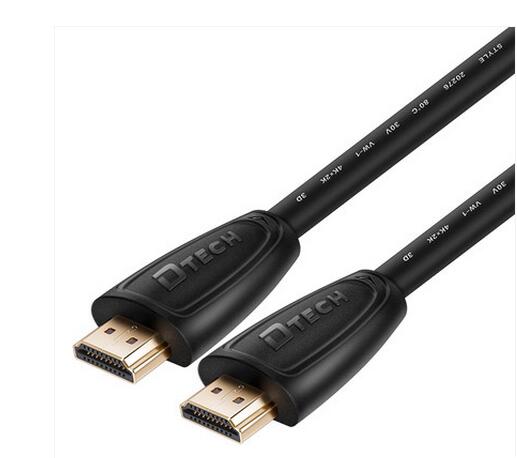
A 1.0 m Dtech HDMI cable for desk and cabinet runs, such as a laptop to the monitor beside it or a player to the TV directly above.
- HDMI 2.0 according to Dtech, with 4K at 60 Hz and 30 Hz listed
- Standard Type A plug on each end
- Not certified: Dtech states no bandwidth
- Brand :Dtech
- SKU :DTECH-H002
- Category :Cables
- Availability :
 In Stock
189 in stock
The Dtech H002 is a 1.0 m copper HDMI lead with a standard Type A plug on each end. One metre covers a laptop and the monitor next to it, a media player and the TV directly above its cabinet, or two devices a few units apart in a rack.
Dtech lists the line as HDMI 2.0 and names 4K at both 60 Hz and 30 Hz among its formats. Neither a bandwidth figure nor an HDMI certification is published for it.
A TV cabinet or a rack at one metre
In a TV cabinet, 1 m reaches from a player on the top shelf to an HDMI input set low on the back of the screen. A higher input, or a player on a lower shelf, calls for the 1.5 m Dtech H003. In a rack, the same length links a switcher or player to a device a few units above or below it without a bundle of spare cable at the rear.
4K at 60 Hz or 30 Hz on a computer monitor
At 30 Hz a 4K desktop redraws 30 times a second, half as often as at 60 Hz, so the pointer and scrolling pages move less smoothly. In the HDMI Licensing Administrator’s scheme, High Speed cables are tested to 10.2 Gbps, enough for 4K at 30 Hz. HDMI 2.0 added 4K at 60 Hz and lifted the ceiling to 18 Gbps.
Dtech rates the H002 for 60 Hz but claims no Premium High Speed certification, the HDMI programme that tests cables at that full 18 Gbps.
Key specifications of the Dtech H002
| Dtech code | H002 |
|---|---|
| Length | 1.0 m |
| 4K refresh rates listed | 60 Hz and 30 Hz |
| HD formats listed | 1080p, 1080i, 720p |
| HDMI version | 2.0, per Dtech |
| Certification | None stated |
| Connectors | Standard HDMI (Type A) plug on each end, gold plated |
| Core | Oxygen-free copper, 19+1 |
| Jacket and shield | Black PVC over aluminium foil |
Questions about the Dtech H002
Is 1 m long enough for a laptop and monitor on the same desk?
Yes, when the monitor’s HDMI input is within about 90 cm of the laptop’s port along the path the cable will follow, which leaves slack to slide the laptop. An input at the back centre of a large monitor lengthens that path, so run a tape along it before choosing between 1 m and 1.5 m.
My 4K monitor only runs at 30 Hz over this cable. What should I check?
Check the computer first: an HDMI 1.4 output cannot send 4K at 60 Hz, whatever the cable. Then find the monitor input that accepts 4K at 60 Hz and any setting it needs. If both ends support 60 Hz and the rate still drops, swap in a certified Premium High Speed cable to rule the lead in or out.
Will the laptop’s sound play through the monitor?
Only if the monitor has speakers or an audio output. HDMI carries sound alongside the picture, so the H002 delivers it to the monitor, but a monitor without either has nowhere to send it. In that case, set the laptop to play through its own speakers or a headset.
Can two laptops share one monitor with these leads?
Yes, through an HDMI switch: one lead from each laptop to the switch and a third from the switch to the monitor. With the switch on the same desk, 1 m usually covers all three. The switch then sets the highest format, so check it handles 4K at 60 Hz if the monitor runs at that rate.
You must be logged in to post a review.
You may also like these
Dtech
In Stock
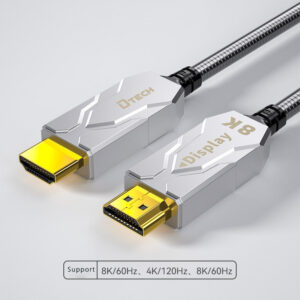
Dtech Armoured Fibre Cable, 30.0m, HDMI, V2.1, 8K resolution - HF8030K
R1,965.19
HF8030K In Stock
Reviews
There are no reviews yet.