All Categories
- ATEN
- EPSON
- HISENSE
-
AV Signal Distribution
In AV Signal Distribution
- JK
-
Screens
In Screens
-
Projector
-
Cables
In Cables
- DTECH
- Business
- VISION
-
Projector Bracket
In Projector Bracket
-
Digital Signage Solutions
In Digital Signage Solutions
Brands
-
Audio
In Audio














All Categories
- ATEN
- EPSON
- HISENSE
-
AV Signal Distribution
In AV Signal Distribution
- JK
-
Screens
In Screens
-
Projector
-
Cables
In Cables
- DTECH
- Business
- VISION
-
Projector Bracket
In Projector Bracket
-
Digital Signage Solutions
In Digital Signage Solutions
Brands
-
Audio
In Audio

BROWSE CATEGORIES
Help
Cables
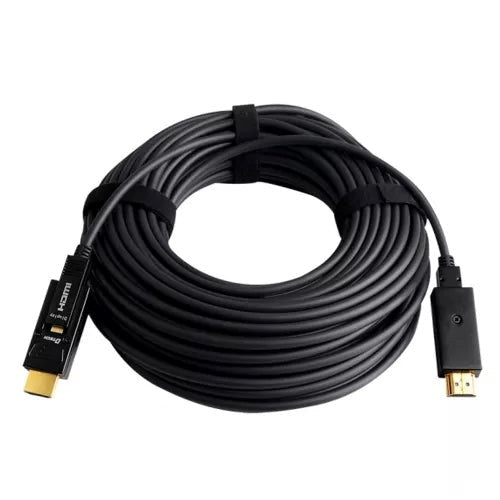
Dtech Detachable Connector Fibre Cable, 20.0m, HDMI, V2.0, 4K resolution – HF0320
R1,455.42
Twenty metres of fibre HDMI 2.0 for school halls, auditoriums and churches, where the last part of the run drops through conduit to the projector.
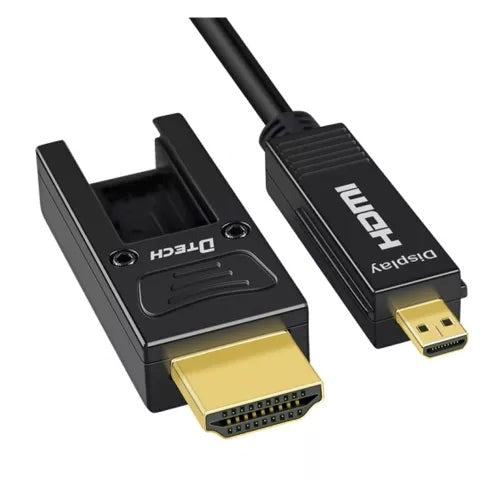
- Display end: micro HDMI plug that leaves its full-size adapter
- Rated 18 Gbps; 4K, 60 Hz, 4:4:4
- No power supply at either end
- Fixed Source plug for the AV rack or lectern
- Brand :Dtech
- SKU :DTECH-HF0320
- Category :Cables
- Availability :
 In Stock
57 in stock
The Dtech HF0320 is 20 m of active fibre HDMI 2.0 for school halls, auditoriums and churches, with a Display end that separates into a micro HDMI plug and a full-size adapter. The micro plug is pulled down the conduit or through the ceiling box to the projector and pushed back into its adapter there. Dtech’s rating for the series is 4K at 60 Hz, and the cable needs no power supply at either end.
Dtech’s three 20 m fibre HDMI cables
At 20 m the choice between Dtech’s HDMI 2.0 fibre cables comes down to the plugs and the jacket:
- HF0320: micro HDMI Display end with a removable adapter, for routes through conduit or small openings.
- Dtech HF2020: full-size plugs fixed at both ends, for open cable trays and ceiling voids.
- Dtech HF2020K: fixed plugs and stainless steel armour, for floors and routes where the cable could be crushed.
Pulling the micro end down to the projector
In a hall, the detachable end matters where the run leaves the ceiling tray and drops through conduit or a ceiling box to the projector bracket. Leave the fixed Source plug at the rack or lectern, take the adapter off the Display end and pull the micro end along the route until it comes out at the projector. Keep the adapter with you: without it, the micro plug will not fit a standard HDMI input.
Where the tray turns down into the conduit, give the cable a gentle curve rather than a corner. Dtech’s manual wants a radius over 20 mm at every bend and forbids folding the fibre back on itself.
Key specifications
| Model | Dtech HF0320 |
|---|---|
| Length | 20 m |
| Connectors | Fixed Type A at the Source end; micro Type D with removable Type A adapter at the Display end |
| Rated bandwidth | 18 Gbps |
| Formats | Up to 4096 x 2160, 60 Hz, 4:4:4 |
| HDCP | 2.2 |
| Power source | The HDMI ports; no mains supply or USB lead |
| ARC | Not at 20 m |
| Bend radius | Above 20 mm |
| Plug shells | Zinc alloy |
Questions about the Dtech HF0320
Can the HF0320 carry protected 4K from a Blu-ray or streaming player?
Yes, provided the projector supports HDCP 2.2 as well. Dtech lists HDCP 2.2 for its detachable HDMI 2.0 cables, next to its 4K 60 Hz rating, so the cable passes the copy-protection handshake between player and projector. Whether protected 4K then plays depends on those two devices.
Does the HF0320 need power at the projector end?
No. Dtech builds the optical engines of its detachable HDMI 2.0 cables into the plugs and specifies no external supply or amplifier, so nothing needs a socket beside the projector for the cable’s sake. The plugs take what they need from the HDMI sockets.
Can the HF0320 go through a ceiling tile?
Yes, through a hole sized for the micro HDMI end rather than a full-size plug, as long as the adapter is off for the pass. Dtech does not publish the micro end’s dimensions, so cut the hole after measuring the housing on the cable you have.
What should I check if the projector shows no picture after installation?
Check the ends first: Dtech’s troubleshooting list starts with the plug printed Source in the source and the Display end in the projector. Next make sure the micro plug sits fully in its adapter and the adapter fully in the projector input. If the picture appears but drops out, the manual’s next suspect is a tight bend along the run.
You must be logged in to post a review.
You may also like these
Dtech
In Stock
Dtech Armoured Fibre Cable, 30.0m, HDMI, V2.0, 4K resolution - HF2030K
R1,465.14
HF2030K In Stock
Redfox
Low stock (1 left)
Redfox Fibre Cable, 40.0m, HDMI, V2.0, 4K resolution - HDMIFAA40M
R2,047.48
HDMIFAA40M Low stock (1 left)
Dtech
Dtech Armoured Fibre Cable, 5.0m, HDMI, V2.0, 4K resolution - HF2005K
R672.36
HF2005K Out of Stock
Dtech
In Stock
Dtech Armoured Fibre Cable, 30.0m, HDMI, V2.1, 8K resolution - HF8030K
R1,965.19
HF8030K In Stock
Reviews
There are no reviews yet.