All Categories
- ATEN
- EPSON
- HISENSE
-
AV Signal Distribution
In AV Signal Distribution
- JK
-
Screens
In Screens
-
Projector
-
Cables
In Cables
- DTECH
- Business
- VISION
-
Projector Bracket
In Projector Bracket
-
Digital Signage Solutions
In Digital Signage Solutions
Brands
-
Audio
In Audio














All Categories
- ATEN
- EPSON
- HISENSE
-
AV Signal Distribution
In AV Signal Distribution
- JK
-
Screens
In Screens
-
Projector
-
Cables
In Cables
- DTECH
- Business
- VISION
-
Projector Bracket
In Projector Bracket
-
Digital Signage Solutions
In Digital Signage Solutions
Brands
-
Audio
In Audio

BROWSE CATEGORIES
Help
AV Signal Distribution
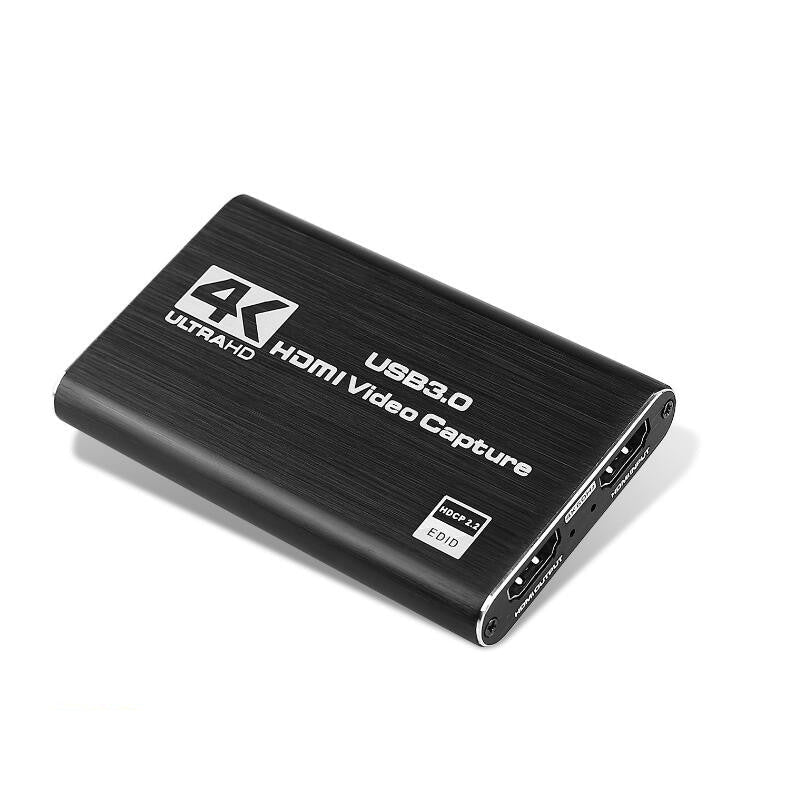
Dtech Video Capture, USB 3.0 – 7089
R2,091.39
A USB 3.0 capture box that brings an HDMI camera, console or second computer into a PC or Mac as a camera input, with an HDMI loop-out for a local screen.
- HDMI input and loop-out up to 4K at 30 Hz
- Sent to the computer at up to 1080p
- UVC and UAC: no driver on Windows, macOS or Linux
- Powered from the USB port
- Capture frame rate not published
- Brand :Dtech
- SKU :DTECH-7089
- Category :AV Signal Distribution
- Availability :
 In Stock
3 in stock
The Dtech 7089 is an HDMI to USB 3.0 capture box. An HDMI source such as a camera, games console or second computer goes in, and the computer receives its picture and sound as a camera and an audio input that recording, streaming and meeting software can select. A second HDMI port loops the signal out to a local screen. The input accepts up to 4K at 30 Hz, but the computer receives 1080p at most.
Resolution in, resolution out
The 7089’s specification gives the HDMI input as up to 4K at 30 Hz and lists the formats sent over USB as 480i, 480p, 576p, 1080i and 1080p. A 4K source is accepted, but recordings and streams top out at 1920 x 1080.
A source running 4K at 60 Hz is outside the listed input. Drop it to 4K at 30 Hz if the loop-out screen should stay at 4K, or to 1080p, which is as much as the recording receives anyway.
Watching on a screen while you record
The HDMI output repeats the input to a TV, monitor or projector, again at up to 4K 30 Hz, so a presenter or player can follow the source on a large screen while the computer records it. The loop-out copies what comes in, not what the software produces: titles, overlays or scenes added on the computer appear only in the recording or stream.
Recognised as a camera and microphone, with no driver
The 7089 is a USB Video Class (UVC) and USB Audio Class (UAC) device, and its specification lists Windows 7, 8 and 10, macOS 10.9 or later and Linux, with no driver to install. Windows 11 is not on that list. Windows runs UVC devices on the driver built into the system, and OBS Studio takes capture devices of this kind as a Video Capture Device source, or through its V4L2 source on Linux.
Power, USB port and cables
There is no power adapter: the 7089 runs from the computer’s USB port, so a laptop on battery can use it at a desk with no mains socket. Plug it into a USB 3.0 port, because the specification ties full HD capture to USB 3.0 and says nothing about USB 2.0 ports. Neither the USB connector type nor the box contents are published, so allow for both HDMI leads yourself, one from the source into the 7089 and one out to the screen. For 4K signals, use HDMI 2.0-rated leads from our V2.0 HDMI copper cables.
Key specifications of the Dtech 7089
| HDMI input | 1, up to 4K at 30 Hz |
|---|---|
| HDMI loop-out | 1, up to 4K at 30 Hz |
| Formats sent to the computer | 480i, 480p, 576p, 1080i, 1080p |
| Capture frame rate | Not published |
| Computer connection | USB 3.0 (connector type not published) |
| Device classes | UVC (video), UAC (audio); no driver to install |
| Operating systems | Windows 7, 8, 10; macOS 10.9 or later; Linux |
| Power | From the USB port, no separate supply |
| HDCP | Case marked HDCP 2.2; handling not specified |
Questions about the Dtech 7089
Why does the case say 4K if the computer only receives 1080p?
The 4K figure applies to the HDMI side: the input and the loop-out both accept up to 4K at 30 Hz. The highest format the 7089 sends over USB is 1080p, so recordings and streams are Full HD. For 4K files you need a capture device whose USB output is itself 4K.
Does it capture at 60 frames per second?
That is not published. The specification lists the capture resolutions and the 4K 30 Hz input limit but gives no frame rate for the USB stream, so if game footage or sport at 60 fps is the reason for buying, treat the 7089 as unconfirmed for it.
Can I bring an HDMI camera or visualiser into Teams or Zoom with it?
Yes, in any program that lets you choose a camera. As a UVC device it appears in the camera list beside the laptop’s webcam, and the HDMI sound appears as a separate microphone input. A visualiser or PTZ camera with an HDMI output can feed it, and the call receives up to 1080p.
Can it record from a Blu-ray player or a satellite decoder?
That is unconfirmed. The case carries an HDCP 2.2 mark, but the specification does not say whether copy-protected input is captured, passed only to the loop-out or blocked. Test with the actual source before a recording depends on it.
You must be logged in to post a review.
You may also like these
Aten
Reviews
There are no reviews yet.