All Categories
- ATEN
- EPSON
- HISENSE
-
AV Signal Distribution
In AV Signal Distribution
- JK
-
Screens
In Screens
-
Projector
-
Cables
In Cables
- DTECH
- Business
- VISION
-
Projector Bracket
In Projector Bracket
-
Digital Signage Solutions
In Digital Signage Solutions
Brands
-
Audio
In Audio














All Categories
- ATEN
- EPSON
- HISENSE
-
AV Signal Distribution
In AV Signal Distribution
- JK
-
Screens
In Screens
-
Projector
-
Cables
In Cables
- DTECH
- Business
- VISION
-
Projector Bracket
In Projector Bracket
-
Digital Signage Solutions
In Digital Signage Solutions
Brands
-
Audio
In Audio

BROWSE CATEGORIES
Help
JK
JK Screen Trigger – TRIGGER
R1,136.09
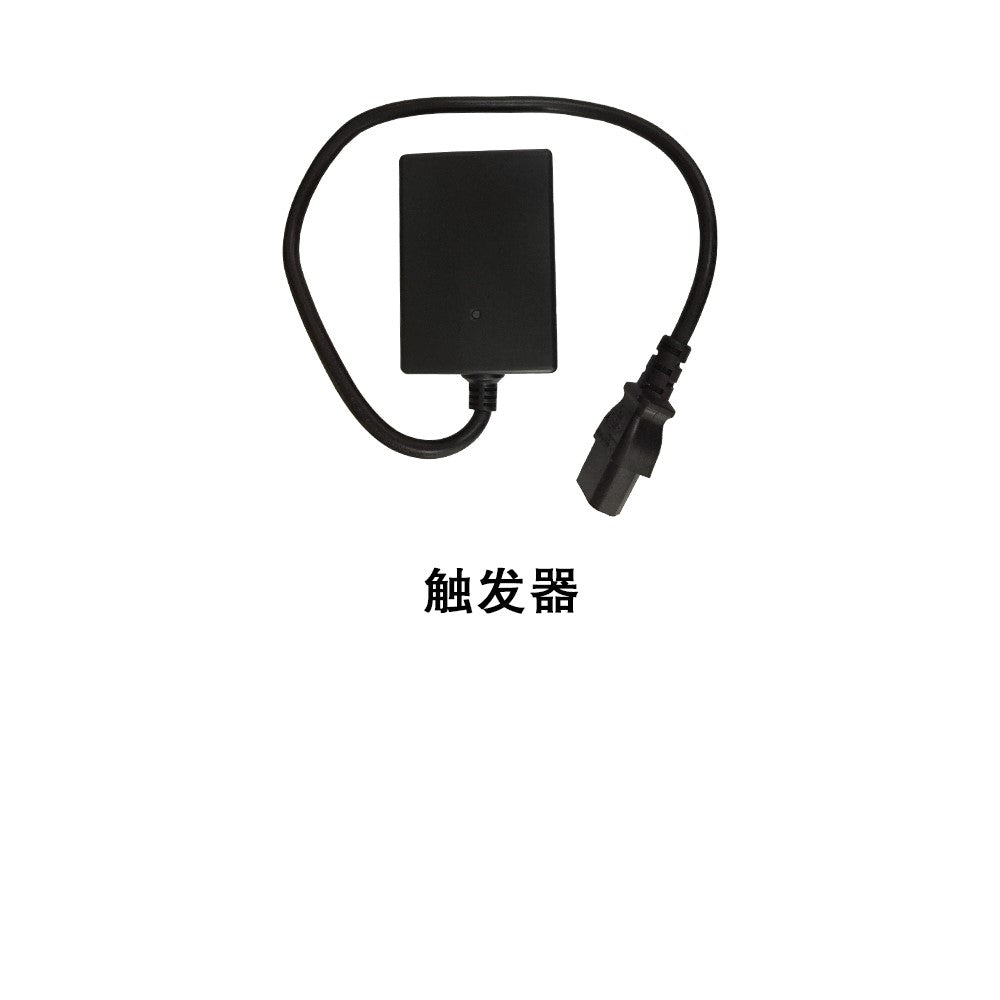
A JK accessory sold as a screen trigger, to lower an electric screen at projector power-on and raise it at power-off.
- How it detects the projector: not yet confirmed by JK
- A 12 V trigger type needs a Trigger Out port; a power-sensing type does not
- Pictured with what looks like an IEC mains connector on its lead
- Brand :JK
- SKU :JK-TRIGGER
- Category :JK
- Availability :
 In Stock
2 in stock
The JK Screen Trigger (code TRIGGER) is listed as an accessory for JK electric projection screens. A screen trigger ties the screen to the projector: down when the projector switches on, up when it switches off. JK has published no instructions or specifications for this unit, so how it detects the projector is unconfirmed, and that decides whether your projector needs a trigger output.
Two ways a screen trigger detects the projector
- 12 V trigger. A cable runs from the projector’s Trigger Out or 12 V trigger port to the screen. Epson’s port, for example, gives 12 V at up to 200 mA while the projector is on, takes a 3.5 mm mini-jack lead and must be enabled in the projector’s menu.
- Power sensing. The trigger sits in the projector’s mains lead, between the wall socket and the projector, and signals the screen when the projector starts and stops drawing power. It suits projectors with no trigger output.
The product photo shows a small black box on a lead ending in what looks like an IEC mains connector. That would fit a unit wired into the mains, but no trigger input or screen connection is visible, so the photo does not settle which kind the TRIGGER is.
JK screens whose datasheets list a 12 V trigger
- JK standard electric screens: 4:3 from 100 to 173 inches, 16:9 and 16:10 from 92 to 196 inches, also with IR, an RF remote and RS232.
- JK Pro Tab in-ceiling electric screens: tab-tensioned, 16:9 and 16:10 from 92 to 150 inches, with an external receiver, RF remote and RS232.
Neither sheet names the TRIGGER or says whether the screen’s trigger input is built in or added by an accessory. JK’s HD Tab electric screens, such as the E9119HDT, appear on neither sheet.
Details JK has not published
There are no connector types, accepted input (a voltage range, or a mains load rating), cable length, box contents or list of compatible screens for the TRIGGER, and nothing on how it passes its signal to the screen. Get these answered before you plan cable runs through a ceiling.
Key specifications of the JK Screen Trigger
| Brand and code | JK TRIGGER |
|---|---|
| Type | Screen trigger for electric projection screens |
| How it detects the projector | Not confirmed: 12 V trigger input or mains power sensing |
| As pictured | Black box on a lead ending in what looks like an IEC mains connector |
| JK screens listing a 12 V trigger | Standard electric; Pro Tab in-ceiling |
| Connectors, input range, cable length, contents | No JK documentation yet |
Questions about the JK Screen Trigger
Does my projector need a 12 V trigger output?
Only if the TRIGGER is a 12 V trigger unit, and JK has not said which kind it is. A power-sensing unit in the projector’s mains lead needs no trigger port. If your projector has none, get the detection method confirmed before you rely on it.
Which JK screens does the TRIGGER work with?
JK has published no compatibility list. Its standard electric and Pro Tab in-ceiling sheets list 12 V trigger control, across sizes from 92 to 196 inches. Whether its HD Tab electric screens accept a trigger is not stated in anything JK publishes.
Will the screen stay down while the projector is on?
Yes, with either kind: it lowers at power-on and stays down until the projector is switched off. Where a room control system should decide when the screen moves, JK lists RS232 on the screens above, though these sheets carry no command set.
Is a trigger cable included?
JK has not published the box contents. A 12 V setup needs a lead from the projector’s trigger port to the screen, a 3.5 mm mini-jack lead in Epson’s case, long enough for the route across the ceiling. A power-sensing unit takes its cue from the mains supply and needs no such lead.
You must be logged in to post a review.
You may also like these
JK
In Stock
JK Manual Pull Down Screen, 119", 16:10 Aspect Ratio, Matt White Fabric, Screen control - M10119SC
R3,904.69
M10119SC In Stock

JK
In Stock
JK Fixed Frame Screen, 100", 16:9 Aspect Ratio, Matt White Fabric - F9100
R6,774.47
F9100 In Stock

JK
Low stock (3 left)
JK Fixed Thin Frame Screen, 119", 16:10 Aspect Ratio, Matt White Fabric - F10119TF
R10,483.25
F10119TF Low stock (3 left)

JK
JK Fixed Frame Screen, 159", 16:10 Aspect Ratio, Matt White Fabric - F10159
R13,902.51
F10159 Out of Stock
JK
JK Electric Screen, 173", 16:10 Aspect Ratio, Matt White Fabric - E10173
R19,343.91
E10173 Out of Stock




JK
Reviews
There are no reviews yet.