All Categories
- ATEN
- EPSON
- HISENSE
-
AV Signal Distribution
In AV Signal Distribution
- JK
-
Screens
In Screens
-
Projector
-
Cables
In Cables
- DTECH
- Business
- VISION
-
Projector Bracket
In Projector Bracket
-
Digital Signage Solutions
In Digital Signage Solutions
Brands
-
Audio
In Audio














All Categories
- ATEN
- EPSON
- HISENSE
-
AV Signal Distribution
In AV Signal Distribution
- JK
-
Screens
In Screens
-
Projector
-
Cables
In Cables
- DTECH
- Business
- VISION
-
Projector Bracket
In Projector Bracket
-
Digital Signage Solutions
In Digital Signage Solutions
Brands
-
Audio
In Audio

BROWSE CATEGORIES
Help
Cables
Redfox Copper Cable, 3.0m, VGA – VGA3M
R185.15
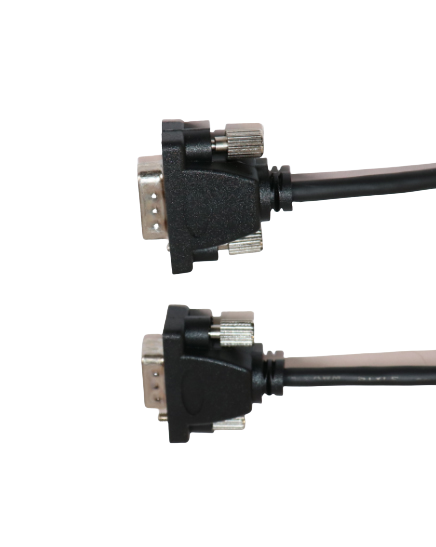
A 3 m copper VGA lead for the short links at a lectern: a laptop to a visualiser's computer input, or a lectern PC to a nearby wall plate.
- Length 3.0 m, product code VGA3M
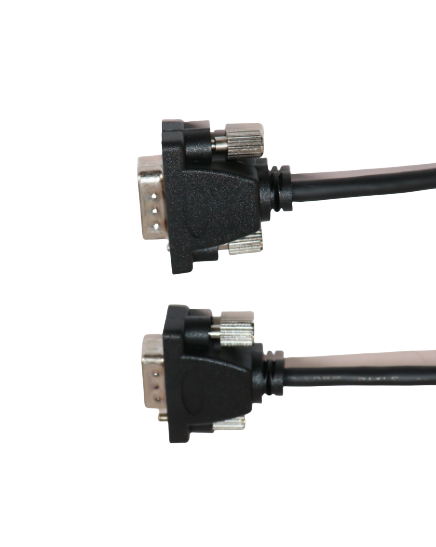
- VGA 15-pin plug with thumbscrews on both ends (photo)
- Analogue picture only, no sound
- Redfox publishes no resolution rating or cable construction
- Brand :Redfox
- SKU :REDFOX-VGA3M
- Category :Cables
- Availability :
 In Stock
179 in stock
At a lectern, the Redfox VGA3M covers the short hops: a presenter’s laptop to a visualiser, or a lectern PC to the wall plate behind it. The photo shows a 15-pin plug held by thumbscrews at each end. Beyond the length, conductor and connector, nothing about the VGA3M is published, so there is no resolution rating to quote.
The second VGA cable for an Epson ELPDC13 visualiser
The Epson ELPDC13 visualiser comes with one VGA cable, and Epson’s instructions use it between the visualiser’s Display Out and the projector. Showing a laptop through the visualiser takes a second VGA cable, from the laptop to the Computer In socket, and the VGA3M covers that leg with room to spare. The projector link has to stay on VGA too, because Epson sends the laptop’s picture out of Display Out only, not the HDMI output.
From the lectern to a wall plate
Where the lectern feeds a wall plate instead, measure from the laptop’s VGA port, through the lectern’s cable opening and along the floor to the plate, and leave slack at each plug. Under 3 m, the VGA3M is the patch lead to the socket on the plate’s face. A floor box directly below the lectern needs less, and the 2 m Redfox VGA2M suits that.
Key specifications of the Redfox VGA3M
| Product code | VGA3M |
|---|---|
| Cable length | 3.0 m |
| Connector, each end | VGA 15-pin (DE-15), thumbscrew fixing (photo) |
| Conductor material | Copper, per our listing |
| Video signal | Analogue red, green and blue, plus separate sync |
| Sound | No audio pins in a VGA plug |
| Rated resolution | None published |
| Gauge and construction | Unpublished |
Questions about the Redfox VGA3M
Does the VGA3M carry the laptop’s sound?
No. A VGA plug has no audio pins, and Epson states that no audio comes out over the ELPDC13’s VGA connection either. Sound for the room speakers needs its own cable from the laptop.
Can a laptop without a VGA port use the Computer In socket?
Not by Epson’s instructions. Computer In works only with a VGA cable, and for a computer without a VGA output Epson says to connect it straight to the projector instead.
Is the supplied cable long enough to reach a ceiling projector?
Epson does not give its length, so measure that leg along the route it will take: down through the lectern, up the wall, over the ceiling and down to the projector. If the supplied cable falls short, a longer Redfox lead such as the 10 m Redfox VGA10M can replace it.
Can the VGA3M lengthen the visualiser’s supplied VGA cable?
Not as photographed. Both of its ends are thumbscrew plugs, and joining it to another cable would need a female end on one of them, so use one lead long enough for the whole leg instead.
You must be logged in to post a review.
You may also like these
Dtech
In Stock
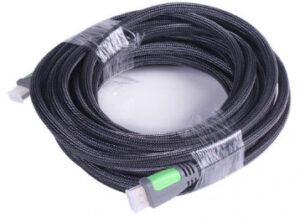
Dtech Copper Cable, 8.0m, HDMI, V1.4, 4K resolution, Braided Jacket - 6680
R333.14
6680 In Stock
Reviews
There are no reviews yet.