All Categories
- ATEN
- EPSON
- HISENSE
-
AV Signal Distribution
In AV Signal Distribution
- JK
-
Screens
In Screens
-
Projector
-
Cables
In Cables
- DTECH
- Business
- VISION
-
Projector Bracket
In Projector Bracket
-
Digital Signage Solutions
In Digital Signage Solutions
Brands
-
Audio
In Audio














All Categories
- ATEN
- EPSON
- HISENSE
-
AV Signal Distribution
In AV Signal Distribution
- JK
-
Screens
In Screens
-
Projector
-
Cables
In Cables
- DTECH
- Business
- VISION
-
Projector Bracket
In Projector Bracket
-
Digital Signage Solutions
In Digital Signage Solutions
Brands
-
Audio
In Audio

BROWSE CATEGORIES
Help
Cables
Redfox Copper Cable, 2.0m, VGA – VGA2M
R138.46
A 2 m copper VGA lead for desk-level connections, such as a tower PC to the monitor above it or to a VGA splitter beside it.
- Length 2.0 m, product code VGA2M
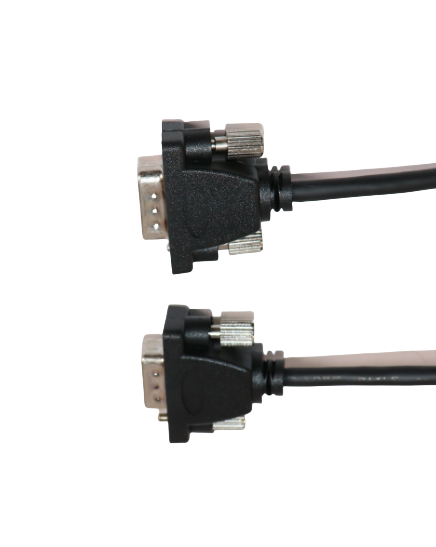
- 15-pin VGA plug with two thumbscrews at each end, as photographed
- Picture only: no sound, no USB
- No resolution rating or wire gauge published by Redfox
- Brand :Redfox
- SKU :REDFOX-VGA2M
- Category :Cables
- Availability :
 In Stock
36 in stock
Two metres is a desk length. The Redfox VGA2M reaches from a floor-standing tower PC to the monitor above it, or from a computer to a splitter on the same worktop. Our photo shows a 15-pin plug with two thumbscrews at each end of the copper cable; Redfox publishes no datasheet, so length, conductor and plug type are all we can state.
Thumbscrew plugs at both ends, so not an extension lead
Both ends in the photo carry the same plug with thumbscrews, the kind that screws into the socket on a PC, monitor or splitter. A cable end made to join another cable has nuts for that cable’s screws, and neither end shows them, though Redfox publishes no drawing to confirm the plug gender.
Sound and touch need their own cables
The 15 pins of a VGA plug carry analogue red, green and blue video and sync, with no pin for sound or USB. Monitor speakers need a separate audio lead from the computer. On a touch-screen monitor the picture appears over the VGA2M, but touch only responds once a USB cable also links the monitor to the computer.
Key specifications of the Redfox VGA2M
| Product code | VGA2M |
|---|---|
| Length | 2.0 m |
| Brand | Redfox |
| Plugs | 15-pin VGA (DE-15) on both ends, with thumbscrews (photo) |
| Conductors | Copper, as named in our product title |
| Sound and USB | Not carried |
| Resolution rating | Not published |
| Wiring table and wire gauge | Not published |
Questions about the Redfox VGA2M
Does 2 m reach from a PC under the desk to the monitor?
It does when the measured route, from the PC’s VGA socket up the back of the desk to the monitor’s input, fits with slack to spare. A tower at the far end of a long desk or a monitor on a swing arm needs more, and the 3 m Redfox VGA3M is the next length.
Will a new cable fix a fuzzy picture on the monitor?
Try the monitor’s own adjustments first. Dell’s troubleshooting for a fuzzy or blurred picture, in the P2714H user’s guide for example, starts with Auto Adjust in the on-screen menu, then the Phase and Pixel Clock controls for a VGA source, then removing any video extension cables. If the picture is still soft after those steps, the cable becomes the suspect.
Can one PC show the same picture on two monitors?
Yes, through a powered VGA splitter. The Dtech DT-7252 VGA splitter sends one VGA input to two outputs with the same image on both, so the VGA2M runs from the PC to its input and each output needs its own lead to a monitor.
Can a laptop with only HDMI use the VGA2M?
Yes, with a converter, since the laptop has no VGA socket for the plug. Fitted to the laptop’s HDMI port, a Dtech DT-6404 converter offers the VGA2M a VGA socket at up to 1920 x 1080.
You must be logged in to post a review.
You may also like these
Dtech
In Stock
Dtech Detachable Connector Fibre Cable, 10.0m, HDMI, V2.0, 4K resolution - HF301B
R1,799.74
HF301B In Stock
Redfox
Redfox Fibre Cable, 20.0m, HDMI, V2.0, 4K resolution - HDMIFAD20M
R2,114.58
HDMIFAD20M Out of Stock
Vision
Low stock (2 left)
Vision Copper Cable, 15.0m, HDMI, V2.0, 4K resolution - 2746865
R1,211.11
2746865 Low stock (2 left)
Reviews
There are no reviews yet.