All Categories
- ATEN
- EPSON
- HISENSE
-
AV Signal Distribution
In AV Signal Distribution
- JK
-
Screens
In Screens
-
Projector
-
Cables
In Cables
- DTECH
- Business
- VISION
-
Projector Bracket
In Projector Bracket
-
Digital Signage Solutions
In Digital Signage Solutions
Brands
-
Audio
In Audio














All Categories
- ATEN
- EPSON
- HISENSE
-
AV Signal Distribution
In AV Signal Distribution
- JK
-
Screens
In Screens
-
Projector
-
Cables
In Cables
- DTECH
- Business
- VISION
-
Projector Bracket
In Projector Bracket
-
Digital Signage Solutions
In Digital Signage Solutions
Brands
-
Audio
In Audio

BROWSE CATEGORIES
Help
AV Signal Distribution
Dtech Converter, HDMI to VGA with Audio – 6404
R127.19
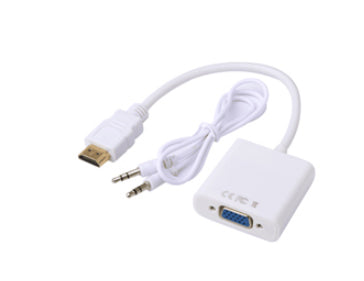
An HDMI to VGA converter with a separate audio output, for running an HDMI laptop or player into an older VGA projector or monitor.
- HDMI plug on a short lead, VGA socket on the adapter body
- Up to 1920 x 1080
- 3.5 mm audio output for speakers or the projector's audio input
- No external power supply, per the supplier specification
- Brand :Dtech
- SKU :DTECH-6404
- Category :AV Signal Distribution
- Availability :
 In Stock
2 in stock
The Dtech DT-6404 converts the HDMI output of a laptop, PC or media player into VGA, so an HDMI-only source can still drive a projector, monitor or VGA wall plate with no HDMI input. VGA carries no sound, so the DT-6404 also passes the audio from the HDMI signal out of a separate 3.5 mm output. Dtech rates it up to 1920 x 1080.
Connecting an HDMI laptop to a VGA projector
The HDMI plug sits on a short lead from the white adapter body, and the body carries a VGA socket. Plug the HDMI end into the laptop, then run a VGA cable with a plug at each end from the adapter to the projector or monitor. For sound, run a 3.5 mm lead from the adapter’s audio output to the projector’s audio input or to powered speakers; the product photo shows a 3.5 mm to 3.5 mm lead with the adapter.
Resolutions and older XGA or WXGA projectors
Dtech gives 1920 x 1080 as the maximum. The supplier specification lists the formats accepted at the HDMI input and produced at the VGA output: 480i, 576i, 480p, 576p, 720p, 1080i and 1080p. Those are video formats. Computer formats such as 1024 x 768 (XGA) and 1280 x 800 (WXGA) are not on the list.
If your projector’s native resolution is one of those, start with the laptop set to 1280 x 720 or 1920 x 1080 and let the projector scale the image. Try the projector’s native resolution on the projector itself before a class or meeting depends on it.
What else you will need
- A male-to-male VGA cable from the adapter to the display. The Dtech V002 1.5 m VGA cable suits a desk monitor, and the Dtech V004 5 m VGA cable reaches a projector on a trolley or table across a small room.
- A 3.5 mm audio lead to the speakers or the projector’s audio input.
Key specifications of the Dtech DT-6404
| Input | HDMI plug on a short lead |
|---|---|
| Video output | VGA socket (15-pin) |
| Audio output | 3.5 mm |
| Maximum resolution | 1920 x 1080 |
| Listed formats | 480i, 576i, 480p, 576p, 720p, 1080i, 1080p |
| HDCP | 1.0, 1.1, 1.2 and 1.3 |
| Power | No external supply (supplier specification) |
| Colour | White |
| Model | DT-6404 (also listed as 6404) |
Questions about the Dtech DT-6404
Can the DT-6404 connect a VGA laptop to an HDMI TV?
No. It converts only from an HDMI source to a VGA display, and its HDMI end is a plug for the laptop’s HDMI port. For a VGA laptop and an HDMI screen, use the Dtech DT-7004B VGA to HDMI converter, which takes VGA video and 3.5 mm audio in and sends HDMI out.
Why is there no sound from the projector?
The VGA cable carries no sound, so the audio has to come from the DT-6404’s 3.5 mm output. Connect a lead from that output to the projector’s audio input or to speakers. If it is still silent, the laptop may be playing through its own speakers: in Windows, set the HDMI output as the output device in Sound settings.
Will the DT-6404 work with a USB-C laptop?
Only if the laptop also has an HDMI port, because the DT-6404 plugs into HDMI. For a laptop whose USB-C port carries video, the Dtech T0021 Type-C to VGA converter does the same job from USB-C: it has a VGA socket for the cable and Dtech rates it to 1920 x 1080.
Does the DT-6404 need a power supply?
No, according to the supplier specification, which says it needs no external power supply; Dtech’s sheet describes it as plug and play. On that basis there is no power point to plan for at the lectern, only the HDMI, VGA and audio connections.
You must be logged in to post a review.
DT - 6404 Datasheet PDF
You may also like these
Aten
Reviews
There are no reviews yet.