All Categories
- ATEN
- EPSON
- HISENSE
-
AV Signal Distribution
In AV Signal Distribution
- JK
-
Screens
In Screens
-
Projector
-
Cables
In Cables
- DTECH
- Business
- VISION
-
Projector Bracket
In Projector Bracket
-
Digital Signage Solutions
In Digital Signage Solutions
Brands
-
Audio
In Audio














All Categories
- ATEN
- EPSON
- HISENSE
-
AV Signal Distribution
In AV Signal Distribution
- JK
-
Screens
In Screens
-
Projector
-
Cables
In Cables
- DTECH
- Business
- VISION
-
Projector Bracket
In Projector Bracket
-
Digital Signage Solutions
In Digital Signage Solutions
Brands
-
Audio
In Audio

BROWSE CATEGORIES
Help
Business
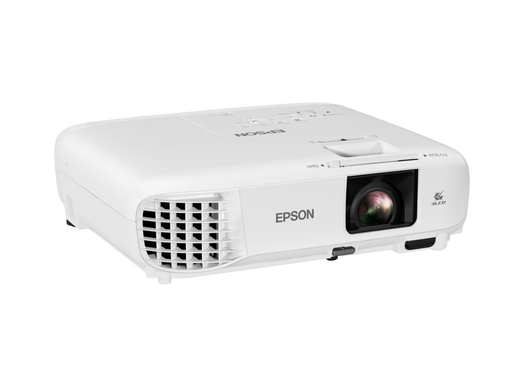
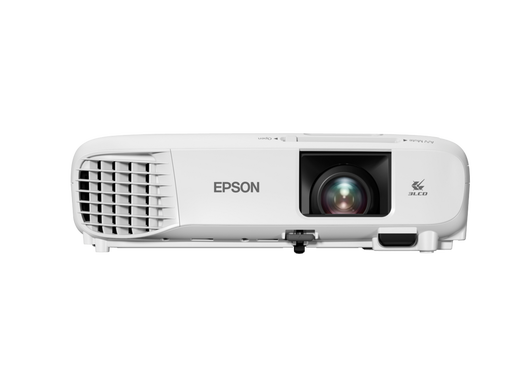
Epson Business Projector, 3800 Ansi Lumens, WXGA resolution, 16:10 Aspect Ratio – EBW49
R15,965.25
A WXGA lamp projector for classrooms and meeting rooms that still need VGA and network control next to HDMI.
- 3,800 lumens, 1280 x 800, 16,000:1 contrast
- 1.2x optical zoom: a 100-inch picture from 2.81 to 3.38 m
- 2 x HDMI, 2 x VGA, LAN, RS-232C and USB Display
- Lamp life of 17,000 hours on the ECO setting
- Brand :Epson
- SKU :EPSON-EBW49
- Category :Business
- Availability :
 In Stock
11 in stock
The Epson EB-W49 (EBW49) is a 3,800 lumen WXGA (1280 x 800) lamp projector with a 1.2x optical zoom. Epson’s table puts a 100-inch 16:10 picture between 2.81 and 3.38 m from the screen, which leaves about 57 cm of leeway when you choose the mounting point.
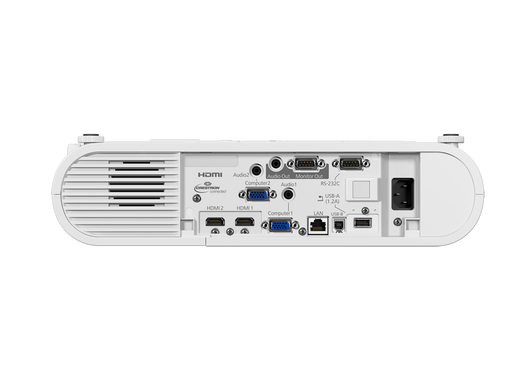
Its connections suit rooms with mixed sources: two HDMI and two VGA inputs, composite video, wired LAN and RS-232C, with Wi-Fi as an add-on.
Brightness, picture and lamp modes
White and colour light output are both rated at 3,800 lumens; in Eco, colour output drops to 2,600 lumens. Contrast is 16,000:1. The three 0.59-inch LCD panels are 1280 x 800 pixels, and the HDMI inputs take Full HD (1920 x 1080) signals at 50 and 60 Hz as well as lower resolutions.
The ECO menu has three power levels, and the lamp interval follows them: up to 8,000 hours on High, 10,000 on Medium and 17,000 on ECO. A Blackboard preset adjusts the picture for projecting straight onto a green chalkboard.
Throw distance and screen sizes for the EB-W49
The throw ratio runs from 1.30 to 1.56:1 across the zoom, and focus is set with a manual ring. These distances come from Epson’s user guide for a 16:10 image using the whole panel:
- 60-inch (129 x 81 cm): 1.68 to 2.02 m
- 80-inch (172 x 108 cm): 2.25 to 2.70 m
- 100-inch (215 x 135 cm): 2.81 to 3.38 m
- 150-inch (323 x 202 cm): 4.24 to 5.09 m
The full range is 33 to 320 inches. Auto V-Keystone squares the picture when the projector is tilted up or down by up to about 30 degrees, and a slider on top corrects roughly 30 degrees of sideways angle. Each correction makes the image slightly smaller, so Epson recommends setting the projector straight on to the screen wherever the room allows.
Inputs, network control and sound
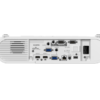
Rear panel connections on the EB-W49:
- HDMI1 and HDMI2, with HDMI audio in PCM only
- Computer1 and Computer2 VGA inputs, each paired with a 3.5 mm audio input, plus a VGA Monitor Out that passes on the Computer1 signal
- Composite video with left and right RCA audio
- USB-B for USB Display, picture and sound from a computer over one USB cable
- USB-A for slide shows from a flash drive (PC Free), an Epson document camera or the wireless module
- RJ45 LAN and RS-232C for control
- 3.5 mm audio output
Split Screen puts two inputs on screen together, though it will not pair the two HDMI inputs or the two VGA inputs. The built-in speaker is 5 W and mutes when external speakers are plugged into the audio output; Epson lists the Epson ELPSP02 active speaker pair among the EB-W49’s options.
Wi-Fi is not built in. With the Epson ELPAP11 wireless LAN module fitted in the USB-A port, laptops, phones and Chromebooks send their screens through Epson’s iProjection app; Miracast screen mirroring is not among this model’s functions.
EB-W49 or EB-W53: what separates them
The Epson EB-W53 has the same 0.59-inch, 1280 x 800 panels and is 200 lumens brighter at 4,000 lumens. It gives up most of the EB-W49’s connections and adjustments:
- Inputs: two HDMI ports and a service-only USB port on the EB-W53; the EB-W49 adds VGA, composite, LAN, RS-232C, USB Display and an audio output.
- Zoom: digital only on the EB-W53, 1.2x optical on the EB-W49.
- Keystone: manual on the EB-W53, automatic vertical correction on the EB-W49.
- Lamp: 6,000 and 12,000 hours on the EB-W53, against 8,000 and 17,000 hours (High and ECO) on the EB-W49.
- Speaker: 2 W against 5 W.
If every source is HDMI and the projector will never join a network, the EB-W53 drops nothing you would use and adds 200 lumens. Rooms with VGA laptops, a control system or plans for wireless sharing need the EB-W49.
Mounting, maintenance and the box contents
The EB-W49 is 302 mm wide, 249 mm deep and 87 mm high, and weighs 2.7 kg. Three M4 fixing points underneath take the Epson ELPMB23 ceiling mount, which Epson pairs with the ELPFP13 (450 mm) or ELPFP14 (700 mm) pipe for higher ceilings and an ELPWR01 safety wire.
The user-replaceable parts are the ELPLP97 lamp (210 W UHE) and the ELPAF32 air filter, which Epson schedules for cleaning every 6,000 hours. Above 1,500 m, Epson asks for High Altitude Mode to be switched on; that applies in Johannesburg, which sits at about 1,750 m.
In the box: the projector, a remote control with batteries, the power cable, a 1.8 m HDMI cable and the Quick Setup Guide.
Key specifications of the Epson EB-W49
| Panel | WXGA 1280 x 800 (16:10), three 0.59-inch LCDs |
|---|---|
| Brightness | 3,800 lumens white and colour; colour 2,600 lumens in Eco |
| Contrast | 16,000:1 |
| Lens | 1.2x optical zoom, throw ratio 1.30 to 1.56:1, manual focus |
| Picture size | 33 to 320 inches |
| Keystone | Auto vertical ±30°, manual horizontal ±30° |
| Connections | 2 x HDMI, 2 x VGA in, VGA out, composite, USB-A, USB-B, RJ45, RS-232C, audio out |
| Wi-Fi | Optional, with the ELPAP11 module |
| Lamp | 210 W UHE, up to 8,000 h (High) and 17,000 h (ECO) |
| Speaker | 5 W |
| Size and weight | 302 x 249 x 87 mm, 2.7 kg |
Questions about the Epson EB-W49
Can I connect a laptop to the EB-W49 with only a USB cable?
Yes, for Windows and Mac computers, through the USB-B port. The first connection installs Epson’s USB Display software from the projector itself. Plug the cable straight into the projector: Epson warns that a USB hub may stop it working. The 2024 user guide lists Windows 7 to 10 and macOS up to 10.14 as supported.
How far back should the EB-W49 be for a 120-inch screen?
Roughly 3.4 to 4.0 m for a 120-inch 16:10 picture, depending on the zoom setting. That estimate sits between the 100-inch row (2.81 to 3.38 m) and the 150-inch row (4.24 to 5.09 m) of Epson’s distance table.
Will the EB-W49 work with a 4:3 or 16:9 screen?
Yes, though the picture then fills the screen’s height or width rather than the whole panel. Epson’s user guide gives 3.19 to 3.83 m for a 100-inch 4:3 picture and 2.89 to 3.48 m for a 100-inch 16:9 picture, against 2.81 to 3.38 m for the native 16:10 shape.
Can a Crestron or AMX system control the EB-W49?
Yes. Epson Europe lists control through AMX, Crestron, Control4 and Extron, and the user guide covers Crestron Connected, PJLink Class 2 and ESC/VP21 commands. Network control uses the RJ45 port; serial control uses the RS-232C port with a crossover cable at 9600 bps by default.
| Colour Light Output | 3.800 Lumen- 2.600 Lumen (economy) In accordance with IDMS15.4 |
|---|---|
| White Light Output | 3.800 Lumen In accordance with ISO 21118:2020 |
| Resolution | WXGA 2 |
| Aspect Ratio | 16:10 |
| Contrast Ratio | 16.000 : 1 |
| Light source | Lamp |
| Lamp | UHE, 210 W, 8.000 h durability, 17.000 h durability (economy mode) |
| Keystone Correction | Auto vertical: ± 30 °, Manual horizontal ± 30 ° |
| Colour Video Processing | 10 Bits |
| 2D Vertical Refresh Rate | 100 Hz - 120 Hz |
| Colour Reproduction | Up to 1.07 billion colours |
You must be logged in to post a review.
You may also like these
Epson
Epson Mini Projector, 700 Ansi Lumens, Full HD 1080p resolution, Bose, Google TV - EF61G
R13,332.26
EF61G Out of Stock
Epson
Epson Consumer Projector, 3600 Ansi Lumens, XGA resolution, 4:3 Aspect Ratio - EBE12
R9,012.15
EBE12 Out of Stock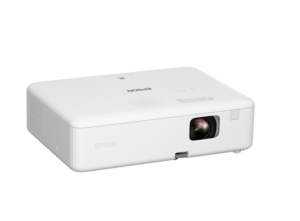
Epson
Epson Consumer Projector, 3000 Ansi Lumens, WXGA resolution, 16:10 Aspect Ratio - COWX02
R8,862.06
COWX02 Out of Stock
Epson
Epson Business Projector, 4100 Ansi Lumens, 1080P resolution, 16:9 Aspect Ratio - EB775F
R52,571.54
EB775F Out of Stock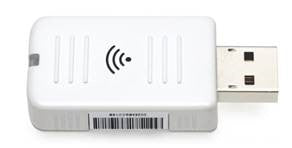
Epson
Reviews
There are no reviews yet.