All Categories
- ATEN
- EPSON
- HISENSE
-
AV Signal Distribution
In AV Signal Distribution
- JK
-
Screens
In Screens
-
Projector
-
Cables
In Cables
- DTECH
- Business
- VISION
-
Projector Bracket
In Projector Bracket
-
Digital Signage Solutions
In Digital Signage Solutions
Brands
-
Audio
In Audio














All Categories
- ATEN
- EPSON
- HISENSE
-
AV Signal Distribution
In AV Signal Distribution
- JK
-
Screens
In Screens
-
Projector
-
Cables
In Cables
- DTECH
- Business
- VISION
-
Projector Bracket
In Projector Bracket
-
Digital Signage Solutions
In Digital Signage Solutions
Brands
-
Audio
In Audio

BROWSE CATEGORIES
Help
AV Signal Distribution
Dtech Extender, HDMI Over IP, Receiver – 7043R
R837.20
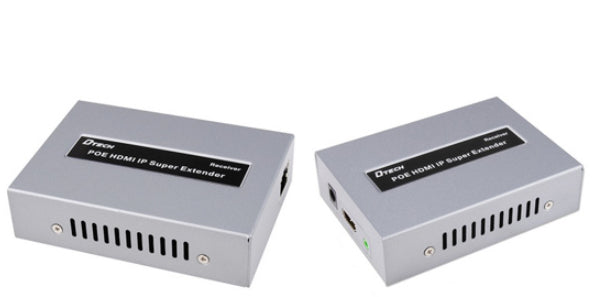
The screen-end unit of a Dtech DT-7043 HDMI over IP link, one per display, fed with 1080p by a DT-7043S transmitter over Cat 6, direct or through a switch.
- Receiver only; needs a DT-7043S transmitter, sold separately
- HDMI output at 1080p 60 Hz, with audio
- 120 m of Cat 6 per run
- Add screens through a switch, to 253 receivers
- Power supply included
- Brand :Dtech
- SKU :DTECH-7043R
- Category :AV Signal Distribution
- Availability :
 In Stock
12 in stock
The Dtech DT-7043R (our code 7043R) sits at the screen end of a DT-7043 HDMI over IP system. It receives the compressed stream from a DT-7043S transmitter over Cat cable, decodes it and feeds one TV, monitor or projector through HDMI, at 1080p 60 Hz or lower.
No transmitter comes with it: a working system needs one DT-7043S per source and one DT-7043R per screen.
Planning screens, cable runs and the switch
Start with the number of screens, because each takes one DT-7043R. Around them you need:
- a Dtech DT-7043S transmitter at the source, whose picture every receiver in the system shows;
- a network switch with a port per receiver plus one for the transmitter (a single screen can be cabled straight to the transmitter, with no switch);
- a Cat cable run to each screen position;
- a plug point at each screen for the receiver’s power supply, which is in the box;
- an HDMI lead from each receiver to its display, from our HDMI copper cables.
Dtech’s limit is 253 receivers on one transmitter, so screens can be added later while the switch has free ports.
Cable lengths to each receiver
A direct cable from transmitter to receiver can run 120 m. Our datasheet states that figure for Cat 6, the cable it advises for HDMI; Dtech’s 2019 DT-7043 sheet also lists Cat 5e, shielded or unshielded.
With a switch or router in the path, the same Dtech sheet gives 240 m in total but no limit for each cable. Hold the transmitter-to-switch cable and every switch-to-receiver cable to the 120 m direct rating.
What reaches the display
The receiver’s HDMI output carries at most 1920 x 1080 at 60 Hz. A 1080p screen shows it pixel for pixel; a 4K TV or projector scales it up, and a 1920 x 1200 monitor fits it to the panel according to its own scaling settings. Audio from the source arrives in the same HDMI signal, so the display, or a soundbar connected to it, plays the sound.
There is no separate audio output. Our photos show a network socket, an HDMI output, a power jack and an indicator LED, and Dtech’s drawings of the receiver show no audio socket either.
Key specifications of the Dtech DT-7043R
| Unit | Receiver only; DT-7043S transmitter sold separately |
|---|---|
| Output | 1 x HDMI |
| Output resolution | Up to 1080p (1920 x 1080) at 60 Hz |
| Audio | In the HDMI output |
| Cable per run | 120 m; Cat 6 recommended, Cat 5e listed |
| With a switch or router | 240 m overall; no per-cable figure given |
| Receivers per transmitter | Up to 253, through a network switch |
| In the box | Receiver and power supply |
| Power | 5 V DC from its own adapter |
Questions about the Dtech DT-7043R
Will the DT-7043R work with a DT-7058 transmitter?
Do not plan on it. Dtech pairs the DT-7043R with the DT-7043S and publishes no compatibility with its other IP extenders, including the DT-7058 HDMI over IP kit. Build each system from DT-7043 units only.
Can each screen show a different source?
Not within one DT-7043 system. A receiver shows whatever its transmitter sends, and Dtech describes no way to switch a receiver between transmitters. Different content on different screens needs a separate transmitter, switch and set of receivers per source, or an HDMI matrix switch where the screens are within HDMI cable reach.
Can the receivers use the building’s existing network?
Only after testing, and a dedicated switch is the safer plan. Dtech allows switches and routers in the path but gives no bandwidth, multicast or switch-setting figures, so its documents cannot tell you how a busy shared network will cope with the video traffic.
Does every DT-7043R need its own power point?
Yes, allow a socket at every screen position for the adapter that comes with each receiver. The label in our photo says “POE HDMI IP Super Extender”, yet Dtech’s 2019 sheet links PoE only to unnamed models in the range and gives no PoE standard or wattage for the DT-7043.
Can I use the source’s remote control from the screen end?
Do not count on it. Dtech’s 2019 sheet shows an IR receive socket on the DT-7043R for a remote used at the screen, but no IR socket shows on the receiver in our photos, and the datasheet’s box list has no IR lead.
You must be logged in to post a review.
You may also like these
Dtech
In Stock
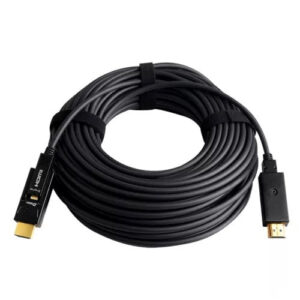
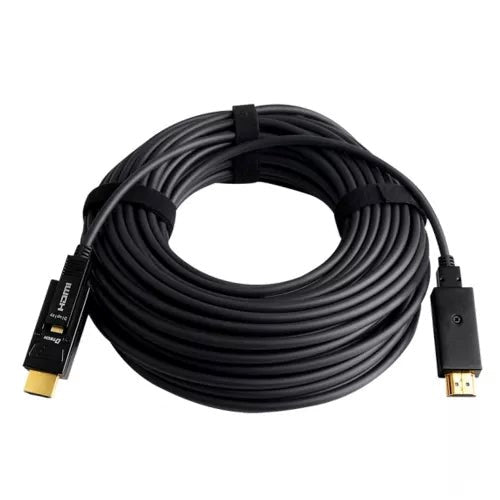
Dtech Detachable Connector Fibre Cable, 10.0m, HDMI, V2.0, 4K resolution - HF301B
R1,799.74
HF301B In Stock
Reviews
There are no reviews yet.