All Categories
- ATEN
- EPSON
- HISENSE
-
AV Signal Distribution
In AV Signal Distribution
- JK
-
Screens
In Screens
-
Projector
-
Cables
In Cables
- DTECH
- Business
- VISION
-
Projector Bracket
In Projector Bracket
-
Digital Signage Solutions
In Digital Signage Solutions
Brands
-
Audio
In Audio














All Categories
- ATEN
- EPSON
- HISENSE
-
AV Signal Distribution
In AV Signal Distribution
- JK
-
Screens
In Screens
-
Projector
-
Cables
In Cables
- DTECH
- Business
- VISION
-
Projector Bracket
In Projector Bracket
-
Digital Signage Solutions
In Digital Signage Solutions
Brands
-
Audio
In Audio

BROWSE CATEGORIES
Help
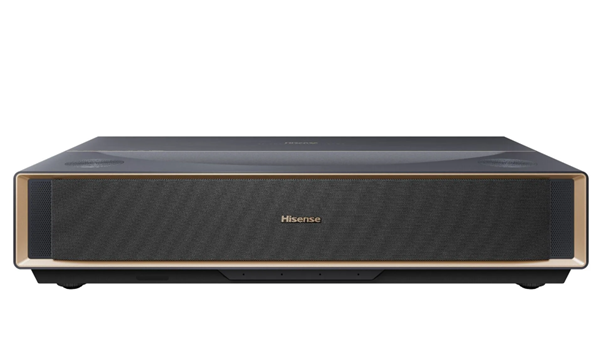
HISENSE
Hisense Laser Projection TV, 2500 Ansi Lumens, 4K resolution, UST – PT1
R27,756.89
Ultra short throw 4K laser TV for a lounge or home cinema, standing on a low cabinet to project 80 to 150 inches.
- 2,500 ANSI lumens, red, green and blue lasers
- 110% BT.2020, Dolby Vision, IMAX Enhanced
- 46 W sound with two up-firing speakers
- Projector only, screen not included
- Brand :Hisense
- SKU :HISENSE-PT1
- Category :HISENSE
- Availability :Out of Stock
Out of stock
The Hisense PT1 is an ultra short throw 4K laser TV: a low console that stands on a cabinet close to the wall and projects upwards to fill an 80 to 150 inch screen. Red, green and blue lasers give it 2,500 ANSI lumens and 110% of the BT.2020 colour space.
This listing is the projector on its own. Two other listings add a screen: the 100PT1 with a 100-inch ALR screen and the 120PT1 with a 120-inch ALR screen.
Distance from the screen for 80 to 150 inches
Hisense’s PT1 setup guide measures from the screen surface to the rear of the console, and from the surface the PT1 stands on to the bottom of the picture. It notes that picture size can vary with the installation, so treat these as starting positions.
| Diagonal | Picture (W x H) | Screen to back of PT1 | Stand surface to picture bottom |
|---|---|---|---|
| 80″ | 1,771 x 993 mm | 95 mm | 310 mm |
| 100″ | 2,214 x 1,245 mm | 183 mm | 369 mm |
| 120″ | 2,657 x 1,494 mm | 272 mm | 427 mm |
| 150″ | 3,321 x 1,868 mm | 405 mm | 515 mm |
The console is 282 mm deep, so add that when you size the cabinet top: a 100-inch picture needs about 465 mm between the screen and the PT1’s front edge. Hisense asks for at least 30 cm (12 in) open at each side, where the vents are, and warns against narrow or enclosed spaces, so a closed shelf niche will not do. Four adjustable feet square the image; focus is set with the remote in the Laser Settings menu.
What the triple laser engine does for the picture
Hisense calls this engine TriChroma: three lasers produce red, green and blue light directly, with no colour filter in the path. The image comes from a 0.47-inch DMD that Hisense Australia credits with 2.07 million micro mirrors, a quarter of the pixel count of a 3840 x 2160 frame, which means the projector shifts the image to place the full 4K pixel count on screen.
Native contrast is 3,000:1. HDR arrives as Dolby Vision, HDR10+, HDR10 or HLG; the PT1 is IMAX Enhanced certified and has a Filmmaker Mode. It shows side-by-side, top-and-bottom and frame-packing 3D through DLP-Link active glasses, which are sold separately. An eye protection sensor beside the lens blanks the picture if someone looks into the beam; Hisense notes that it is inactive during keystone correction.
Sound, smart platform and connections
Four built-in speakers give 46 W: two 15 W units face the room and two 8 W units fire up at the ceiling for Dolby Atmos height effects. The PT1 also decodes DTS:X. A sound bar or AV receiver can take over through HDMI 3 (eARC) or the optical output.
On Hisense South Africa’s site the PT1’s feature images show VIDAA, Hisense’s own smart platform, with voice control. The Hisense Canada datasheet in the Datasheets tab describes the North American Google TV version, so its app and voice assistant lists may not match a South African unit. There is no TV tuner or aerial input.
- HDMI: three inputs; the first two are HDMI 2.1 with ALLM (auto low latency mode), the third HDMI 2.0 with eARC
- USB: two ports, one of them on the side panel
- Network: Wi-Fi and a LAN port
- Audio out: optical, headphone jack and eARC
- Control: Control4 compatible
For gaming there is HSR, Hisense’s 240 Hz high-speed refresh mode, plus ALLM, and Hisense quotes 12 ms input lag. Hisense USA gives 60 Hz as the 4K maximum.
PT1 or PX3-PRO
The Hisense PX3-PRO has the same size of DMD, the same 110% BT.2020 rating and the same 3,000:1 native contrast. Hisense’s figures differ on five points:
- Brightness: 3,000 ANSI lumens for the PX3-PRO, 20% more light, which helps in a lit lounge or on a bigger screen
- Sound: 50 W of front-firing Harman Kardon speakers on the PX3-PRO; 46 W on the PT1, including its up-firing Atmos pair
- Gaming: HSR 240 and ALLM on both; Designed for Xbox certification on the PX3-PRO; a published input lag figure (12 ms) only for the PT1
- Placement: 216 mm to the screen at 100 inches for the PX3-PRO, 183 mm for the PT1, which also weighs less (7.2 kg against 9.0 kg)
- Alignment: built-in cameras on the PT1; the PX3-PRO corrects from a photo taken on your phone
Choosing a screen for the PT1
Hisense’s setup guide offers the automatic screen fit on 100 and 120-inch screens only, says screen type strongly affects how well it works, and recommends a Hisense ambient light rejecting (ALR) screen. Bought separately, the Hisense DLT120C 120-inch ALR screen is a Fresnel type that Hisense Canada lists for ultra short throw projectors, with a gain of 1.8 and more than 83% ambient light rejection.
Key specifications of the Hisense PT1
| Light source | Red, green and blue lasers, 25,000+ hours |
|---|---|
| Brightness | 2,500 ANSI lumens |
| Output resolution | 3840 x 2160 from a 0.47″ DMD |
| Colour gamut | 110% BT.2020 |
| Contrast | 3,000:1 native |
| Throw ratio | 0.2 |
| Image size | 80″ to 150″ |
| HDMI | 2 x HDMI 2.1 (ALLM), 1 x HDMI 2.0 (eARC) |
| Audio | 46 W: 2 x 15 W front, 2 x 8 W up-firing |
| Power consumption | 200 W |
| Size and weight | 521 x 282 x 119 mm, 7.2 kg |
Questions about the Hisense PT1
Can the PT1 project straight onto a wall?
Yes, onto a smooth, light-coloured wall, but with the lights on expect less contrast than on an ALR screen, because paint reflects room light along with the picture. Hisense notes that dark walls and strong room light can defeat the automatic alignment; the manual 4-point or 8-point correction then squares the image.
Can I watch DStv or free-to-air channels on it?
Only through a decoder. The PT1 has no tuner and no aerial input, so connect your DStv or other decoder to one of the three HDMI inputs and select it as the source.
What mains supply does the PT1 need?
That depends on the regional version, so check the rating label on the unit before you plug it in. Hisense’s US quick setup guide gives 120 to 240 V AC at 50/60 Hz and 200 W, while the Hisense Canada datasheet lists 120 V at 60 Hz. Hisense also asks that you switch off with the remote rather than cutting the power while it runs.
Can the PT1 be mounted on a ceiling?
Yes, with a bracket. Hisense’s guide shows four mounting holes on the base, 170 x 130 mm apart, for M6 bolts, and asks for a bracket it recommends, fitted by a professional. The projection mode setting flips the picture top to bottom and left to right to suit the mount.
What is in the box?
Hisense’s US setup guide lists the PT1, a remote with two AAA batteries, a mains cable, two pairs of handling gloves, a lens-cleaning kit, two C-shaped blocks with their fitting instructions and the quick setup guide. Hisense says accessories vary by region. No screen, HDMI cable or 3D glasses come with it.
You must be logged in to post a review.
You may also like these
Hisense
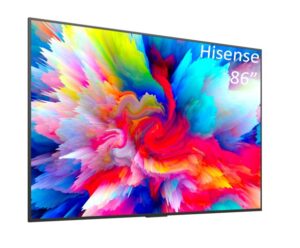
Hisense Digital Signage 86", 500 nits, 4k resolution, UHD, with 7day x 18hrs operation, Android 11 OPS - 86GM50D
R40,476.98
86GM50D Out of Stock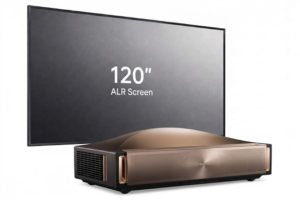
Hisense
 Low stock (1 left)
Hisense Laser Projection TV, 5000 Ansi Lumens, 4K resolution, UST, Incl 120" ALR - 120L9Q
R102,585.45
120L9Q Low stock (1 left)
Hisense
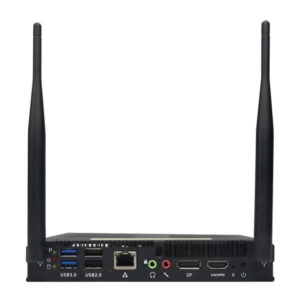
Hisense OPS, Windows 11-Pro, i5, 12450H, 16G, 256G - S02EMS5CA21B
R27,269.95
S02EMS5CA21B Out of Stock
Hisense
Reviews
There are no reviews yet.