All Categories
- ATEN
- EPSON
- HISENSE
-
AV Signal Distribution
In AV Signal Distribution
- JK
-
Screens
In Screens
-
Projector
-
Cables
In Cables
- DTECH
- Business
- VISION
-
Projector Bracket
In Projector Bracket
-
Digital Signage Solutions
In Digital Signage Solutions
Brands
-
Audio
In Audio














All Categories
- ATEN
- EPSON
- HISENSE
-
AV Signal Distribution
In AV Signal Distribution
- JK
-
Screens
In Screens
-
Projector
-
Cables
In Cables
- DTECH
- Business
- VISION
-
Projector Bracket
In Projector Bracket
-
Digital Signage Solutions
In Digital Signage Solutions
Brands
-
Audio
In Audio

BROWSE CATEGORIES
Help
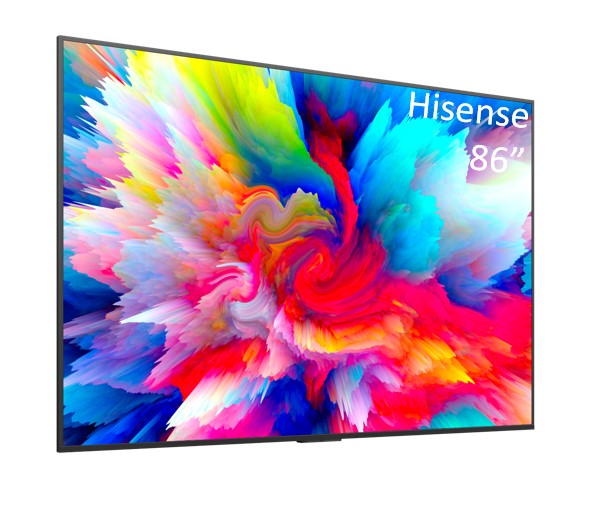
Digital Signage 18x7
Hisense Digital Signage 86″, 500 nits, 4k resolution, UHD, with 7day x 18hrs operation, Android 11 OPS – 86GM50D
R40,476.98
An 86-inch Hisense 4K signage display with a built-in Android 11 player, for large lobbies, venues and showrooms that close overnight.
- 217 cm visible picture at 500 nits
- Rated for up to 18 hours a day, every day
- Two HDMI 2.0 inputs, DisplayPort 1.2a and HDMI loop-out
- 38.2 kg; VESA 600 x 400 mm mounting
- No touch input and no OPS slot
- Brand :Hisense
- SKU :HISENSE-86GM50D
- Category :Digital Signage 18x7
- Availability :Out of Stock
Out of stock
The Hisense 86GM50D is the largest size in Hisense’s GM50D signage range, with 217 cm of visible picture. It shows 3840 x 2160 at 500 nits typical, plays content from its own Android 11 system and is rated for up to 18 hours of use a day, seven days a week, which suits a venue where the screen goes off at night.
It weighs 38.2 kg and fixes to a 600 x 400 mm VESA bracket. There is no touch input and no OPS slot.
Planning wall space for an 86-inch screen
The display is 1,926.6 mm wide, 1,095.5 mm high and 64.2 mm deep, rising to 89.1 mm at the rear handles. Hisense wants at least 10 cm of open space around all four edges and warns against setting the screen into a recess that blocks airflow, so the clear zone on the wall is roughly 2,127 x 1,296 mm.
Mounted in portrait, the footprint becomes 1,095.5 mm wide and 1,926.6 mm tall; turn it anticlockwise until the power light sits on the lower edge. The shipping carton weighs 59.5 kg and is 2,117 mm wide, 1,298 mm tall and 269 mm deep, so check doorways, lifts and stair turns before the install date.
Bracket, fixings and power for the 86GM50D
Four M6 threaded holes on a 600 x 400 mm grid carry the screen, and Hisense warns that overlong screws cause irreparable damage. Hisense matches this size to its LG60060BE wall bracket and cautions that other brackets may be unstable. The Vision VFM-W8X6 heavy-duty wall mount accepts the 600 x 400 mm pattern, carries a 130 kg safe working load and is rated by Vision for 47 to 100 inch screens. Other options sit under our flat panel wall brackets; any bracket you choose must take 600 x 400 mm and well over 38.2 kg.
Hisense’s wall rule is that each expansion bolt must hold more than one third of the display’s weight, over 12.7 kg per bolt here, and plank or plasterboard walls need reinforcement first. Keep the screen within 15° of vertical. The 86-inch set is a Class I appliance that must be plugged into an earthed socket. Hisense’s datasheet gives 200 W typical and 325 W maximum from a 100 to 240 V supply, with standby under 0.5 W; the manual’s table lists 360 W, so size the circuit on the higher figure.
Daily hours, scheduling and remote management
The 18/7 rating covers up to 18 hours a day on every day of the week, and Hisense quotes panel life at up to 50,000 hours. The timer accepts three switch-on and switch-off times a day, a turn-on delay of 2 to 255 seconds staggers start-up when several screens share a circuit, and Wake-on-LAN (off by default) brings the display out of standby over the wired network. Factory settings also send it to standby when no signal arrives for 10 minutes, or when the Android side goes 15 minutes without operation; both timers have an Off setting.
For a venue that never closes, the Hisense 86DM66GE is the 86-inch display Hisense rates for 24/7 use, and the smaller GM50D sizes sit under 18/7 digital signage displays. A CMS key on the remote opens Hisense’s VisionInfo device-management software. For a control system, the RS232 ports take IDs from 1 to 255, and the RS232 out socket passes the serial line on to the next screen.
Picture and sound in a large space
Spread over 86 inches, 3840 x 2160 works out to about 51 pixels per inch, the same density as a 43-inch Full HD screen. Brightness is 500 nits typical, adjusted automatically from the ambient light sensor unless you turn Auto adjust off; contrast is 1,200:1 and the 25% haze coating cuts reflections. Viewing angles are 178° both ways.
The two 10 W speakers sit behind grilles on the back panel. For a hall or concourse, send audio to an amplifier through the 3.5 mm output or HDMI ARC instead, or to a Bluetooth or USB audio device.
Inputs and built-in playback
All connections are on one side-facing strip at the rear: RS232 in, LAN, HDMI 2, DisplayPort, HDMI out, HDMI 1 (ARC), RS232 out, USB 2.0, USB 3.0 and audio out. Both HDMI inputs are version 2.0 and, like the DisplayPort 1.2a input, accept 3840 x 2160 at 60 Hz. HDMI out repeats whatever reaches HDMI 2 or DisplayPort.
Inside, Android 11 runs on a quad-core ARM Cortex-A55 board (3 GB DDR4, 32 GB eMMC), together with the Media Autoplay player, a web browser and the VisionInfo client. Devices that support Miracast can cast to it once Wi-Fi Display is opened, over dual-band 802.11ac Wi-Fi.
Key specifications of the Hisense 86GM50D
| Diagonal | 86″ (217 cm visible) |
|---|---|
| Native resolution | 3840 x 2160 pixels, 60 Hz refresh |
| Luminance | 500 nits (typ.) |
| Panel type | ADS with DLED backlight, 1,200:1, 72% NTSC |
| Operating hours | 18 hours per day, 7 days per week |
| Built-in player | Android 11, 3 GB memory, 32 GB eMMC |
| Video inputs | HDMI 2.0 x 2, DisplayPort 1.2a x 1 |
| Control | RS232 in and out (RJ45), LAN, Wake-on-LAN |
| Power draw | 200 W typical, 325 W maximum (datasheet) |
| Dimensions | 1,926.6 x 1,095.5 x 64.2 mm |
| Weight | 38.2 kg net, 59.5 kg packed |
| Mounting | VESA 600 x 400 mm, four M6 holes |
Questions about the Hisense 86GM50D
How heavy is the 86GM50D to install?
The display alone weighs 38.2 kg, or 59.5 kg in its carton. Hisense’s manual has the installer place it on a solid table covered with a soft cloth to fit the bracket parts before it is lifted onto the wall plate, so plan the lift and a padded table longer than the 1,926.6 mm screen.
Can I fit a Windows PC inside the 86GM50D?
No. Hisense’s datasheet and manual show no OPS slot or internal PC bay on this model. A Windows PC or media player connects externally to HDMI 2.0 or DisplayPort 1.2a, while playlists and VisionInfo content run on the built-in Android 11 system without one.
Can I cast a laptop to the 86GM50D?
Yes, from a laptop with Miracast support: open the Wi-Fi Display page in the network settings and pick the screen from the laptop’s wireless display list. Hisense also lists its built-in ScreenShare app for wireless screen sharing.
Will the 86GM50D start playing content by itself after a power cut?
Yes, if it is set up that way. The power-on mode can be boot, standby or last state, with boot as the default, and the switch-on source can be a Media Autoplay playlist, a chosen HDMI or DisplayPort input, or the home screen. With boot and Media Autoplay selected, the playlist starts again when mains power returns.
What does the 86GM50D come with?
The datasheet’s list is the remote with two AAA batteries, a mains lead, the quick setup guide and an RS232 converter cable for the RJ45 serial socket. In the GM50D manual that cable is an optional item, and the type of mains lead varies with the destination country. Brackets, HDMI leads and any external player are separate purchases.
Panel Speaker Environment Connectivity
| Backlight | DLED |
|---|---|
| Panel Type | ADS |
| Size | 86’’ |
| Resolution | 3840 x 2160 |
| Refresh rate | 60HZ |
| Colour Depth | 1.07G (8 Bits+FRC) |
| Brightness | 500 nits (typ) |
| Contrast(typ) | 1200:1 (typ) |
| Response Time(typ) | 8ms |
| Viewing Angle | 178° / 178° |
| Colour Gamut(typ) | 72% NTSC |
| Haze | 25% |
| Orientation | Landscape & Portrait |
| Lifetime | up to 50,000hrs |
| Operation Hours | 7Day x 18Hour |
| Built in speaker | 10W x 2 |
| Operation Temperature | 0 - 40°C |
| Operation Humidity | 10% - 80% Non-Condensing |
| WI-FI | 2.4/5.0GHz dual,802.11a/b/g/n/ac |
| Bluetooth | BT5.1 |
Operating System
| OS | Android 11 |
|---|
Physical Certification What’s in the box
| Bezel Colour | Black |
|---|---|
| Set Dimension(W×H×D) | 1926.6 x 1095.5 x 64.2mm / 75.9 x 43.1 x 2.5inch |
| Bezel width(T/L/R/B) | 10.3mm(T/L/R), 10.8mm(B) |
| Net Weight | 38.2kg / 84.2lbs |
| Packing Dimension(W×H×D) | 2117 x 1298 x 269mm / 83.3 x 51.1 x 10.6inch |
| Gross Weight | 59.5kg / 131.2lbs |
| VESA Mount | 600mm x 400mm |
| Standard Certification | CCC/CB/CE/FCC/cTUVus/UKCA/CEC/ERP |
| Safety | 62368-1 |
| Environment | Energy Star 8.0 |
| IP Rating | IP5X |
You must be logged in to post a review.
You may also like these
Hisense
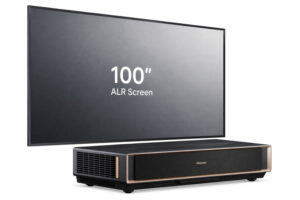
Hisense Laser Projection TV, 2500 Ansi Lumens, 4K resolution, UST, Incl 100" ALR - 100PT1
R37,337.08
100PT1 Out of Stock
Hisense
 Low stock (1 left)
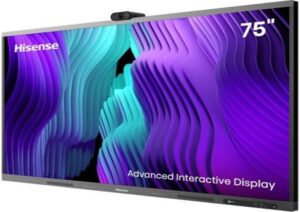
Hisense Interactive Panel, 75", 4k resolution, 400 nits, Android 13.0 - 75WM6FE
R56,085.29
75WM6FE Low stock (1 left)
Reviews
There are no reviews yet.