All Categories
- ATEN
- EPSON
- HISENSE
-
AV Signal Distribution
In AV Signal Distribution
- JK
-
Screens
In Screens
-
Projector
-
Cables
In Cables
- DTECH
- Business
- VISION
-
Projector Bracket
In Projector Bracket
-
Digital Signage Solutions
In Digital Signage Solutions
Brands
-
Audio
In Audio














All Categories
- ATEN
- EPSON
- HISENSE
-
AV Signal Distribution
In AV Signal Distribution
- JK
-
Screens
In Screens
-
Projector
-
Cables
In Cables
- DTECH
- Business
- VISION
-
Projector Bracket
In Projector Bracket
-
Digital Signage Solutions
In Digital Signage Solutions
Brands
-
Audio
In Audio

BROWSE CATEGORIES
Help
ATEN
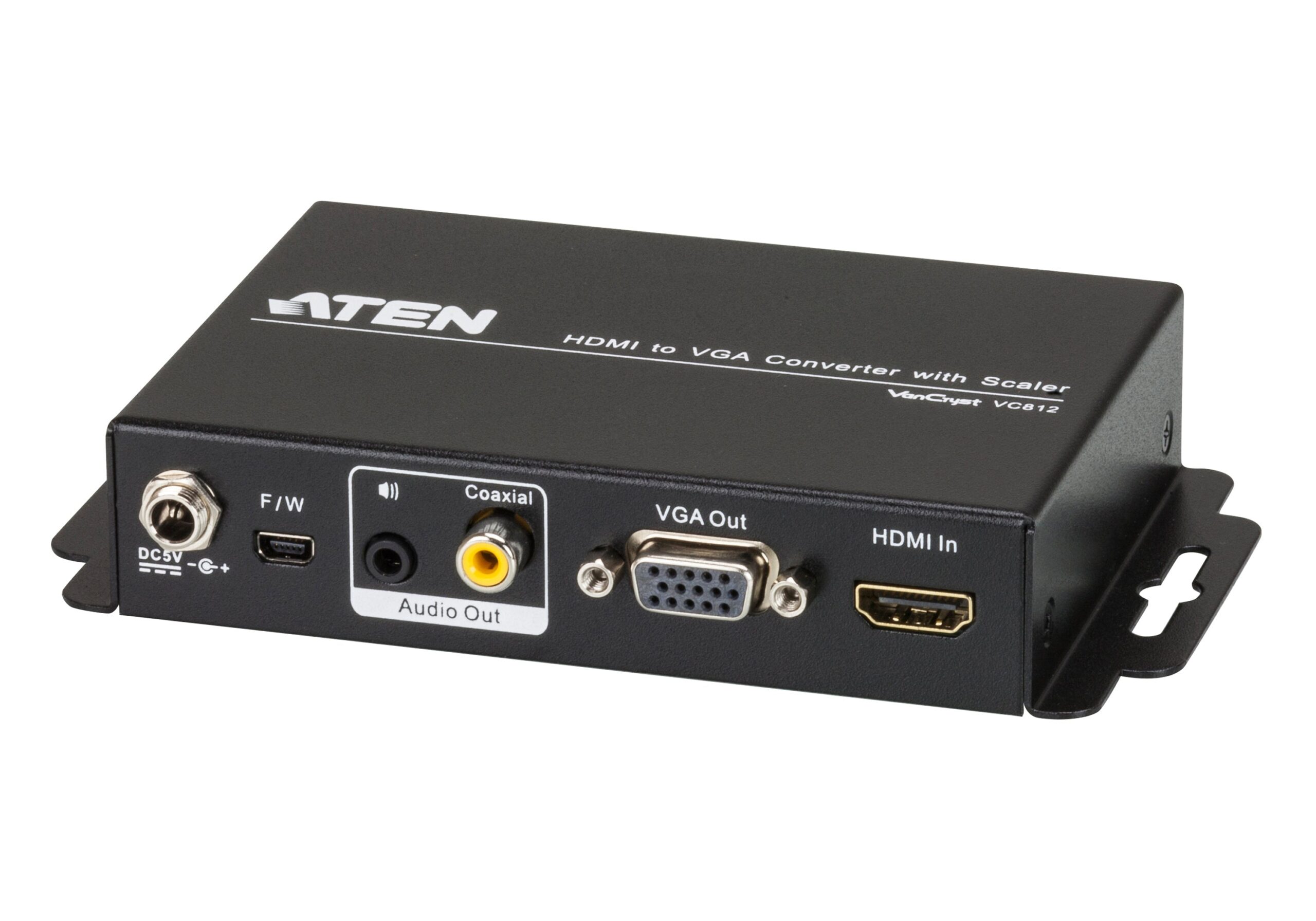
Aten Converter, HDMI to VGA with Audio and Scaler- VC812
R6,391.09
An HDMI to VGA converter with a scaler, for fixed installations where a VGA projector or monitor needs its own resolution and the sound must reach speakers.
- VGA output modes between 640 x 480 and 1920 x 1200
- Aspect, mirror and position settings in an on-screen menu
- 3.5 mm stereo and coaxial digital audio outputs
- Needs its 5 V adapter; brackets for a wall or rack
- No HDCP support
- Brand :Aten
- SKU :ATEN-VC812
- Category :ATEN
- Availability :Out of Stock
Out of stock
The Aten VC812 converts HDMI to VGA through a scaler, so the projector or monitor gets the output mode you pick in the on-screen menu, anywhere between 640 x 480 and 1920 x 1200, while the laptop stays at its own resolution. HDMI audio comes out on a 3.5 mm stereo jack and a coaxial digital RCA. The VC812 runs from a 5 V adapter, screws to a wall or rack with its built-in brackets, and does not support HDCP.
Choosing the VGA output mode
The Menu, Up and Down buttons on the front panel open and move through the on-screen menu. Aten’s manual lists these among the Output Resolution choices:
- Computer modes up to 1600 x 1200: 640 x 480, 800 x 600, 1024 x 768 and 1280 x 1024, each at 60 or 75 Hz, plus 1400 x 1050 and 1600 x 1200.
- Widescreen computer modes: 1360 x 768 and 1366 x 768; 1440 x 900 at 60 or 75 Hz; 1680 x 1050; 1920 x 1080 and 1920 x 1200 with reduced blanking.
- Video: 480p, 720p and 1080p at 60 Hz.
The aspect ratio is 4:3 from the factory; for a widescreen projector or monitor, set 16:9 under Adjustment. The System page shows which input resolution the VC812 is detecting.
Rear projection, ceiling mounting and picture position
H-Mirror reverses the picture left to right, which a rear-projection screen needs, and V-Mirror turns it upside down for a ceiling-hung projector that cannot flip its own image. H-Shift and V-Shift move the picture, and Under/Over Scan shrinks or enlarges it by up to 50%. A Default Pattern menu puts cross, hatch, grey, ramp and solid colour screens on the output for focusing and aligning a projector.
Audio outputs and the EDID audio setting
The VC812 takes the audio from the HDMI signal and sends it to a 3.5 mm stereo jack, for powered speakers or an amplifier, and to a yellow coaxial digital RCA, for an AV receiver. Audio Source in the Output Setup menu sets the audio capability the VC812 declares to the source in its EDID: 2ch or 7.1ch. With only the 3.5 mm jack in use, 2ch should keep the source sending stereo.
Power, mounting and box contents
The VC812 has to run from its supplied 5 V DC adapter, so plan a power point where it will be fixed; Aten’s 2023 manual gives typical consumption as 2.125 W. Slotted brackets on both sides of the 0.29 kg metal case take screws for a wall or a rack, and the case is 11.00 x 8.30 x 2.80 cm. On the front, the red Power LED shows the unit has power and the green Signal LED shows an active HDMI source, and the F/W Upgrade switch beside them stays on Off in normal use.
The package holds the VC812, the power adapter, a software CD and user instructions. Add an HDMI cable from the source and a VGA cable to the display.
VC812 converter or the VC810 adapter
The Aten VC810 HDMI to VGA adapter plugs straight into the laptop and needs no power, but it passes the laptop’s own resolution, has no audio connection and nothing to screw down. It is enough where every laptop already sends the projector’s native mode and the sound comes from elsewhere. Fit the VC812 behind a lectern, in a rack or on a wall when the VGA display needs a set resolution whatever the source, or when the HDMI audio has to reach speakers or a receiver.
Key specifications of the VC812
| HDMI input | Type A female; 480p, 720p, 1080i and 1080p video; PC up to 1920 x 1200 |
|---|---|
| VGA output | HD-15 female; 640 x 480 to 1920 x 1200, chosen in the menu |
| Aspect ratio | 16:9 or 4:3 (factory setting 4:3) |
| Pixel clock | 165 MHz |
| Audio outputs | 3.5 mm stereo jack; coaxial digital RCA |
| Power | 5 V DC adapter (required), 2.125 W typical |
| Mounting | Built-in brackets, wall or rack |
| Size and weight | 11.00 x 8.30 x 2.80 cm; 0.29 kg; metal |
| Operating temperature | 0 to 40 °C |
| HDCP | Not supported |
Questions about the Aten VC812
Can the VC812 send 1024 x 768 to an older XGA projector from a 1080p laptop?
Yes. Leave the laptop at 1080p, choose 1024 x 768 at 60 or 75 Hz under Output Resolution, and the scaler converts the picture to that mode. The aspect ratio already sits on 4:3 from the factory, which matches an XGA projector.
Will protected video, such as a Blu-ray film, play through the VC812?
No. Aten states that the VC812 does not support HDCP, and its support FAQ explains that HDCP rules stop protected sources such as Blu-ray players from working with VGA displays, which are not HDCP compliant. Streaming services that require HDCP are blocked in the same way; slides, documents and unprotected video convert normally.
Do I need the software CD to set the VC812 up?
Not for day-to-day settings. The on-screen menu covers output resolution, aspect ratio, picture, position and the audio setting. Aten’s utility on the CD adds extras such as freeze, blank and a one-click 1080i60 output, and connects through the mini USB port with a USB to mini USB cable that is not in the box. The program file can be copied to a laptop that has no disc drive.
Is there a remote control for the VC812?
Not in the box. The front panel has an IR sensor, and Aten’s manual describes the remote as an optional extra without naming a model, referring buyers to their dealer.
Video Input
| Interfaces | 1 x HDMI Type A Female (Black) |
|---|---|
| Impedance | 100 Ω |
Video Output
| Interfaces | 1 x HDB-15 Female (Black) |
|---|---|
| Impedance | 75 Ω |
Video
| Max. Pixel Clock | 165 MHz |
|---|---|
| Max. Resolution | Up to 1920 x 1200 |
| Scaler Resolutions | 480p; 480i; 576p; 576i; 800 x 600; 1024 x 768; 1280 x 720; 1280 x 1024; 1360 x 768; 1440 x 900; 1400 x 1050; 1600 x 1200; 1680 x 1050; 1080i; 1080p; 1920 x 1200 |
Audio
| Output | Analog: 1 x Mini Stereo Jack Female (Black) Digital: 1 x RCA (Yellow) |
|---|
Connectors
| Power | 1 x DC Jack |
|---|---|
| Power Consumption | DC5V:2.125WBTU |
Environmental
| Operating Temperature | 0 - 40 ºC |
|---|---|
| Storage Temperature | 20 - 60 ºC |
| Humidity | 20 - 90% RH, Non-Condensing |
Physical Properties
| Housing | Metal |
|---|---|
| Weight | 0.29 kg ( 0.64 lb ) |
| Dimensions (L x W x H) | 11.00 x 8.30 x 2.80 cm (4.33 x 3.27 x 1.1 in.) |
| Carton Lot | 5 pcs |
| Note | For some of rack mount products, please note that the standard physical dimensions of WxDxH are expressed using a LxWxH format. |
You must be logged in to post a review.
VC812 Datasheet PDF
 In Stock
Reviews
There are no reviews yet.