All Categories
- ATEN
- EPSON
- HISENSE
-
AV Signal Distribution
In AV Signal Distribution
- JK
-
Screens
In Screens
-
Projector
-
Cables
In Cables
- DTECH
- Business
- VISION
-
Projector Bracket
In Projector Bracket
-
Digital Signage Solutions
In Digital Signage Solutions
Brands
-
Audio
In Audio














All Categories
- ATEN
- EPSON
- HISENSE
-
AV Signal Distribution
In AV Signal Distribution
- JK
-
Screens
In Screens
-
Projector
-
Cables
In Cables
- DTECH
- Business
- VISION
-
Projector Bracket
In Projector Bracket
-
Digital Signage Solutions
In Digital Signage Solutions
Brands
-
Audio
In Audio

BROWSE CATEGORIES
Help
ATEN
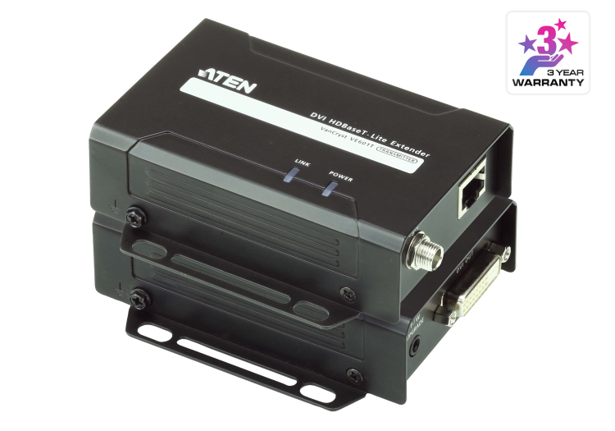
Aten Extender, DVI HDBaseT-Lite – VE601
R7,188.10
Aten VE601 transmitter and receiver that carry DVI-D over one Cat cable, for DVI sources and screens too far apart for a DVI lead.
- 1080p up to 70 m on Cat 6a
- 1920 x 1200 up to 40 m on Cat 6a
- HDBaseT-Lite (Class B), HDCP 1.4
- Picture only: no audio, IR or RS-232
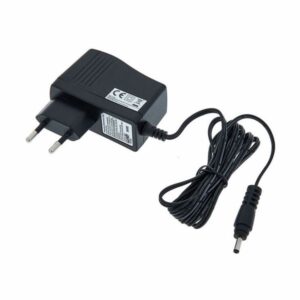
- 5 V adapter for each unit, both supplied
- Brand :Aten
- SKU :ATEN-VE601
- Category :ATEN
- Availability :Out of Stock
Out of stock
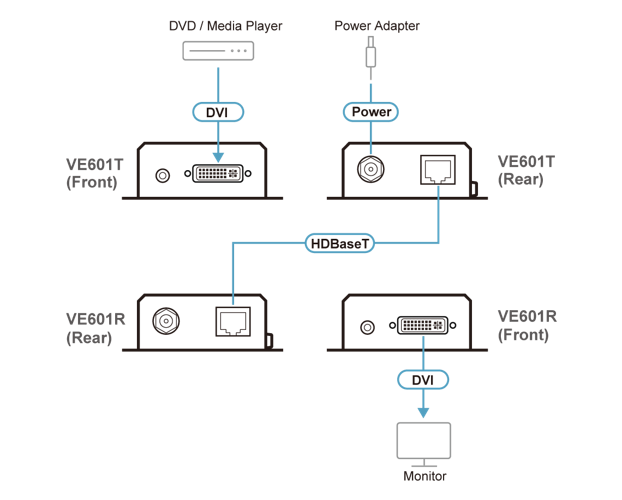
The Aten VE601 is a two-box extender for DVI-D. The VE601T transmitter takes the signal from a DVI source, and the VE601R receiver drives a DVI monitor or projector up to 70 m away over one Cat cable. It uses HDBaseT-Lite (HDBaseT Class B) and carries the picture only, so sound and device control need their own route. Each unit has a locking DC jack and its own 5 V adapter.
Reach at 1080p and at 1920 x 1200
Aten gives one pair of distances per resolution, and both depend on the cable grade:
- 1080p: 60 m over Cat 5e/6; 70 m over Cat 6a or Aten’s own 2L-2910 Cat 6.
- 1920 x 1200 (WUXGA): 35 m over Cat 5e/6; 40 m over Cat 6a or 2L-2910.
A 16:10 monitor or WUXGA projector running at its native 1920 x 1200 needs the shorter figure. Aten rates the link at 10.2 Gbps and 340 MHz, lists 3D and Deep Colour, and rates nothing above 1920 x 1200. Keep the DVI lead at each end to 1.8 m or less.
Where a DVI HDBaseT link fits
The VE601 suits a source whose only digital output is DVI-D feeding a DVI screen in another room, with no conversion at either end, and it passes HDCP 1.4. Aten pitches it at installations that need protection from signal interference, naming medical and military sites, and lists HDBaseT anti-jamming among its features.
For HDMI equipment, the Aten VE801 HDBaseT-Lite kit is the HDMI model in the same Class B range. When stereo sound has to travel with the picture, the Aten VE600A DVI extender with audio carries it, at a shorter 40 m for 1080p.
Cabling, power and mounting
Cat 5e is the lowest grade Aten accepts for the link. Its manual warns that lower-grade cable degrades the picture and suggests Aten’s 2L-2801 low-skew Cat 5e cable where the run is long, and the quick start guide calls for shielded (STP) cable to meet FCC and CE limits.
The box holds two 5 V adapters, one per unit, so the screen end needs a power point as well as the source end. Typical draw is 1.84 W for the VE601T and 4.36 W for the VE601R. The metal cases weigh 0.25 kg each and have mounting brackets, and Aten lists the VE601 as rack-mountable with its VE-RMK1U or VE-RMK3U kits, sold separately.
Box contents and the parts you supply
Aten’s package has the VE601T, the VE601R, two power adapters and printed instructions. You supply the Cat cable run and a DVI-D lead for each end, plus a separate path for any audio, IR or RS-232 the far end needs.
Key specifications of the Aten VE601
| Ports | DVI-D in (VE601T), DVI-D out (VE601R), one RJ-45 link port on each |
|---|---|
| Link type | HDBaseT-Lite (HDBaseT Class B) |
| Reach at 1080p | Cat 5e/6: 60 m. Cat 6a or Aten 2L-2910: 70 m |
| Reach at 1920 x 1200 | Cat 5e/6: 35 m. Cat 6a or Aten 2L-2910: 40 m |
| HDCP | Version 1.4 |
| Data rate | Up to 10.2 Gbps; 340 MHz pixel clock |
| Operating temperature | 0 to 50 °C |
| Audio, IR, RS-232 | Not carried |
| DVI lead per end | Up to 1.8 m |
| Power | 5 V DC locking jack on each unit; 1.84 W (VE601T), 4.36 W (VE601R) |
| Size and weight | 10.20 x 8.70 x 3.00 cm including bracket; 0.25 kg per unit |
Questions about the Aten VE601
Can the VE601 carry sound or a projector’s RS-232 control?
No. Aten’s current datasheet and quick start guide show only DVI-D, the RJ-45 link and power on the two units. Run audio and RS-232 on their own cables, or, if stereo sound is the only extra, use the VE600A, which has a 3.5 mm input on its local unit and an output on its remote unit.
Will it run a 2560 x 1600 monitor from a dual-link DVI card?
No. Aten rates the VE601 to 1920 x 1200 and lists nothing higher, so 2560 x 1600, which needs dual-link DVI, is outside its specification. Set the graphics card to 1920 x 1200 or lower for the extended screen.
How can I tell whether HDCP content is getting through?
Watch the DVI Out light on the VE601R. Aten’s manual says it stays on when video is passing with HDCP, flashes when video is passing without HDCP, and is off when there is no DVI signal. A flashing Link light on either unit points to a problem with the Cat connection instead.
Can I use existing Cat 5e wiring in the building?
Yes, if the run links the two units end to end and stays within the distance for your resolution: 60 m at 1080p or 35 m at 1920 x 1200 on Cat 5e. Aten’s installation steps plug the VE601T straight into the VE601R with one RJ-45 run and show no network equipment between them.
You must be logged in to post a review.
VE601 Datasheet PDF
 In Stock
Reviews
There are no reviews yet.