All Categories
- ATEN
- EPSON
- HISENSE
-
AV Signal Distribution
In AV Signal Distribution
- JK
-
Screens
In Screens
-
Projector
-
Cables
In Cables
- DTECH
- Business
- VISION
-
Projector Bracket
In Projector Bracket
-
Digital Signage Solutions
In Digital Signage Solutions
Brands
-
Audio
In Audio






All Categories
- ATEN
- EPSON
- HISENSE
-
AV Signal Distribution
In AV Signal Distribution
- JK
-
Screens
In Screens
-
Projector
-
Cables
In Cables
- DTECH
- Business
- VISION
-
Projector Bracket
In Projector Bracket
-
Digital Signage Solutions
In Digital Signage Solutions
Brands
-
Audio
In Audio

BROWSE CATEGORIES
Help
Cables
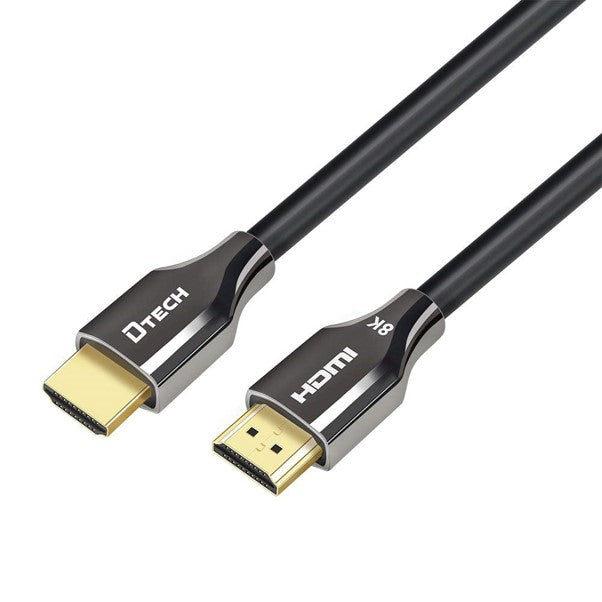
Dtech Copper Cable, 2.0m, HDMI, V2.1, 8K resolution – H8002
R113.65
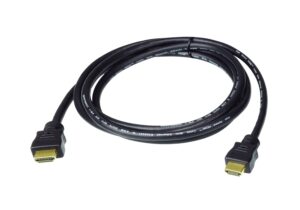
A 2 m Dtech H800-series copper HDMI cable for a source on a cabinet or table and a screen close by, listed as HDMI 2.1 for 8K.
- 48 Gbps maximum by Dtech's 8K cable figure
- 2 m, copper conductors
- Full-size HDMI plugs
- Works with HDMI 2.0 devices at their own limits
- Brand :Dtech
- SKU :DTECH-H8002
- Category :Cables
- Availability :Out of Stock
Out of stock
The Dtech H8002 is a 2 m copper HDMI cable, the middle length of the three Dtech H800-series cables on AV Supply. It is listed as an HDMI 2.1 cable for 8K, Dtech’s bandwidth figure for its 8K HDMI cable is up to 48 Gbps, and it ends in a standard HDMI plug at both sides. Two metres reaches from a TV unit, lectern shelf or credenza to a screen just above or beside it.
Measuring a 2 m route to the screen
Follow the path the cable will take: down from the source’s HDMI port inside the cabinet, out through the back panel, up the wall to the height of the display’s input and across to it. Leave a loose loop at the display end so the plug is not pulled sideways out of the socket. If the total comes close to 2 m, the 3 m Dtech H8003 gives you margin.
Which devices decide whether you get 8K or 4K at 120 Hz
An HDMI cable carries only the modes the connected devices agree on. The source must output the mode, the display input must accept it, and an AV receiver or switch in the path must pass it too. Check each box’s specification before suspecting the cable.
Key specifications of the Dtech H8002
| Product code | H8002 (Dtech H800 series) |
|---|---|
| Cable length | 2 m |
| Conductor material | Copper |
| Plug type | HDMI A male x 2 |
| Listing | HDMI 2.1, 8K |
| Dtech bandwidth figure | Up to 48 Gbps, given for its 8K cable |
| Colour | Black |
The 2 m H204 cable, and longer runs
AV Supply also lists a 2 m cable from Dtech’s H204 series, the Dtech H20402, sold on the same HDMI 2.1, 8K terms. For a run across a room to a projector, an optical cable such as the Dtech HF8020K carries HDMI 2.1 over 20 m. The copper HDMI 2.1 category holds every length we list.
Questions about the Dtech H8002
Will the H8002 work with my HDMI 2.0 TV?
Yes. The plug is identical on every HDMI version, so it fits an HDMI 2.0 TV, which then sets the limit at 4K at 60 Hz. The HDMI 2.1 listing only pays off once the source and the TV both handle HDMI 2.1 modes.
Can I use the H8002 between a laptop and a meeting-room display?
Yes, if the laptop has an HDMI output, or a USB-C adapter with one, and the display stands within 2 m of the laptop along the cable route. A laptop at the far end of a long table needs a floor box or a longer cable to reach the screen.
Can the H8002 go through a desk grommet?
Only when the hole clears a full-size HDMI plug with its housing. AV Supply has no plug dimensions for the H800 series, so measure the plug before drilling, or choose a grommet or floor box with a wide cable slot.
Can the H8002 feed a TV on a swing-out wall arm?
Yes, if the route still measures under 2 m with the arm pulled fully out. Clip the cable along the arm and leave a loose loop at each joint, so swinging the screen does not pull on the HDMI port.
You must be logged in to post a review.
 In Stock
Reviews
There are no reviews yet.