All Categories
- ATEN
- EPSON
- HISENSE
-
AV Signal Distribution
In AV Signal Distribution
- JK
-
Screens
In Screens
-
Projector
-
Cables
In Cables
- DTECH
- Business
- VISION
-
Projector Bracket
In Projector Bracket
-
Digital Signage Solutions
In Digital Signage Solutions
Brands
-
Audio
In Audio














All Categories
- ATEN
- EPSON
- HISENSE
-
AV Signal Distribution
In AV Signal Distribution
- JK
-
Screens
In Screens
-
Projector
-
Cables
In Cables
- DTECH
- Business
- VISION
-
Projector Bracket
In Projector Bracket
-
Digital Signage Solutions
In Digital Signage Solutions
Brands
-
Audio
In Audio

BROWSE CATEGORIES
Help
AV Signal Distribution
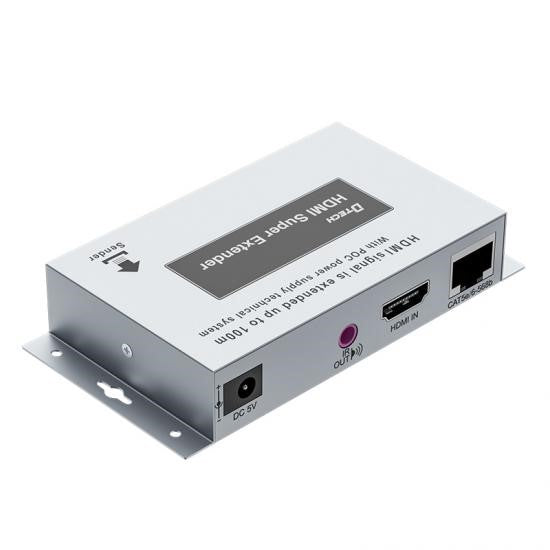
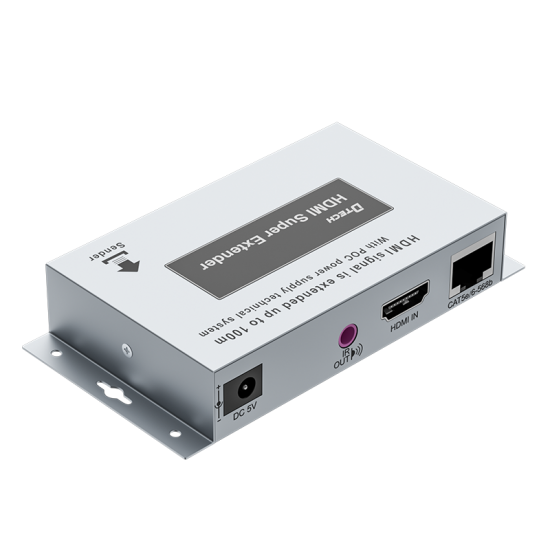
Dtech Extender, POC HDMI, 100m with IR, No Loop – 7078
R1,542.15
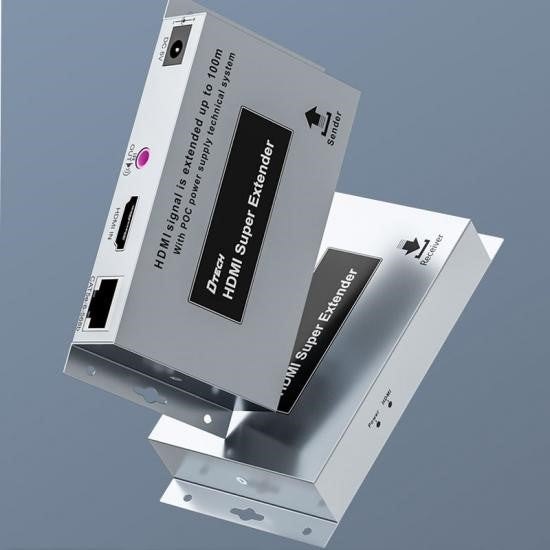
An HDMI extender pair for a 1080p screen up to 100 m from its source, where only the source end has a power point for the extender.
- 100 m over a single Cat 5e or Cat 6 run
- 1080p at 60 Hz; no 1080i
- Receiver powered over the cable from the transmitter
- IR return, with emitter and receiver leads
- No HDMI loop-out
- Brand :Dtech
- SKU :DTECH-7078
- Category :AV Signal Distribution
- Availability :
 In Stock
55 in stock
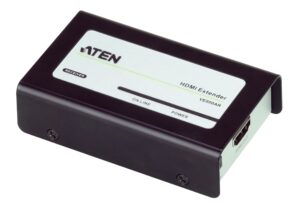
The Dtech DT-7078 (our code 7078) is a two-box HDMI extender: the transmitter connects to the source, the receiver to the display, and a single Cat 5e or Cat 6 run of up to 100 m links them. It carries HDMI video and audio at 1080p 60 Hz or lower. The receiver draws its power over that cable (PoC), so only the transmitter needs a power point. IR return is included; an HDMI loop-out is not.
One adapter, at the source end
The 5 V adapter plugs into the transmitter, and the transmitter powers the receiver through the Cat cable. The display still needs its own mains supply; what PoC saves is a second adapter and socket for the receiver, useful behind a wall-mounted screen or beside a ceiling projector, where a second adapter is hard to place.
Use the adapter supplied with the set: the product notes warn that a different power supply can make the link unstable.
Cable, distance and accepted formats
The distance rating is 100 m on shielded Cat 5e or Cat 6. The transmitter’s network socket is marked CAT5e/6-568B, so terminate both ends of the run to T568B. Run the cable straight from transmitter to receiver: Dtech describes no switch in the path, and the receiver’s power travels on that same cable.
Accepted formats are progressive ones, to a maximum of 1920 x 1080 at 60 Hz; 1080i is not supported. For a 4K source over the same 100 m, the Dtech DT-7051A HDMI extender carries 3840 x 2160 at 30 Hz and adds RS-232 alongside IR, but needs a 5 V 2 A supply at each end, so it gives up the single power point.
IR return and what comes in the box
The transmitter has an IR OUT socket for the emitter lead, which sits in front of the IR window of the decoder, media player or computer. The IR receiver lead goes at the screen end, so the source’s remote works from where people are watching.
The set contains:
- the transmitter and the receiver, both with slotted flanges for screwing to a wall, shelf or the inside of a cabinet;
- a 5 V power supply;
- an IR emitter lead and an IR receiver lead;
- instructions.
Cat cable and HDMI leads are not included. Power and HDMI indicator lights on the receiver show whether it is powered and receiving a signal.
Keeping a monitor at the source
With an HDMI input and no HDMI output on the transmitter, nothing feeds a second screen next to the source. A Dtech DT-7212 two-way HDMI splitter placed before the DT-7078 does: one output runs to the transmitter, the other to the local monitor. The splitter’s EDID switch, set to 1080P@60Hz, keeps the source at a format the DT-7078 takes.
Key specifications of the Dtech DT-7078
| Kit | Transmitter and receiver |
|---|---|
| Distance | Up to 100 m |
| Cable | Cat 5e or Cat 6, shielded recommended |
| Formats | Progressive, to 1920 x 1080 at 60 Hz; no 1080i |
| Audio | HDMI audio with the video |
| Power | 5 V adapter at the transmitter; receiver powered over the cable (PoC) |
| IR | IR return; emitter and receiver leads included |
| HDMI loop-out | None |
| Protection | Built-in ESD protection |
| Network socket | RJ45, marked CAT5e/6-568B |
Questions about the Dtech DT-7078
Can a PoE switch or injector power the DT-7078?
No, plan on the supplied adapter at the source end. The DT-7078 uses PoC: the adapter powers the transmitter, which feeds the receiver over the extender cable. Dtech says nothing about PoE for this model, so keep PoE switches and injectors out of the run.
Will it work with a decoder set to 1080i?
Not at that setting. Switch the decoder’s HDMI output to 1080p before connecting it, because Dtech lists only progressive formats for the DT-7078 and names 1080i as unsupported.
Do I need shielded cable for the full 100 m?
Yes, for the full rating: the datasheet specifies shielded Cat 5e or Cat 6 for 100 m, and its general advice is quality Cat 6. For a new run, pull shielded Cat 6. On an existing unshielded run, check the picture over the full length before fixing the units in place.
Can one DT-7078 feed two screens?
No. The DT-7078 links one transmitter to one receiver, and the transmitter has a single network socket. For one source on several screens over Cat cable, an HDMI over IP system such as the Dtech DT-7043S transmitter, with a DT-7043R receiver per screen, is the better fit.
You must be logged in to post a review.
Reviews
There are no reviews yet.