All Categories
- ATEN
- EPSON
- HISENSE
-
AV Signal Distribution
In AV Signal Distribution
- JK
-
Screens
In Screens
-
Projector
-
Cables
In Cables
- DTECH
- Business
- VISION
-
Projector Bracket
In Projector Bracket
-
Digital Signage Solutions
In Digital Signage Solutions
Brands
-
Audio
In Audio














All Categories
- ATEN
- EPSON
- HISENSE
-
AV Signal Distribution
In AV Signal Distribution
- JK
-
Screens
In Screens
-
Projector
-
Cables
In Cables
- DTECH
- Business
- VISION
-
Projector Bracket
In Projector Bracket
-
Digital Signage Solutions
In Digital Signage Solutions
Brands
-
Audio
In Audio

BROWSE CATEGORIES
Help
AV Signal Distribution
Dtech Audio De-Embedder, HDMI – 7048
R535.07
An inline HDMI audio de-embedder that takes the sound off an HDMI signal for an amplifier, mixer or soundbar with no HDMI input.
- HDMI in and HDMI out, plus optical, coaxial and 3.5 mm analogue audio outputs
- Video up to 3840 x 2160 at 30 Hz, with 3D
- Powered through a DC 5 V socket
- Dtech's sheet lists no supported audio formats
- Brand :Dtech
- SKU :DTECH-7048
- Category :AV Signal Distribution
- Availability :
 In Stock
79 in stock
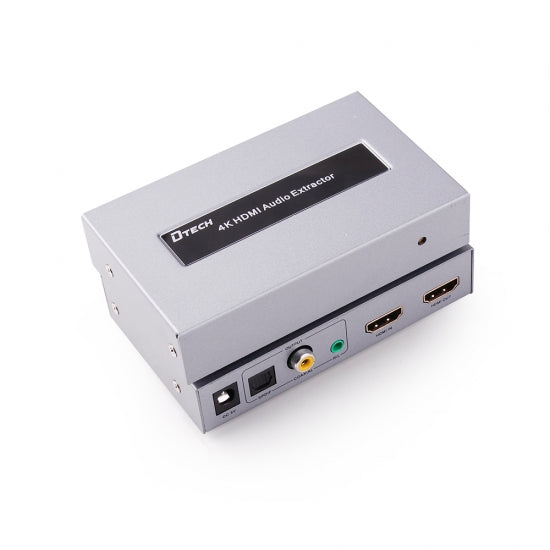
The Dtech 7048 is an HDMI audio de-embedder, printed on its case as a 4K HDMI Audio Extractor. It sits in the HDMI line between a source and a display: the picture carries on through its HDMI output, and the sound comes out of optical, coaxial and 3.5 mm analogue outputs for an amplifier, mixer or soundbar that has no HDMI input.
Check two limits before you choose it: video is limited to 3840 x 2160 at 30 Hz, and Dtech’s sheet lists no audio formats.
Where the 7048 sits in the signal chain
Connect the source to HDMI IN: a laptop, media player, set-top box or the output of an HDMI switch. Run HDMI OUT to the projector, the display or the transmitter of an HDMI extender, then take sound from whichever output matches the amplifier. In a classroom, for example, the projector shows the laptop’s picture while the 7048 feeds the laptop’s sound to the amplifier that drives the ceiling speakers.
The three audio outputs and what they carry
- Optical, marked SPDIF on the case: a Toslink socket for soundbars, AV receivers and amplifiers with an optical digital input. Because the link is light rather than copper, it isolates the two units electrically, which can help with ground-loop hum.
- Coaxial digital: an RCA socket carrying S/PDIF digital audio over copper, for receivers and mixers with a coaxial digital input.
- Analogue: a green 3.5 mm jack for powered speakers, amplifier line inputs and mixer channels. Dtech’s sheet calls the analogue output 2.1, but the case has one jack and no separate subwoofer connection.
Dtech does not say what the 7048 decodes for the analogue jack. With no format list to go on, set the source to stereo PCM when you use the 3.5 mm output, because stereo PCM needs no decoding.
Video: 4K at 30 Hz, with 3D
Dtech rates both HDMI ports to 3840 x 2160 at 30 Hz, with 3D support, so a source sending 4K at 60 Hz has to be set to 30 Hz or to a lower resolution such as 1920 x 1080. Dtech’s sheet does not mention HDCP copy protection. If the source is a streaming box or Blu-ray player, connect the whole chain and play protected content before the 7048 goes into a ceiling void or rack.
Where the display must run 4K at 60 Hz, the Aten VC882 HDMI repeater with audio de-embedder is rated to 4096 x 2160 at 60 Hz with HDCP 2.2, and has coaxial and analogue audio outputs.
What else you will need
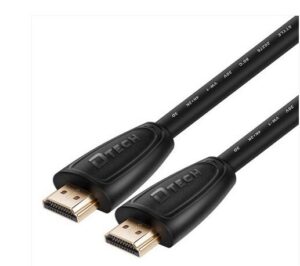
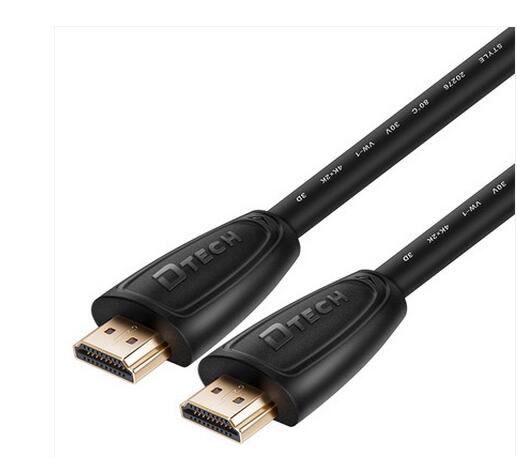
- An HDMI cable on each side of the unit: source to HDMI IN, and HDMI OUT to the display. The Dtech H004 2 m HDMI cable suits a desk or rack; longer lengths are under HDMI copper cables.
- A lead for the audio output you use: a Toslink optical cable, an RCA coaxial digital cable, or a 3.5 mm audio cable ending in whatever the amplifier accepts.
- An amplifier, powered speakers or a soundbar with a matching input. For a room system with ceiling or wall speakers, see amplifiers.
Key specifications of the Dtech 7048
| Function | HDMI audio de-embedder (extractor) with HDMI pass-through |
|---|---|
| Input | 1 x HDMI |
| Video output | 1 x HDMI |
| Audio outputs | Optical S/PDIF (Toslink), coaxial digital (RCA), 3.5 mm analogue |
| Video resolution | Up to 3840 x 2160 at 30 Hz, input and output |
| 3D | Supported |
| Audio formats | Not listed on Dtech’s sheet |
| HDCP | Not stated |
| Power input | DC 5 V socket |
Questions about the Dtech 7048
Can the Dtech 7048 output 5.1 surround sound?
Only as a compressed stream from the optical or coaxial output, and only if the 7048 passes it through, which Dtech does not document. S/PDIF carries two channels of PCM or compressed 5.1 such as Dolby Digital or DTS, but not lossless surround formats. The 3.5 mm jack is a single analogue output with no subwoofer connection, so plan on stereo from it.
Why does the amplifier get no sound when the picture is fine?
Check where the source is sending its sound before checking the cables. On a Windows laptop, open Sound settings and choose the HDMI display as the output device, which also makes it the default; Windows may not do this by itself. Then check that the amplifier is switched to the input the audio lead goes into.
Does the 7048 need a power supply?
Yes. It has a DC 5 V input socket beside the optical output, and Dtech’s sheet describes no other way to power it. Allow for a power point or a 5 V source where the unit will sit, whether that is at the lectern, in the rack or behind the display.
Is an HDMI audio de-embedder the same as an audio extractor?
Yes. Both names describe a unit that takes the sound out of an HDMI signal, and the 7048’s case says 4K HDMI Audio Extractor. Because it keeps an HDMI output for the display, it works inline; an HDMI to audio converter with no video output would end the chain at the amplifier.
You must be logged in to post a review.
You may also like these
Aten
Reviews
There are no reviews yet.