All Categories
- ATEN
- EPSON
- HISENSE
-
AV Signal Distribution
In AV Signal Distribution
- JK
-
Screens
In Screens
-
Projector
-
Cables
In Cables
- DTECH
- Business
- VISION
-
Projector Bracket
In Projector Bracket
-
Digital Signage Solutions
In Digital Signage Solutions
Brands
-
Audio
In Audio














All Categories
- ATEN
- EPSON
- HISENSE
-
AV Signal Distribution
In AV Signal Distribution
- JK
-
Screens
In Screens
-
Projector
-
Cables
In Cables
- DTECH
- Business
- VISION
-
Projector Bracket
In Projector Bracket
-
Digital Signage Solutions
In Digital Signage Solutions
Brands
-
Audio
In Audio

BROWSE CATEGORIES
Help
DTECH
Dtech KVM extender,USB 2.0,IR,50m – 7054
R2,280.66
A KVM extender set that puts a PC's HDMI screen, USB keyboard and mouse up to 50 m from the computer, for PCs kept in a server room or cabinet.
- 50 m over a single Cat5e or Cat 6 run
- 1920 x 1080 at 60 Hz
- USB 2.0 keyboard and mouse at the far end
- IR remote pass-through
- DC 5 V, 1 A power adapter
- Brand :Dtech
- SKU :DTECH-7054
- Category :DTECH
- Availability :Out of Stock
Out of stock
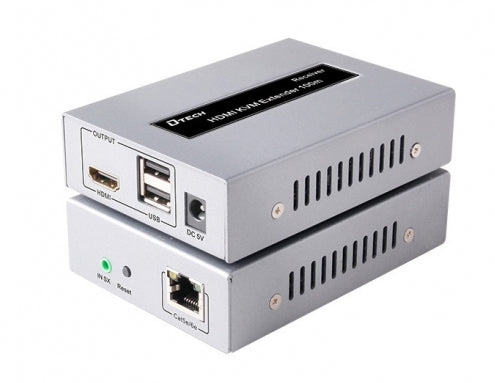
The Dtech DT-7054 (our code 7054) is an HDMI and USB KVM extender. It puts a computer’s monitor, keyboard and mouse up to 50 m away on a single Cat5e or Cat 6 run, with the picture at up to 1920 x 1080 at 60 Hz. A typical use is a PC locked in a server room or cabinet, with the user at a desk, kiosk or lectern elsewhere in the building.
Runs longer than 50 m
50 m is the only distance Dtech gives for the DT-7054, so plan the cable route to it. For a longer run, the Dtech DT-7050P IP KVM extender is labelled for 120 m on the unit we picture (Dtech quotes 150 m for its current version).
Keyboard, mouse and IR across the link
The sender takes the computer’s HDMI output and a USB connection from the PC. At the user’s end, a USB 2.0 keyboard and mouse plug into the receiver. Dtech’s specification names keyboard and mouse only; flash drives, webcams, printers and touch screens are not listed.
Dtech also lists an IR pass-through, which it calls an IR cycle function. A remote control can then work across the 50 m link, for example to switch a display on or change its volume from the other end.
Power, box contents and what you supply
Dtech specifies a DC 5 V, 1 A power adapter and built-in ESD (static discharge) protection. It publishes no packing list for the DT-7054, so the number of adapters, and whether IR leads and a USB cable for the computer come with it, are not confirmed. Ask before you plan power points or IR control.
You supply the Cat5e or Cat 6 cable and an HDMI lead at each end, for example from our copper HDMI cables.
Key specifications of the Dtech DT-7054
| Type | HDMI and USB KVM extender, sender and receiver |
|---|---|
| Maximum distance | 50 m |
| Cable | One Cat5e or Cat 6 cable |
| Maximum resolution | 1920 x 1080 at 60 Hz |
| USB | USB 2.0 keyboard and mouse |
| IR | IR pass-through (IR cycle) |
| Power | DC 5 V, 1 A adapter |
| Protection | Built-in ESD protection |
Questions about the Dtech DT-7054
Will a 4K monitor work at the user’s end?
Yes, but only at 1080p. The DT-7054 carries up to 1920 x 1080 at 60 Hz, so a 4K monitor shows a 1080p picture and scales it to fill the screen. For a 4K desktop at the far end, choose a KVM extender rated for 4K.
Can I use a USB flash drive or webcam through the DT-7054?
Treat them as unsupported. Dtech’s specification covers a USB 2.0 keyboard and mouse and lists no other devices. Plug storage and cameras into the computer itself, or give them their own USB extension run.
Can the Cat cable run through a network switch?
Plan on a direct cable. Dtech specifies one Cat5e or Cat 6 cable between the sender and receiver and says nothing about network switches, so run it straight from one unit to the other and keep it off the office network.
Is Cat5e good enough, or do I need Cat 6?
Cat5e is within Dtech’s 50 m rating. If you are pulling new cable anyway, the Dtech datasheets for this range recommend good-quality Cat 6 for HDMI extension.
You must be logged in to post a review.
You may also like these
Dtech
 In Stock
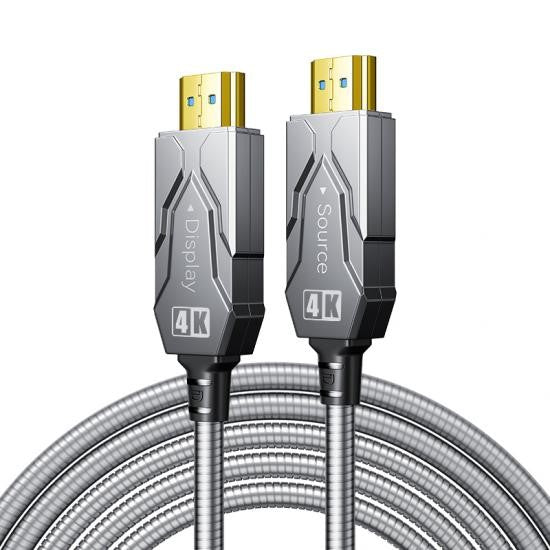
Dtech Armoured Fibre Cable, 50.0m, HDMI, V2.0, 4K resolution - HF2050K
R2,643.70
HF2050K In Stock
Reviews
There are no reviews yet.