All Categories
- ATEN
- EPSON
- HISENSE
-
AV Signal Distribution
In AV Signal Distribution
- JK
-
Screens
In Screens
-
Projector
-
Cables
In Cables
- DTECH
- Business
- VISION
-
Projector Bracket
In Projector Bracket
-
Digital Signage Solutions
In Digital Signage Solutions
Brands
-
Audio
In Audio














All Categories
- ATEN
- EPSON
- HISENSE
-
AV Signal Distribution
In AV Signal Distribution
- JK
-
Screens
In Screens
-
Projector
-
Cables
In Cables
- DTECH
- Business
- VISION
-
Projector Bracket
In Projector Bracket
-
Digital Signage Solutions
In Digital Signage Solutions
Brands
-
Audio
In Audio

BROWSE CATEGORIES
Help
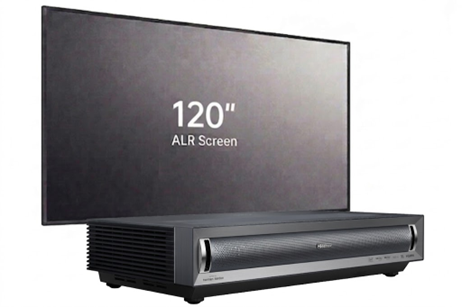
ALR
Hisense Laser Projection TV, 3000 Ansi Lumens, 4K resolution, UST, Incl 120″ ALR – 120PX3PRO
R63,693.85
A 120-inch ALR screen with the Hisense PX3-PRO, the larger PX3-PRO set, for a cinema room or a games room with a long wall.
- 120-inch picture, about 2.66 m across
- 3,000 ANSI lumens from three lasers
- Console stands 314 mm from the screen
- Xbox certified, ALLM, 240 Hz mode
- Brand :Hisense
- SKU :HISENSE-120PX3PRO
- Category :ALR
- Availability :Out of Stock
Out of stock
The 120PX3PRO is the Hisense PX3-PRO 4K laser TV plus a 120-inch (305 cm) ALR screen. This is the larger of the two PX3-PRO sets, for a cinema room or a games room with a wall of about 2.7 m or more, and its 3,000 ANSI lumens give 20% more light than the Hisense PT1 at the same 120-inch size.
The console stands on a low cabinet, 314 mm out from the screen.
Sizing the room for 120 inches
Without the screen’s border, the image measures 2,657 by 1,494 mm. Hisense’s chart puts its lower edge 452 mm above the top of the cabinet, so a 350 mm cabinet places the image between roughly 800 mm and 2,300 mm from the floor. A taller cabinet raises the top edge towards the ceiling, so measure the room height before choosing furniture.
From the screen to the front of the 296 mm deep console is about 610 mm. Its side vents need at least 30 cm of free space each, and the cables need a gap behind.
Brightness across 3.97 square metres
A 120-inch 16:9 picture covers 3.97 square metres, 44% more than at 100 inches. At 3,000 ANSI lumens the PX3-PRO puts 20% more light on that area than the 2,500-lumen PT1 in the 120PT1 set, which counts when a room is never fully dark. An ALR surface turns away some of the room light, but blacks still depend on how much light reaches the screen, so dark films call for dimmed lights at this size.
Placing the console and aligning the image
Set the back of the PX3-PRO 314 mm from the screen surface and turn its feet with the supplied wrench until it is parallel to the screen. Auto keystone correction runs through your phone: connect phone and projector to the same Wi-Fi, scan the on-screen QR code and photograph the screen with its 16-point grid. Hisense asks for the screen to fill at least two-thirds of the photo with all 16 points visible, and for the screen’s border to sit inside the projected image, so at 120 inches stand far enough back to fit the whole screen in the shot. Manual 4-point and 8-point correction and the focus menu finish the job.
Gaming and sound on a 120-inch screen
The PX3-PRO is certified Designed for Xbox, and its HDMI 2.1 pair (HDMI 1 and 2) supports ALLM. Hisense USA’s listing shows 4K/60Hz as the resolution and refresh limit, which leaves the 240 Hz HSR mode for lower resolutions. The picture comes from three lasers and a 0.47-inch DMD at 3840 x 2160, with 110% BT.2020 colour, 3,000:1 native contrast, Dolby Vision, HDR10+ and IMAX Enhanced certification.
Sound comes from 50 W of Harman Kardon-badged speakers, with Dolby Atmos decoding. A receiver or sound bar connects to the eARC socket (HDMI 3) or the optical one. Hisense’s South African page pictures this model on VIDAA, while North American units run Google TV; with no tuner on board, TV channels arrive through a decoder on HDMI.
Other PX3-PRO options
The 100PX3PRO pairs the same projector with a 100-inch ALR screen, which gives a brighter picture in a smaller room. Buyers with a screen already in place can take the Hisense PX3-PRO without one.
Key specifications of the 120PX3PRO set
| ALR screen size | 120″ (305 cm) |
|---|---|
| Viewable picture | 2,657 x 1,494 mm |
| Console to screen | 314 mm (rear of unit) |
| Picture starts | 452 mm above the cabinet top |
| Laser brightness | 3,000 ANSI lumens |
| Colour range | 110% of BT.2020 |
| Inputs | Two HDMI 2.1 with ALLM, one HDMI 2.0 with eARC |
| HDR support | HDR10+, HDR10, HLG, Dolby Vision |
| Built-in audio | 50 W Harman Kardon, Dolby Atmos |
| Power draw | 250 W |
Questions about the 120PX3PRO
Can the Xbox Series X play at 4K 120 Hz on this set?
No: 60 Hz is the ceiling for 4K input on the PX3-PRO, according to Hisense USA. A higher refresh rate means a lower resolution through the 240 Hz HSR mode. With the console on HDMI 1 or 2, ALLM can switch on game mode automatically.
What is in the box with the 120PX3PRO?
Two items: the PX3-PRO and a 120-inch ALR screen. Hisense’s US setup guide gives the projector’s accessories as a remote (2 x AAA), a mains lead, a foot-adjusting wrench, a lens cleaning kit, handling gloves, two C-shaped blocks and a setup guide, and says accessories vary by region. HDMI cables are bought separately.
Can the console stand on the floor instead of a cabinet?
Yes, if the room allows it. The picture then starts 452 mm above the floor and its top edge sits at about 1,946 mm, which may be partly hidden by people or furniture in front. Keep the vents clear on both sides and the console parallel to the screen.
Can I add surround speakers or a subwoofer?
Yes, through an AV receiver or a sound bar system. Connect it to HDMI 3, the eARC port, which can carry Dolby Atmos audio to the external system; the optical output is the fallback for older equipment.
| Specifications | General Information |
|---|
Aspect Ratio
| : 16 | 9 |
|---|
Throw Ratio
| : 0.25 | 1 (D) |
|---|
Audio Out
| HDMI Ports | HDMI 2.0 x 3 |
|---|---|
| USB Ports | USB x 2 |
You must be logged in to post a review.
You may also like these
Hisense
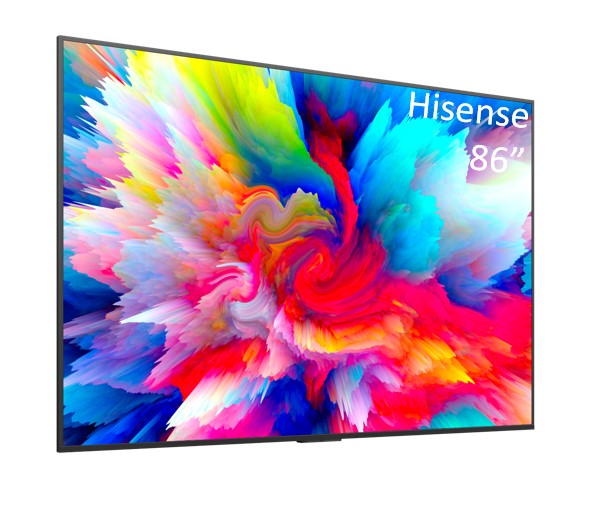
Hisense Digital Signage 86", 500 nits, 4k resolution, UHD, with 7day x 18hrs operation, Android 11 OPS - 86GM50D
R40,476.98
86GM50D Out of Stock
Hisense
Hisense All-In-One LED, 108", 2K resolution, Android 9.0 OPS - OP108DE
R498,823.07
OP108DE Out of Stock
Hisense
Reviews
There are no reviews yet.