All Categories
- ATEN
- EPSON
- HISENSE
-
AV Signal Distribution
In AV Signal Distribution
- JK
-
Screens
In Screens
-
Projector
-
Cables
In Cables
- DTECH
- Business
- VISION
-
Projector Bracket
In Projector Bracket
-
Digital Signage Solutions
In Digital Signage Solutions
Brands
-
Audio
In Audio














All Categories
- ATEN
- EPSON
- HISENSE
-
AV Signal Distribution
In AV Signal Distribution
- JK
-
Screens
In Screens
-
Projector
-
Cables
In Cables
- DTECH
- Business
- VISION
-
Projector Bracket
In Projector Bracket
-
Digital Signage Solutions
In Digital Signage Solutions
Brands
-
Audio
In Audio

BROWSE CATEGORIES
Help
ATEN
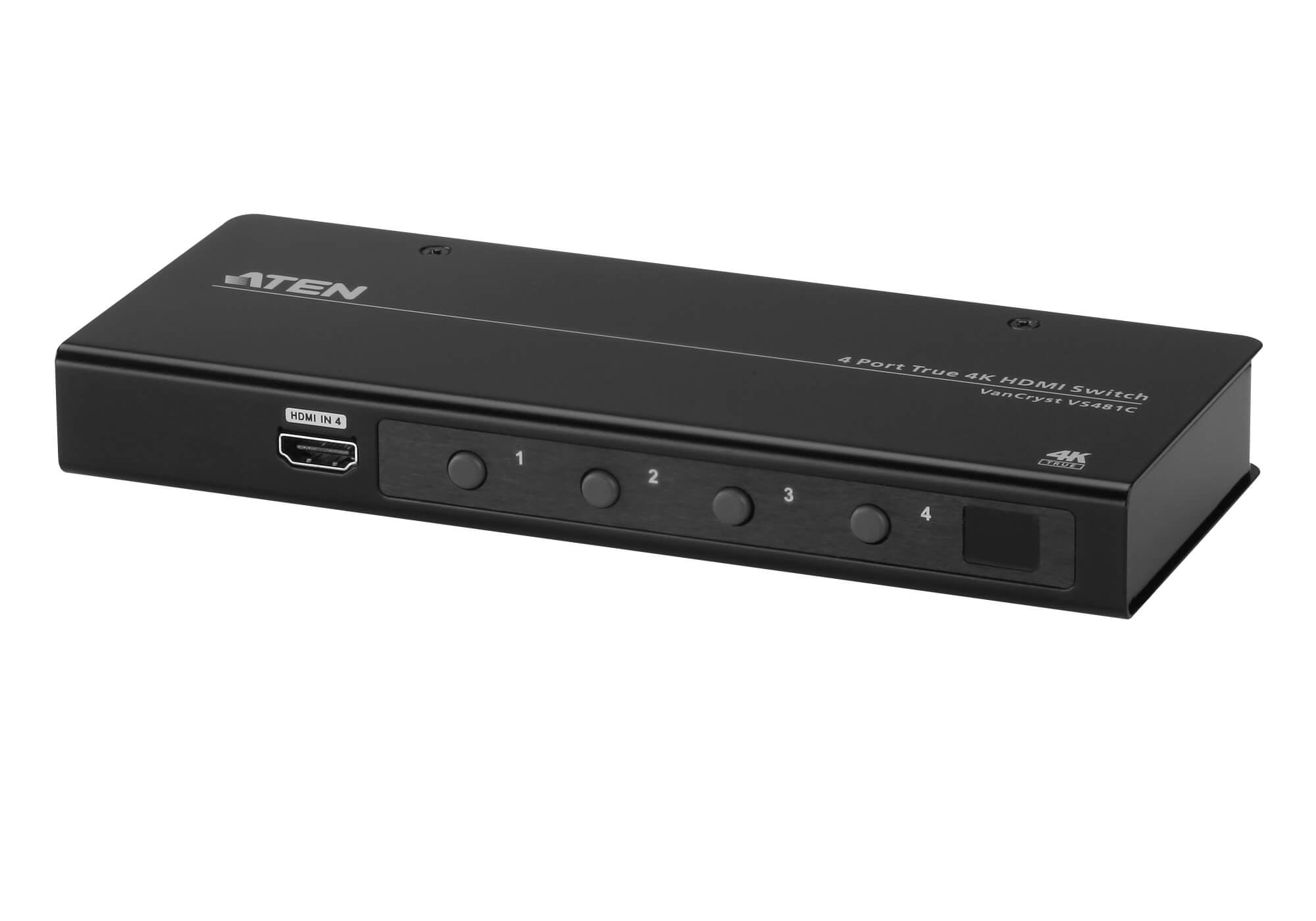
Aten Switch, True 4K, HDMI, 4 Port – VS481C
R3,124.97
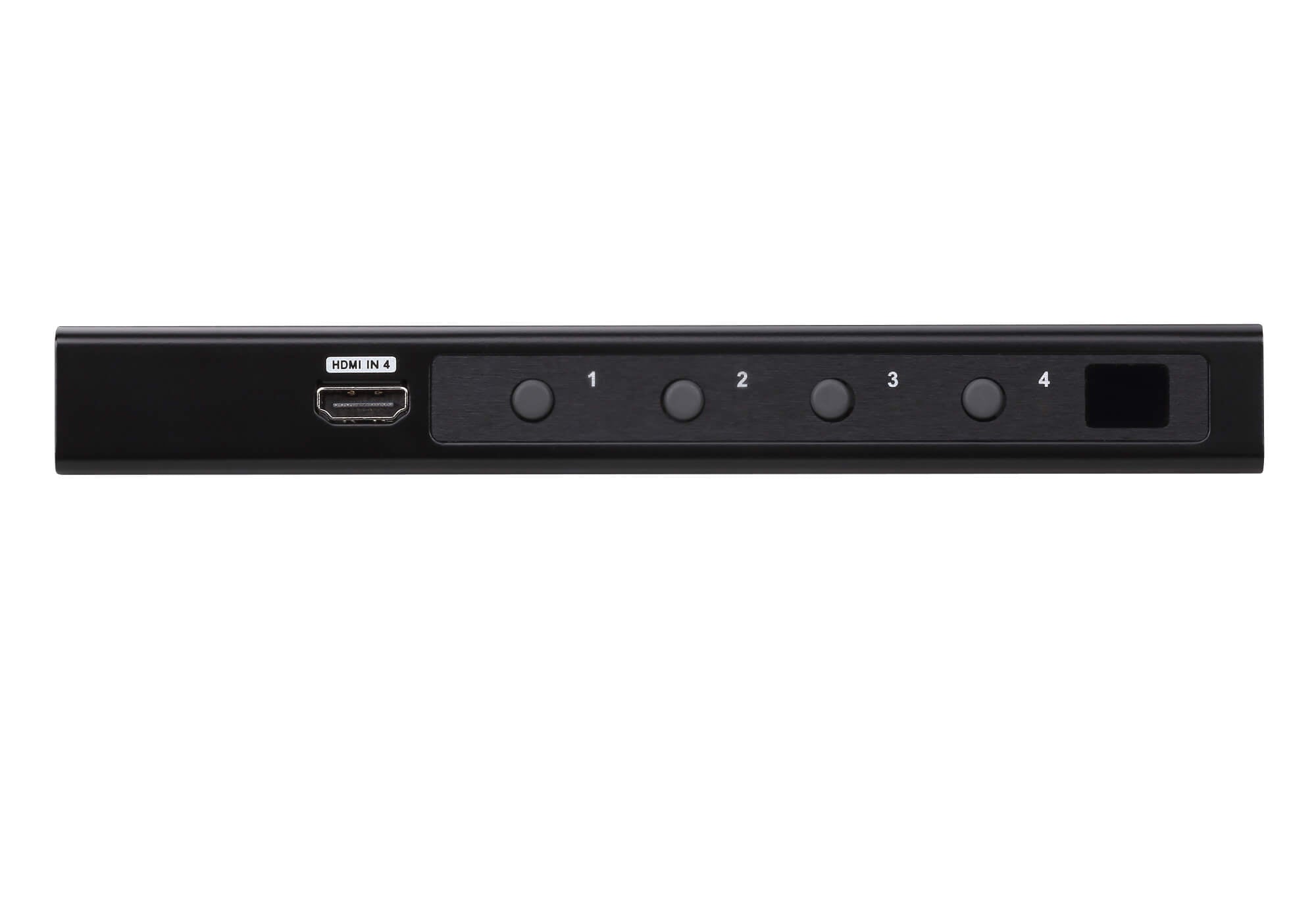
A four-input True 4K HDMI switch for one display, for boardrooms and home cinemas switching 4K60 and HDR sources by remote, buttons or RS-232.
- Full-colour (4:4:4) 4K60 over 18 Gbps, HDCP 2.2
- HDR10+ and 12-bit Deep Colour
- Rear auto switch, plus priority and power-on detection modes
- 5 m rated input and output runs
- HDMI cable, IR remote and power adapter included
- Brand :Aten
- SKU :ATEN-VS481C
- Category :ATEN
- Availability :Out of Stock
Out of stock
The Aten VS481C puts one of four HDMI sources on a single display and keeps 4K60 signals in full 4:4:4 colour, whether 4096 or 3840 pixels wide. Aten lists 18 Gbps of bandwidth, HDCP 2.2 and HDR10+, so UHD Blu-ray players, streaming boxes and PCs reach the screen at their 4K60 output.
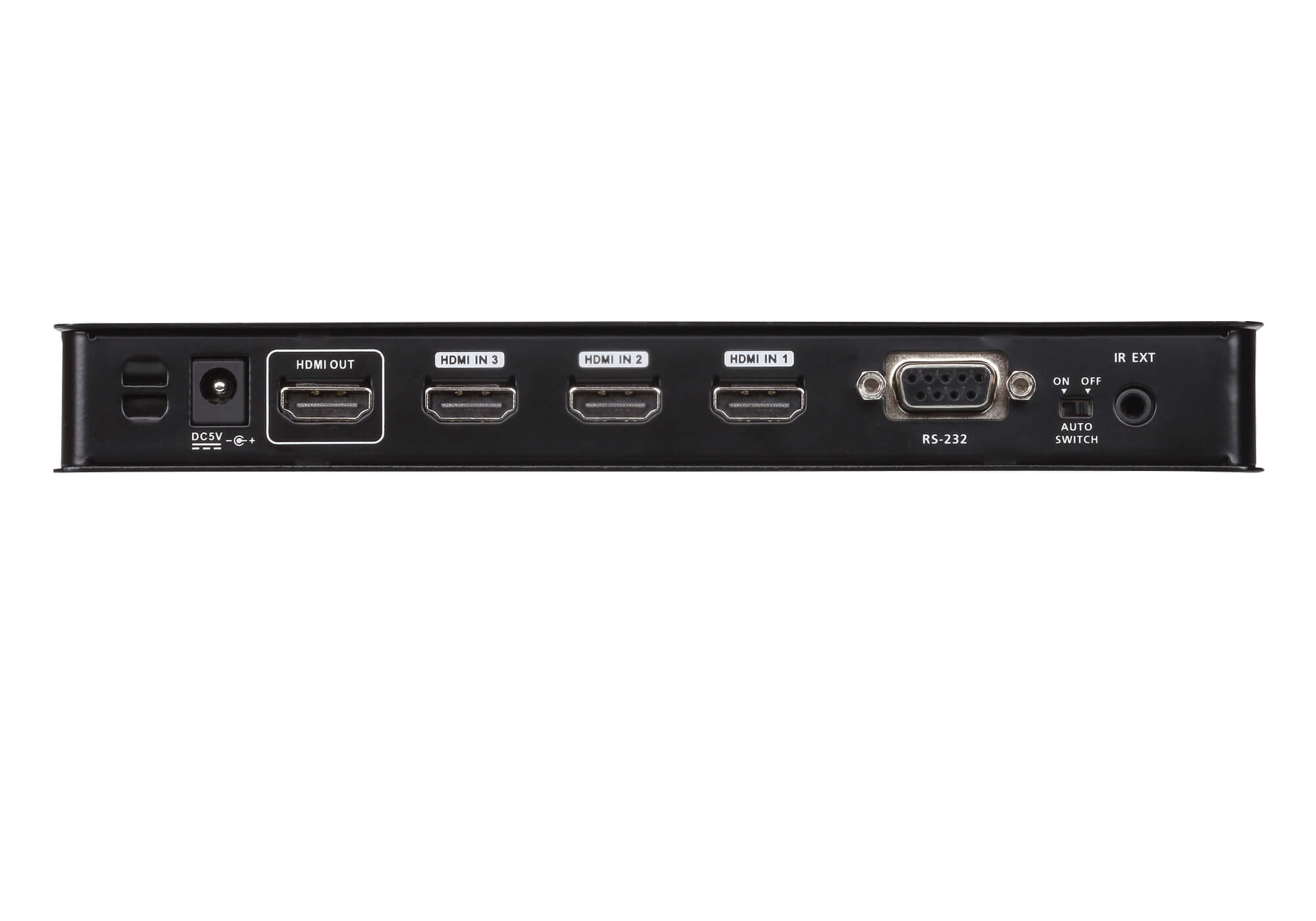
Inputs change by front buttons, IR remote or RS-232, and a rear slide switch turns auto switching on or off. One HDMI input is on the front for a guest device, and each HDMI lead is rated for 5 m.
Bandwidth, colour depth and HDR
Aten quotes 18 Gbps and a 600 MHz pixel clock, the top HDMI 2.0 rate, which leaves room for 4:4:4 at 4K60, so fine text and spreadsheet gridlines from a PC stay sharp. Deep Colour goes up to 12-bit. HDCP 2.2, the copy protection that UHD discs and 4K streaming apps use, is in the specification, and HDR10+ is on the product page. CEC is listed too, and lossless audio formats travel inside the HDMI signal to the screen or AV receiver.
Auto switching: the rear slide switch and four modes
With the rear slide switch on, the VS481C stays in Next mode and ignores RS-232 mode commands. With it off, automatic switching stops, and a controller can choose any of these:
- Off: inputs change only from a button, the remote or a command.
- Next: the factory default; the switch follows whichever port has just had a source plugged in.
- Priority: a nominated port takes the screen as soon as a source is detected on it, and holds it.
- POD (power-on detection): when the device on screen is turned off, the switch moves to the next port with a powered-on source. It works alongside the other modes.
After a restart the VS481C opens on the first port where it finds a powered-on source.
RS-232 and the IR remote
The DB-9 serial port runs at 19200 bps with 8 data bits, 1 stop bit and no parity or flow control. Its commands select a port, turn the HDMI output on or off, set the switching mode and read status back to a controller. On the front, four buttons with green LEDs pick inputs, and a built-in IR receiver takes the remote from up to 6 m. For a switch inside a cabinet, the rear IR jack takes Aten’s optional 2XRT-0003G IR receiver.
Cable runs and reaching a distant display
Aten’s specification allows 5 m on every input and on the output with a 4K60 4:4:4 signal, and its product page names the Aten 2L-7D05H-1 5 m True 4K HDMI cable for that length. One 1.8 m HDMI cable is in the box, with the IR remote, a power adapter and instructions. For a display further away, the manual lists the Aten VE811 HDBaseT extender as compatible. Aten rates the VE811 for 4K at up to 70 m on Cat 5e or Cat 6, but at 10.2 Gbps, so a display reached through it gets 4K60 in 4:2:0 or 4K30 in 4:4:4, not the full format this switch passes.
VS481C or VS481B
The Aten VS481B shares the footprint, front input and control options, but its 10.2 Gbps limit holds 4:4:4 colour to 4K at 30 Hz, Aten lists no HDR for it and its specification gives no HDCP version. Auto switching on the VS481B is set only over RS-232. What it offers in return is reach: a 15 m rating for the display cable at 4K30. If any source outputs 4K60 or HDR, buy the VS481C.
Key specifications of the VS481C
| Ports | 4 HDMI inputs (front 1, rear 3), 1 HDMI output |
|---|---|
| Resolution | 4K (4096 or 3840 x 2160) to 60 Hz, 4:4:4 |
| Bandwidth | 600 MHz pixel clock, 18 Gbps |
| HDCP and HDR | HDCP 2.2; HDR10+ (Aten product page) |
| Other HDMI features | 3D, Deep Colour to 12-bit, CEC |
| Cable length rating | 5 m per input and output (4:4:4, 60 Hz) |
| Control | Front buttons, remote (6 m range), DB-9 RS-232, rear auto switch |
| Power | 5 V DC adapter (supplied), locking DC socket, 0.924 W |
| Dimensions and weight | 20.00 x 8.21 x 2.50 cm, 0.47 kg, metal |
Questions about the Aten VS481C
How do I stop the VS481C changing inputs on its own?
Set the rear slide switch to off. Inputs then change only from the buttons, the remote or an RS-232 command. A controller can send swmode off to the same effect, but only while the slide switch is off, since the switch in the on position overrides it.
Can one input always take over the screen?
Yes, with Priority mode, set over RS-232 while the slide switch is off. Sending swmode i01 priority, for example, gives port 1 the screen whenever a source is detected on it, which suits a lectern input that must override the room PC.
Can the firmware be updated?
Yes, through the RS-232 port with Aten’s Windows firmware upgrade utility. Hold the port 1 button while reconnecting power to enter upgrade mode; the port LEDs flash to confirm it.
Will a 4K PC run at 60 Hz through it?
Yes, in 4:4:4 at either 4K resolution, provided each HDMI lead stays within Aten’s 5 m rating and is rated for 18 Gbps. Leads certified only for 10.2 Gbps can force the PC down to 4K30 or 4:2:0.
Switches
| DIP | Auto Switch ON/OFF |
|---|
Video Input
| Interfaces | 4 x HDMI Type A Female (Black) |
|---|---|
| Impedance | 100 Ω |
| Max. Distance | 5M at 4096 x 2160 / 3840 x 2160 @ 60Hz (4:4:4) |
Video Output
| Interfaces | 1 x HDMI Type A Female (Black) |
|---|---|
| Impedance | 100 Ω |
| Max. Distance | 5M at 4096 x 2160 / 3840 x 2160 @ 60Hz (4:4:4) |
Video
| Max. Data Rate | 18 Gbps (6 Gbps Per Lane) |
|---|---|
| Max. Pixel Clock | 600 MHz |
| Compliance | HDMI 2.0 (3D, Deep Colour, 4K) HDCP 2.2 Consumer Electronics Control (CEC) |
| Max. Resolution | 4096 x 2160 / 3840 x 2160 @ 60Hz (4:4:4) |
Control
| RS-232 | Connector:1 x DB-9 Female (Black) Baud Rate:19200 / Data Bits:8 / Stop Bits:1 / Parity:NO / Flow Control:NO |
|---|---|
| IR | 1 x Mini Stereo Jack Female (Black) 1 x IR Receiver |
Connectors
| Power | 1 x DC Jack (with locking) |
|---|---|
| Power Consumption | DC5V:0.924W:20BTU |
Environmental
| Operating Temperature | 0-40 °C |
|---|---|
| Storage Temperature | 20 - 60 °C |
| Humidity | 0 - 80% RH, Non-Condensing |
Physical Properties
| Housing | Metal |
|---|---|
| Weight | 0.47 kg ( 1.04 lb ) |
| Dimensions (L x W x H) | 20.00 x 8.21 x 2.50 cm (7.87 x 3.23 x 0.98 in.) |
| Carton Lot | 10 pcs |
| Note | For some of rack mount products, please note that the standard physical dimensions of WxDxH are expressed using a LxWxH format. |
You must be logged in to post a review.
VS481C Datasheet PDF
You may also like these
 In Stock
Aten
Reviews
There are no reviews yet.