All Categories
- ATEN
- EPSON
- HISENSE
-
AV Signal Distribution
In AV Signal Distribution
- JK
-
Screens
In Screens
-
Projector
-
Cables
In Cables
- DTECH
- Business
- VISION
-
Projector Bracket
In Projector Bracket
-
Digital Signage Solutions
In Digital Signage Solutions
Brands
-
Audio
In Audio














All Categories
- ATEN
- EPSON
- HISENSE
-
AV Signal Distribution
In AV Signal Distribution
- JK
-
Screens
In Screens
-
Projector
-
Cables
In Cables
- DTECH
- Business
- VISION
-
Projector Bracket
In Projector Bracket
-
Digital Signage Solutions
In Digital Signage Solutions
Brands
-
Audio
In Audio

BROWSE CATEGORIES
Help
ATEN
Aten Sharing Switch, USB to USB-C, 2 Port – US3324
R1,414.95
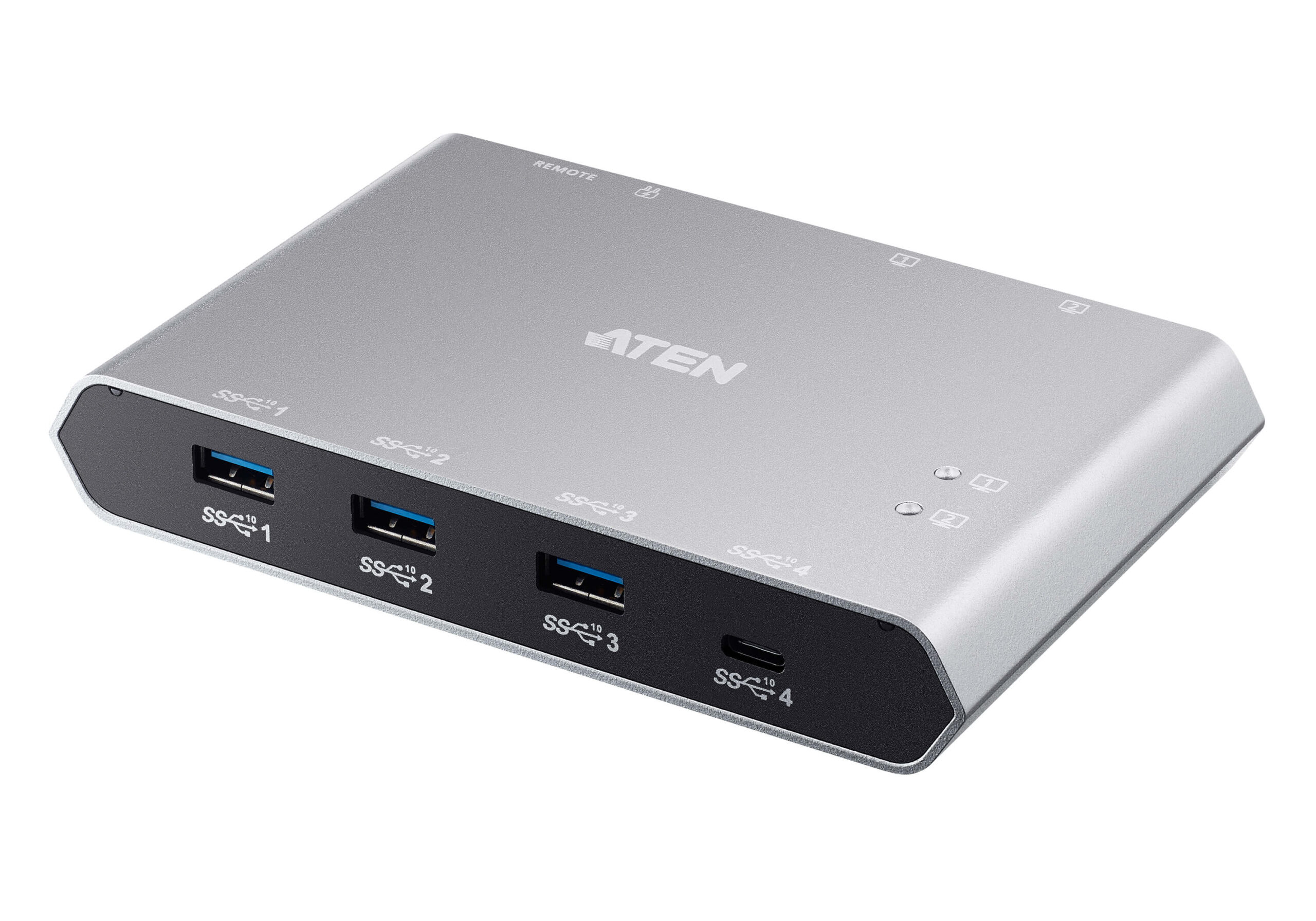
A USB 3.2 Gen 1 sharing switch that lets two computers, one of them a USB-C laptop, take turns with four USB devices.
- 2 computers share 4 USB devices at up to 5 Gbps
- One USB-B to USB-C and two USB-B to USB-A cables included
- Remote push-button selector on a 1.8 m lead
- Bus-powered, optional Micro-B power input
- Brand :Aten
- SKU :ATEN-US3324
- Category :ATEN
- Availability :Out of Stock
Out of stock
The Aten US3324 lets two computers take turns with the same four USB devices, such as a printer, a keyboard and mouse, an HD camera or a flash drive. A press of the remote selector button hands all four to the other computer. It runs at USB 3.2 Gen 1 (5 Gbps), draws its power from the computers’ USB ports, and ships with a USB-B to USB-C cable so one of the two machines can be a USB-C laptop.
One press moves all four devices
The four USB Type-A ports on the front take the peripherals, and the two USB Type-B ports on the back connect to the computers. Pressing the remote port selector moves the USB focus, Aten’s term for the active connection, to the other computer, and one of two white LEDs on top shows which computer has it. Aten describes a single focus for the whole switch, so the printer cannot stay with one machine while the keyboard works on the other.
The selector is a button on a 1.8 m lead that plugs into a jack on the back (2.5 mm in Aten’s installation drawing), so the switch itself can sit behind a monitor or under the desk. Aten names no keyboard hotkey or software switching; the button is the only method it lists.
Cables in the box: two USB-A, one USB-C
Aten packs two 1.2 m Type-B to Type-A cables and one 1.8 m Type-B to Type-C cable, all USB 3.2 Gen 1. Run the USB-C lead to a laptop and a USB-A lead to a desktop, and one USB-A cable is left over. The switch end of every cable is USB-B, so two USB-C laptops need a second Type-B to Type-C cable, bought separately. The Aten US234 is the same 2 x 4 switch without the USB-C cable; Aten’s quick start guide covers both.
Speed, and what the switch does not carry
Transfers run at up to 5 Gbps, and USB 2.0 and USB 1.1 devices still work. Aten names USB docking stations and HD cameras among the devices that use the extra bandwidth. The switch carries USB only: there are no video connectors, so each computer keeps its own monitor cable, and switching screens as well calls for a KVM switch. Aten lists no USB Power Delivery either, so a laptop still needs its own charger.
Key specifications of the US3324
| Computer ports | 2 x USB Type-B (USB-A or USB-C computers via the supplied cables) |
|---|---|
| Device ports | 4 x USB Type-A |
| USB standard | USB 3.2 Gen 1, up to 5 Gbps; USB 2.0 and 1.1 compatible |
| Port selection | Remote port selector, 1.8 m cable |
| Power | Bus-powered; optional Micro-B USB input |
| Cables included | 2 x Type-B to Type-A (1.2 m), 1 x Type-B to Type-C (1.8 m) |
| Operating systems | Windows, Linux, Mac; no drivers |
| Indicators | 2 white LEDs for the selected computer |
| Operating temperature | 0 to 40 °C |
| Housing, size and weight | Plastic, 9.37 x 9.30 x 2.68 cm, 0.12 kg |
Questions about the Aten US3324
Does the US3324 need a power adapter?
Not normally, and none is in the box: it runs on power from the computers’ USB ports. A Micro-B USB socket on the front takes an optional power source, which Aten recommends for setups with higher power consumption, such as several bus-powered hard drives on the four ports. Over-current protection is built in.
How far can the computers and devices be from the switch?
The supplied leads give 1.2 m to a USB-A computer and 1.8 m to a USB-C one, and the remote button sits on a 1.8 m lead. For a computer or device further away, Aten lists its USB 3.2 Gen 1 extender cables as compatible, among them the Aten UE3310 10 m USB extender cable and the Aten UE3315A 15 m USB extender cable.
Is there a version for four computers?
Yes. Aten’s quick start guide also covers the 4 x 4 Aten US434, which connects up to four computers to the same four devices with four Type-B to Type-A cables (two 1.2 m, two 1.8 m), and the US3344, which adds two Type-B to Type-C cables.
Can I connect a Mac laptop that only has USB-C ports?
Yes, with the supplied 1.8 m Type-B to Type-C cable. Aten lists Windows, Linux and Mac support, and the switch needs no drivers on any of them.
| Computer Connections | 2 |
|---|---|
| Port Selection | Remote port selector |
Connectors
| Computer | 2 x USB Type B Female (Blue) |
|---|---|
| Device | 4 x USB Type A Female (Blue) |
| Power (Optional) | 1 x USB micro B Female (Black) |
Cable Length
| USB Cable | USB 3.2 Gen 1 B to A Cable 1.2m x 2 USB 3.2 Gen 1 B to C Cable 1.8m x 1 |
|---|---|
| Remote Port Selector | 1.8 m |
LEDs
| Selected | 2 (White) |
|---|
Environmental
| Operating Temperature | 0–40°C |
|---|---|
| Storage Temperature | 20–60°C |
| Humidity | 0–80% RH, Non-condensing |
Physical Properties
| Housing | Plastic |
|---|---|
| Weight | 0.12 kg ( 0.26 lb ) |
| Dimensions (L x W x H) | 9.37 x 9.30 x 2.68 cm (3.69 x 3.66 x 1.06 in.) |
| Note | For some of rack mount products, please note that the standard physical dimensions of WxDxH are expressed using a LxWxH format. |
You must be logged in to post a review.
US3324 Datasheet PDF
You may also like these
Aten
 Low stock (2 left)
Reviews
There are no reviews yet.