All Categories
- ATEN
- EPSON
- HISENSE
-
AV Signal Distribution
In AV Signal Distribution
- JK
-
Screens
In Screens
-
Projector
-
Cables
In Cables
- DTECH
- Business
- VISION
-
Projector Bracket
In Projector Bracket
-
Digital Signage Solutions
In Digital Signage Solutions
Brands
-
Audio
In Audio














All Categories
- ATEN
- EPSON
- HISENSE
-
AV Signal Distribution
In AV Signal Distribution
- JK
-
Screens
In Screens
-
Projector
-
Cables
In Cables
- DTECH
- Business
- VISION
-
Projector Bracket
In Projector Bracket
-
Digital Signage Solutions
In Digital Signage Solutions
Brands
-
Audio
In Audio

BROWSE CATEGORIES
Help
ATEN
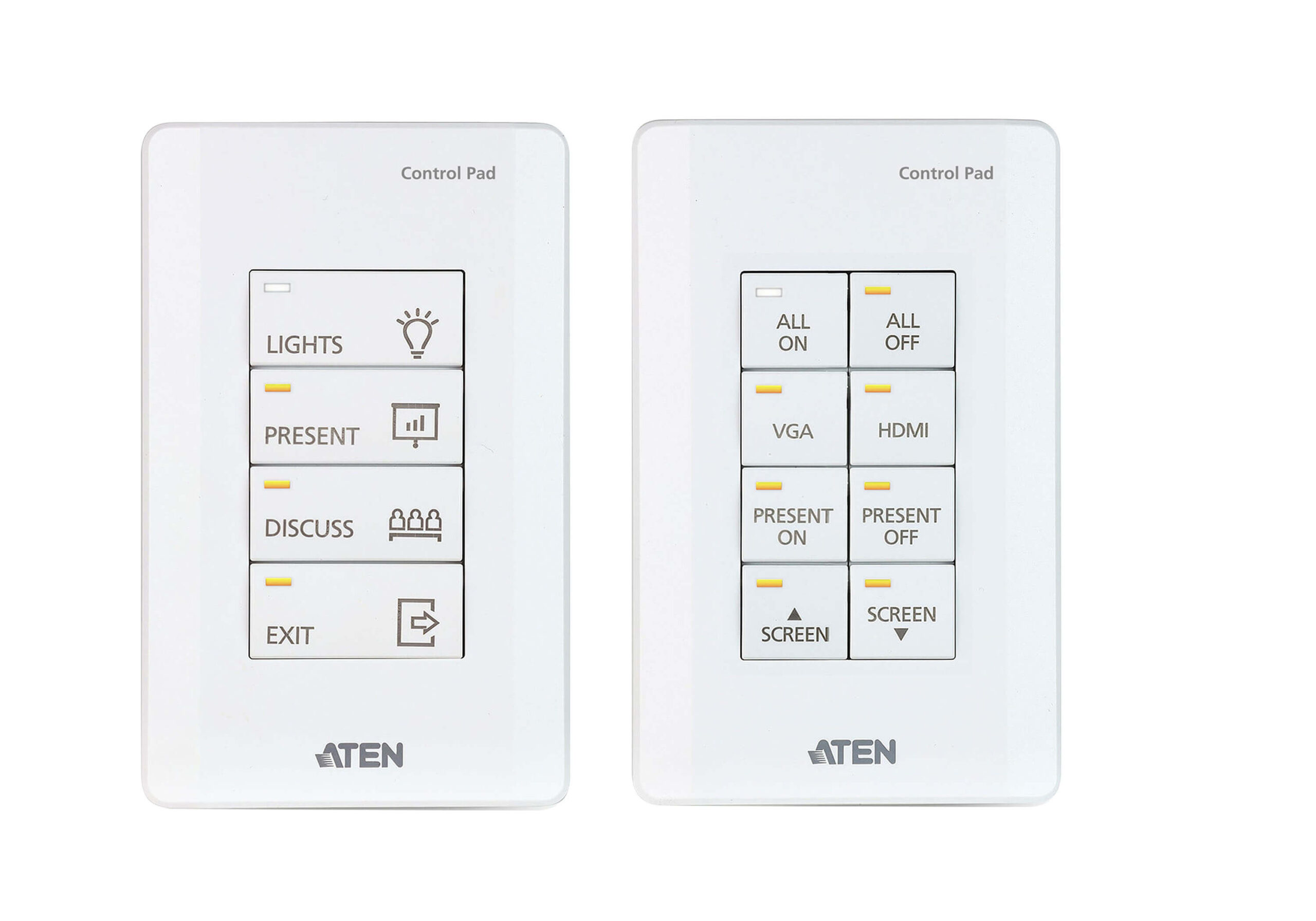
Aten Control Keypad, 8 Button – VK0100
R14,685.52
An 8-button Aten Control Pad on a US single-gang plate, with the room controller inside, for a huddle room or small classroom.
- Two RS-232 ports, two relays and one sensor input
- Network control of up to eight IP devices; no IR
- Up to 8 buttons, in any of 14 layouts
- Runs on PoE; a 5 V DC adapter is optional and not included
- Brand :Aten
- SKU :ATEN-VK0100
- Category :ATEN
- Availability :Out of Stock
Out of stock
The Aten VK0100 is an 8-button Control Pad (US, 1 Gang). Behind the buttons sits an Aten room controller, so one plate can run a small classroom or meeting room: two RS-232 devices, two relay-switched loads, one sensor and up to eight devices on the network. It has no IR port, and Aten lists no South African wall box for its US-style plate.
Aten’s example room for the VK0100
Aten’s wiring diagram for the pad connects:
- a projector and a video matrix switch to the two RS-232 ports, which are two-way, so each device reports its status back
- a projector screen, projector lift or lighting controller to the relays (normally open, 1 A at up to 24 V DC)
- an occupancy or door sensor to the digital input, which takes a dry contact or compares a voltage with a threshold set between 1 and 5 V
- a smart TV and a video conferencing system on the network, through the PoE switch that also powers the pad
Two relays go quickly: a screen with separate up and down inputs uses both. Aten’s VK248 expansion box adds eight relays over the network, and a device that only takes an IR remote needs the VK236 IR/serial box.
Measuring for the US single-gang plate
Aten recommends a 1-gang wall box at least 5 cm deep for the VK0100’s connectors and cables, but names no South African box. Take these figures from Aten’s drawings to the site:
- faceplate 11.92 cm tall and 7.42 cm wide
- two fixing slots 8.33 cm apart, one above and one below the buttons
- for a boxless install, an opening 5.4 cm wide and 7.2 cm tall, with a 1.8 cm wide strip on one side running down to 8.4 cm
Screws are not supplied. On a desk, Aten’s VK101 tabletop kit holds the pad at a 37 degree tilt and can also go on a wall, but a pad on the VK101 takes power from PoE only.
What else the VK0100 needs
- Power: a PoE switch port (1.375 W typical) or a 5 V DC adapter, bought separately. The adapter’s plug is cut off and its leads go into a 2-pin terminal block; with PoE connected too, the two act as redundant supplies.
- A project: buttons do nothing until a project built in Aten’s VK6000 Configurator is uploaded, and the pad holds one project file.
- Licences for phones: none are included and the pad accepts 10, one for each phone or tablet connected through the ATEN Control System app. An Aten touch panel such as the VK330 10.1″ panel needs no licence on Control Pad firmware 2.8 or later.
- Extra keypads, if wanted: up to eight, such as the Aten VK108US in the same single-gang size, each switched to the pad’s controller ID.
VK0100, VK0200 or VK108US
| Model | Buttons | Controller inside | Box format |
|---|---|---|---|
| VK0100 | 4 to 8, 14 layouts | Yes | US 1-gang |
| VK0200 | 6 to 12, 125 layouts | Yes, same ports | EU-type or MK-type 2-gang |
| VK108US | 4 to 8, 14 layouts | No, network port only | US 1-gang |
The VK108US only adds buttons to a room that already has a controller. Choose the VK0100 when the single-gang plate itself has to run the room.
Key specifications of the Aten VK0100
| Buttons | 4 to 8 in 14 layouts, two cap sizes |
|---|---|
| Serial | Two bidirectional RS-232 (3-pole), 300 to 115200 baud, default 9600 |
| Relays | Two, normally open and isolated, 1 A at up to 24 V DC |
| Digital input | One, dry contact or VDC mode (programmable 1 to 5 V) |
| Network | RJ-45, 10/100Base-T, controls up to 8 IP devices |
| IR output | None |
| Mobile licences | 0 free, up to 10 paid |
| Power | PoE 1.375 W or 5 V DC 1.1 W (adapter not included) |
| Body and faceplate | 11.63 x 7.06 x 4.80 cm, 0.16 kg; faceplate 11.92 x 7.42 cm |
| In the box | Pad, button pack, 6 terminal blocks (4 x 2-pin, 2 x 3-pin), faceplate, instructions |
Questions about the Aten VK0100
Is the VK0100 a keypad or a controller?
Both. Aten’s manuals count every Control Pad as a controller, alongside its Gen. 2 control boxes, so the VK0100 runs a room alone and accepts keypads, touch panels and phones of its own. The VK108US looks much the same from the front but must report to a controller.
Can the VK0100 switch the room on and off at set times?
Yes, if the schedule is part of the VK6000 project. The pad’s web page then lists each scheduled event, such as a weekday start and finish, and lets you switch single events or whole days off there.
Will the VK0100 fit a South African wall box?
Aten does not say so: its drawings are for a US-style 1-gang box. Hold the 8.33 cm slot spacing and the 5 cm depth against your box, and if they do not line up, set the pad into a plain cut-out or use the VK101 tabletop kit.
What do the button lights mean?
Orange means the button’s function is off and white means it is on. One button blinking orange and white is carrying out its command; all of them blinking that way means a firmware upgrade is running.
Interfaces
| Keypad Layout | 4~8 buttons customizable in 14 keypad layouts |
|---|---|
| Serial | 2 x Bi-directional RS-232 Port (2 x 3-Pole Terminal Block Connector); – Baud Rate: 300 to 115200 (default: 9600); – Data Bit: 8 (default) or 7; – Stop Bit: 1 (default) or 2; – Parity: None (default), even or odd |
| Relay | 2 x Relay Channel (2 x 2-Pole Terminal Block Connector); • Normally open, isolated Relays; • Contact Rating: Max 24 VDC, 1A |
| I/O | 1 x Digital Input Channel (1 x 2-Pole Terminal Block Connector); – VDC Mode Input Voltage Range: 0 to 5 VDC; Programmable Range: 1 to 5 VDC; – Dry Contact Mode Pull-up 2k ohms to + 5 VDC |
| Ethernet | 1 x RJ-45 Female, 10/100Base-T • Supported Protocol: ARP, ICMP, TCP/IP, DHCP, HTTPS, SSH • DHCP-enabled. The following default IP settings will be used if no IP is assigned within 30 seconds: IP: 192.168.0.60 Subnet Mask: 255.255.255.0 |
Switches
| Controller ID | 1 x 16-segment Switch |
|---|---|
| Reset Button | 1 x Semi-recessed Pushbutton |
| Power Consumption | DC5V:1.1W:5BTU POE:1.375W:6BTU |
Environmental
| Operating Temperature | 0 – 50°C |
|---|---|
| Storage Temperature | –20 – 60°C |
| Humidity | 0 - 80% RH, Non-Condensing |
Physical Properties
| Housing | Plastic |
|---|---|
| Weight | 0.16 kg ( 0.35 lb ) |
| Dimensions (L x W x H) | 11.63 x 7.06 x 4.80 cm (4.58 x 2.78 x 1.89 in.) |
License
| Max. No. Allowed | 10 licenses |
|---|---|
| Note | Each time a mobile device connects to an ATEN Control Pad for remote control, one license on the Control Pad will be occupied. To purchase and add additional licenses to your ATEN Control Pad, contact your local sales representative for more information. |
| Note | For some of rack mount products, please note that the standard physical dimensions of WxDxH are expressed using a LxWxH format. |
You must be logged in to post a review.
VK0100 Datasheet PDF

 Low stock (2 left)
Reviews
There are no reviews yet.