All Categories
- ATEN
- EPSON
- HISENSE
-
AV Signal Distribution
In AV Signal Distribution
- JK
-
Screens
In Screens
-
Projector
-
Cables
In Cables
- DTECH
- Business
- VISION
-
Projector Bracket
In Projector Bracket
-
Digital Signage Solutions
In Digital Signage Solutions
Brands
-
Audio
In Audio














All Categories
- ATEN
- EPSON
- HISENSE
-
AV Signal Distribution
In AV Signal Distribution
- JK
-
Screens
In Screens
-
Projector
-
Cables
In Cables
- DTECH
- Business
- VISION
-
Projector Bracket
In Projector Bracket
-
Digital Signage Solutions
In Digital Signage Solutions
Brands
-
Audio
In Audio

BROWSE CATEGORIES
Help
ATEN
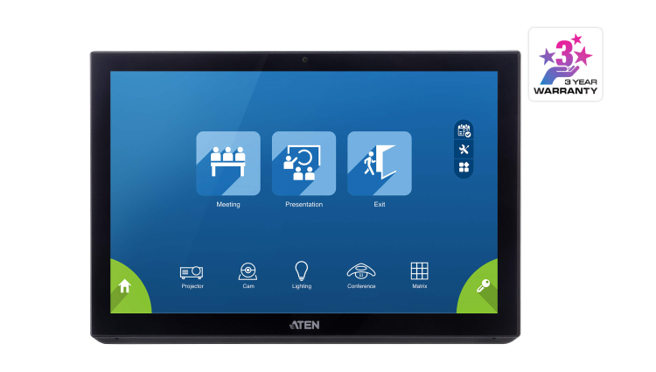
Aten Control Touch Panel, 10.1″ Gen. 2 – VK330A
R34,477.20
Second-generation 10.1" Aten control panel with 4 GB of memory, a light and proximity sensor and PoE+, for meeting rooms run by an Aten controller.
- 1280 x 800 capacitive screen, 450 cd/m², 1000:1
- 4 GB SDRAM and 32 GB flash
- USB Type-A, USB-C and IEEE 802.1x
- Needs an Aten controller such as the VK1100A or VK2100A
- VK302 wall and VK304 desk kits sold separately
- Brand :Aten
- SKU :ATEN-VK330A
- Category :ATEN
- Availability :Out of Stock
Out of stock
The Aten VK330A (10.1″ Touch Panel Gen. 2) is the panel a presenter taps to start a meeting, switch sources or dim the lights. It runs the ATEN Control System app, but the switching happens in an Aten controller, which stores the pages the panel shows.
Against the first VK330 it has twice the memory (4 GB SDRAM, 32 GB flash), a light and proximity sensor, USB-C, IEEE 802.1x support and on-screen service requests to Unizon. It is also slightly smaller, at 24.3 x 16.7 x 2.4 cm and 0.57 kg.
What the VK330A works with
Aten lists five controllers for it: the Aten VK1100A and Aten VK2100A control boxes, the VK1200 and VK2200, and the VK0200 Control Pad. The panel joins its controller over the LAN, on the same subnet, and downloads the control pages (Viewers) stored there. Those pages, and the command behind every button, are set up in the controller’s VK6000 project, which a programmer builds in Aten’s Windows software: integration work to arrange before the panel is fitted.
PoE+, USB-C and network security
Aten’s current VK330A datasheet and its touch panel manual both specify IEEE 802.3at (PoE+), so plan one PoE+ switch port or injector per panel. Without PoE, it runs from Aten’s 12 V adapter (part 0AD8-8012-33MG) with a power cord, both bought separately. The panel powers on as soon as it is connected to PoE.
The Gigabit RJ-45 port supports IEEE 802.1x authentication, so the panel can join a network that admits only approved devices. It also has a USB Type-A port and a USB-C port, and a 90° RJ-45 adapter comes in the box.
Screen, light sensor and humidity limits
The 1280 x 800 capacitive screen is rated at 450 cd/m² with a 1000:1 contrast ratio and ±85° viewing angles. Its light and proximity sensor raises or lowers screen brightness as the light around the panel changes, which Aten says keeps it readable and saves power.
Aten rates the VK330A for 0 to 40 °C and 10 to 70% relative humidity, non-condensing, against 10 to 80% for the VK330. For a room without air-conditioning in a humid coastal city, check that ceiling before choosing this model.
Room booking and service requests with Unizon
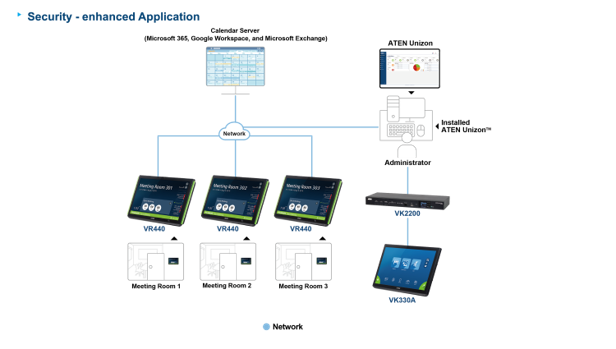
Connected to ATEN Unizon and the ATEN Room Booking System, the VK330A shows whether a room is free or in use and lets people book it, check in or out and extend a meeting from the panel. With a VK401 Access Inspector added, only authorised cardholders can book or check in. The panel also sends on-screen requests for cleaning, catering, repair or replacement, or a fault report on room equipment; administrators are notified at once and track each request in Unizon, Aten’s management software, which runs on a separate computer.
Choosing between the VK330A and the VK330
The original Aten VK330 is rated brighter at 500 cd/m², has a demo mode that runs without a controller, and tolerates more humidity. The VK330A is the one for a Unizon deployment that uses service requests, a network that requires 802.1x, or a room where automatic brightness helps. Both share the 10.1″ 1280 x 800 screen, the controller list, the VK302 and VK304 mounts and the camera-preview limit.
Key specifications of the Aten VK330A
| Display | 10.1″ capacitive TFT-LCD, 1280 x 800, 16:10 |
|---|---|
| Luminance and contrast | 450 cd/m²; 1000:1 |
| Memory | 4 GB SDRAM; 32 GB flash; quad-core CPU |
| Sensors | Ambient light; proximity |
| Ports | Gigabit RJ-45 with PoE; USB Type-A; USB-C |
| Power input | PoE+ (IEEE 802.3at) or 12 V DC adapter, sold separately |
| Network security | IEEE 802.1x |
| Environment | 0 to 40 °C; 10 to 70% RH, non-condensing |
| Dimensions; weight | 24.3 x 16.7 x 2.4 cm; 0.57 kg |
| Package | Touch Panel Gen. 2, 90° RJ-45 cable adapter, user instructions |
Questions about the Aten VK330A
Will the VK330A work with my VK1100A or VK2100A?
Yes. Both are on Aten’s list, and once the panel is on the same subnet it downloads the Viewers stored on either one. What you give up against Aten’s VK1200 and VK2200 is live video: previews from IP cameras and ATEN VE89 transmitters appear on the panel only with those two controllers.
What does the proximity sensor do?
Aten documents one job for the combined light and proximity sensor: matching screen brightness to the light in the room. Neither the datasheet nor Aten’s 2026 touch panel manual says that it wakes the screen when someone walks up, so do not plan a room around that.
Can the VK330A run third-party apps?
Yes, Aten’s AppSwitcher switches between third-party apps running on the panel and the ATEN Control System app, but Aten’s datasheet does not list which apps can be installed. If you plan to run a conferencing or room app on it, confirm that app runs on the VK330A before buying for that purpose.
Does the VK330A come with a wall bracket or stand?
No. The box contains the panel, a 90° RJ-45 cable adapter and the user instructions. Wall mounting uses the Aten VK302 wall mount kit and desk mounting the Aten VK304 tabletop kit, both sold separately, or a VESA 75 x 75 mm bracket or arm you already own.
| Processor | Quad-core |
|---|
Memory
| SDRAM | 4GB |
|---|---|
| Flash | 32GB |
Panel Spec
| Display Type | TFT-LCD |
|---|---|
| Size | 10.1" |
| Touch Screen | Capacitive |
| Resolution | 1280 x 800 |
| Aspect Ratio | 16 : 10 |
| Colour Depth | 8 bit |
| Contrast Ratio | 1000 : 1 |
| Backlight | LED |
| Viewing Angle | ± 85° (H), ± 85° (V) |
| Luminance | 450 cd/m² |
Interfaces
| Ethernet | 1 x RJ-45 Female, 10 / 100 / 1000 BaseT |
|---|---|
| USB | 1 x USB Type A 1 x USB Type C |
| Others | 1 x Light Sensor 1 x Proximity Sensor |
Power Inputs
| Power over Ethernet (PoE) | 802.3af PoE |
|---|---|
| Power Consumption | DC12V:8.88W:30.3BTU/h POE:10.51W:35.86BTU/h Note: ● The measurement in Watts indicates the typical power consumption of the device with no external loading. ● The measurement in BTU/h indicates the power consumption of the device when it is fully loaded. |
Environmental
| Operating Temperature | 0 – 40°C |
|---|---|
| Storage Temperature | –10 – 55°C |
| Humidity | 10 - 70% RH, Non-Condensing |
Physical Properties
| Housing | Plastic |
|---|---|
| Weight | 0.57 kg ( 1.26 lb ) |
| Dimensions (L x W x H) | 24.30 x 16.70 x 2.40 cm (9.57 x 6.57 x 0.94 in.) |
You must be logged in to post a review.
VK330A Datasheet PDF
You may also like these
Aten
 In Stock
Reviews
There are no reviews yet.