All Categories
- ATEN
- EPSON
- HISENSE
-
AV Signal Distribution
In AV Signal Distribution
- JK
-
Screens
In Screens
-
Projector
-
Cables
In Cables
- DTECH
- Business
- VISION
-
Projector Bracket
In Projector Bracket
-
Digital Signage Solutions
In Digital Signage Solutions
Brands
-
Audio
In Audio














All Categories
- ATEN
- EPSON
- HISENSE
-
AV Signal Distribution
In AV Signal Distribution
- JK
-
Screens
In Screens
-
Projector
-
Cables
In Cables
- DTECH
- Business
- VISION
-
Projector Bracket
In Projector Bracket
-
Digital Signage Solutions
In Digital Signage Solutions
Brands
-
Audio
In Audio

BROWSE CATEGORIES
Help
ATEN
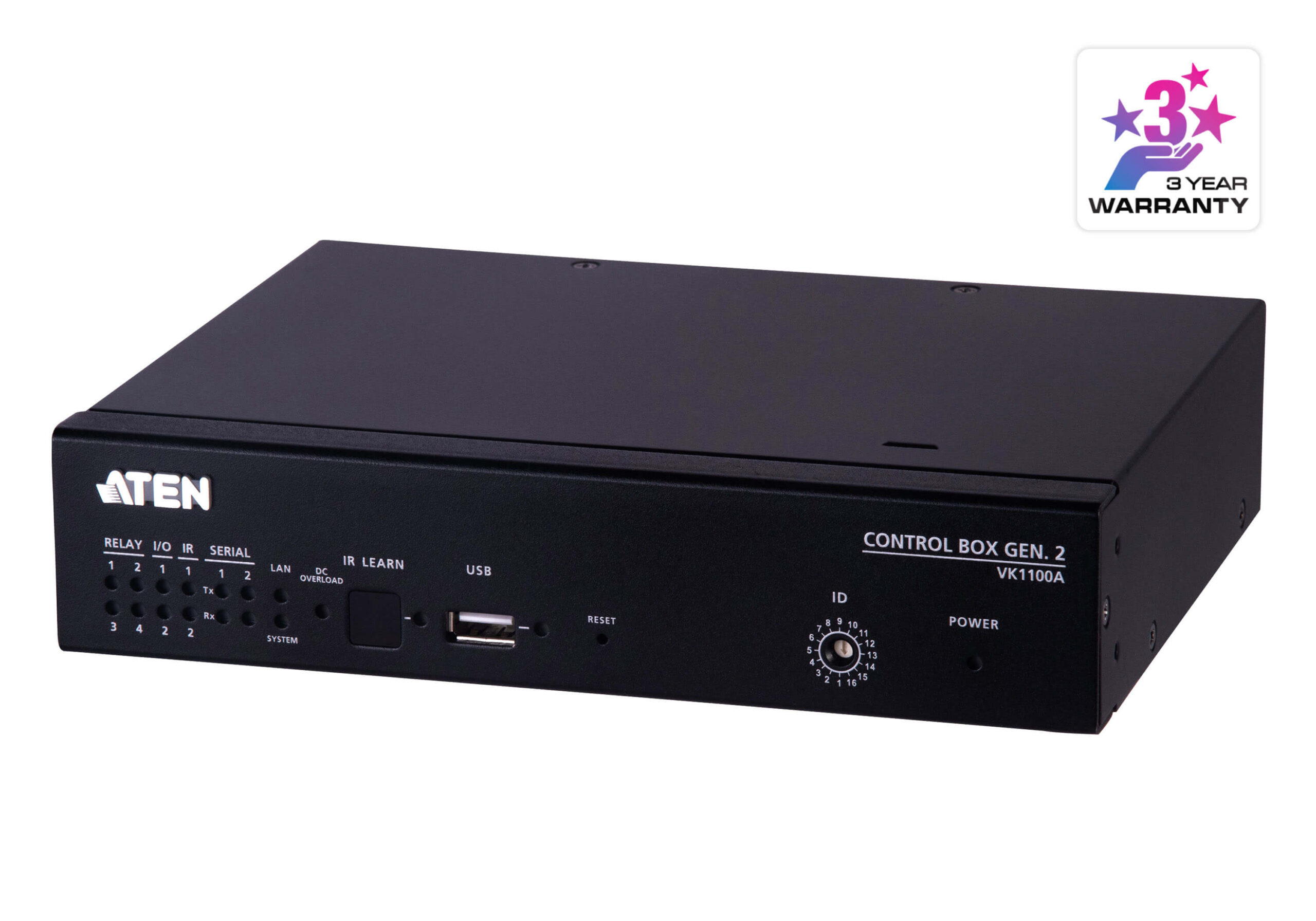
Aten Control System – VK1100A
R23,781.62
Compact second-generation Aten controller for one meeting room or lecture venue, programmed in Aten's VK6000 Configurator and operated from an Aten touch panel, keypad or phone app.
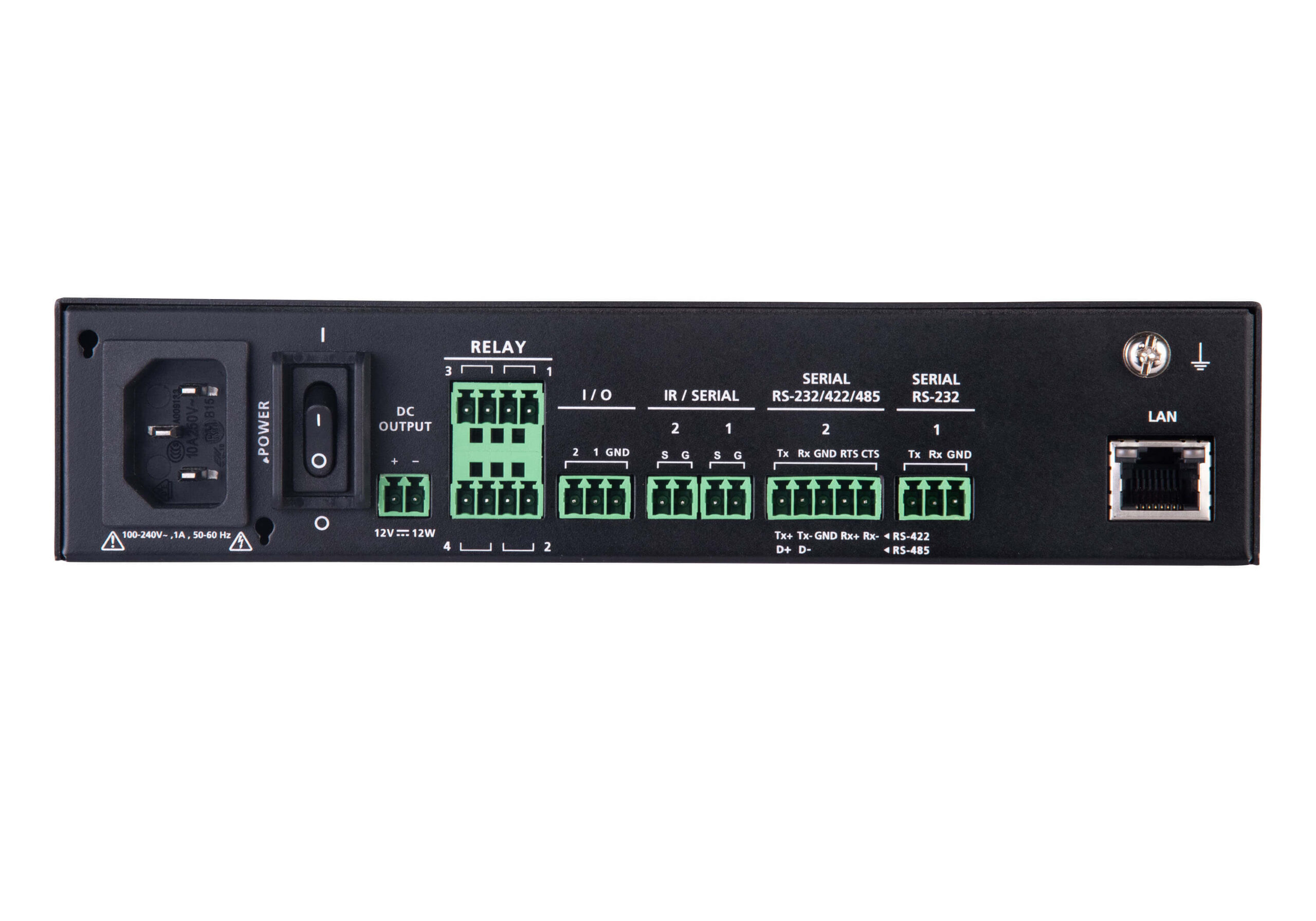
- 1 x RS-232/422/485, 1 x RS-232 and 2 x IR/serial ports
- 4 relays (24 V DC, 2 A) and 2 digital I/O channels
- Gigabit LAN for up to 25 IP devices
- 2 mobile licences included, 16 maximum
- Rack kit sold separately (2X-049G or 2X-021G)
- Brand :Aten
- SKU :ATEN-VK1100A
- Category :ATEN
- Availability :Out of Stock
Out of stock
The Aten VK1100A (Compact Control Box Gen. 2) is the controller at the centre of an Aten room control system: it sends commands to the projector or display, screen, lighting and matrix switch, and reads the room’s sensors, when someone presses a button on a panel, keypad or phone.
It has one RS-232/422/485 port, one RS-232 port, two IR/serial outputs, four relays, two digital I/O channels and Gigabit LAN for up to 25 IP devices. Nothing happens until someone builds its project in Aten’s VK6000 Configurator.
The three parts of a working Aten room
A controlled room needs three things, each a separate purchase or task:
- The controller: this VK1100A, wired to each device by serial, IR, relay, digital I/O or network.
- Something people press: an Aten touch panel such as the Aten VK330A 10.1″ panel or the Aten VK330, a keypad such as the Aten VK108US 8-button keypad, or the ATEN Control System app on iOS, Android or Windows devices. Live camera previews on Aten’s panels work only with its VK1200 and VK2200 controllers, not with the VK1100A.
- A project: built in VK6000 on a Windows 7, 8, 8.1 or 10 PC with .NET Framework 4.5 or later. The programmer adds every device and its commands, designs the control pages Aten calls Viewers, and uploads them over the network or from an NTFS-formatted USB stick.
The project is a separate job from buying the hardware: it needs every device’s control protocol or IR remote, and time in the room to test each button. Settle who will do it before installation.
Matching the ports to your devices
- Serial: the 5-pole port is set to RS-232, RS-422 or RS-485 by its pin assignment, and the 3-pole port is RS-232 only. Both are two-way, so a projector, matrix switch or camera on them can report its status back.
- IR/serial: two outputs send IR at 10 to 455 kHz, or one-way TTL-level serial.
- Relays: four normally open, isolated contacts rated 24 V DC, 2 A, for screens, projector lifts and curtains that take a contact-closure input.
- Digital I/O: two channels that read occupancy sensors, door contacts or buttons, as dry contacts or against a 1 to 24 V DC threshold. As outputs they sink 300 mA and must switch a relay module, not the load itself.
- 12 V DC output: one terminal supplying up to 1 A, for a small device or a relay loop.
- LAN: up to 25 IP devices over TCP, UDP, Telnet, SSH, HTTP, HTTPS, WebSocket, PJLink or ONVIF, plus Modbus, and KNX lighting and HVAC through a KNX IP interface.
When the ports run out, Aten’s expansion boxes add more over the network, up to eight of each model: VK224 (4 serial), VK236 (6 IR/serial), VK248 (8 relays) and VK258 (8 digital I/O).
Cable distances, rack mounting and earthing
Aten recommends keeping RS-232 runs within 15 m, RS-422 and RS-485 within 350 m, and relay, I/O and IR wiring within 30 m, and says cable quality changes the real limit. A projector 20 m from the rack on RS-232 is past that guidance: use its RS-422 or RS-485 port if it has one, control it over the network, or move the controller closer.
The VK1100A has no rack ears. For a 19-inch rack, add the Aten 2X-049G single rack mount kit for one unit, or Aten’s 2X-021G dual kit, which joins two VK1100A boxes side by side; the screws into the rack rails are your own. Before switching on, run an earth wire from the rear earthing terminal to a grounded point; Aten says not to skip it, as earthing protects against surges and static.
First power-up and network settings
The VK1100A takes a DHCP address, or falls back to 192.168.0.60 (mask 255.255.255.0) if none arrives within 30 seconds. Aten’s IP Installer utility for Windows finds it on the network, and the browser interface makes you set a new password at first login. Where a subnet has more than one controller, give each a unique ID on the front rotary switch. Panels, keypads and phones must be on the controller’s subnet.
VK1100A or VK2100A
Both Gen. 2 boxes have four relays, control up to 25 IP devices and take up to 16 mobile licences. The 43 cm wide 1U Aten VK2100A adds a second RS-232/422/485 port, three more RS-232 ports, two more IR/serial outputs, two more digital I/O channels, four 12 V outputs sharing 2 A, 1 GB of memory and rack brackets in the box. Count the room’s devices by connection type before you choose; expansion boxes can add ports to either model later.
Key specifications of the Aten VK1100A
| Processor and memory | Quad-core CPU, 512 MB SDRAM, 8 GB flash |
|---|---|
| Serial | 1 x RS-232/422/485 (5-pole), 1 x RS-232 (3-pole) |
| IR/serial outputs | 2 (IR 10 to 455 kHz, or one-way TTL RS-232) |
| Relays | 4, normally open, isolated, max 24 V DC 2 A |
| Digital I/O | 2 channels |
| 12 V DC output | 1 port, 1 A max |
| Network | 1 x RJ-45, 10/100/1000, up to 25 IP devices |
| Mobile licences | 2 included, 16 maximum |
| Power | Internal 100 to 240 V AC supply, 4.5 W typical at 220 V |
| Size and weight | 20.00 x 16.41 x 4.40 cm, 1.19 kg, metal housing |
| In the box | Power cord, user instructions, terminal block kit, 4 foot pads |
Questions about the Aten VK1100A
Can I program the VK1100A myself?
Yes, if someone has the time to learn it. Aten offers VK6000 as a download from its product pages, and a project moves through four tabs: project, devices, page design and upload. If nobody on your side has built a VK6000 project before, budget for an AV integrator who has.
How many phones and tablets can control one VK1100A?
Two out of the box, and up to 16 with added licences. Each phone or tablet that connects for remote control occupies one licence. To add more, export a controller ID file from the web interface, send it to your system integrator, and import the licence file that comes back.
Can the VK1100A raise and lower a motorised projector screen?
Yes, through its relays, and directly only when the screen’s control input is low voltage. The contacts are rated 24 V DC, 2 A, so a screen with a mains motor needs two external relays (up and down) switched by the VK1100A, which can feed their coils from its 12 V output. Aten’s setup guide includes this wiring.
Will it control equipment that only has an IR remote?
Yes. Put the VK1100A in learning mode and hold the remote within 10 cm of the IR window, in direct line of sight, or type the codes in Pronto hex format. Each output then drives an IR emitter placed on or near the device’s IR receiver; emitter cables are not in the box.
Does the VK1100A replace an original VK1100 directly?
Not without rewiring. The first-generation VK1100 had two RS-232/422/485 ports on DB9 connectors and 10/100 Ethernet. The VK1100A uses terminal blocks, has only one port for RS-422 or RS-485 plus one RS-232 port, adds two digital I/O channels and moves to Gigabit LAN.
Memory
| SDRAM | 512MB |
|---|---|
| Flash | 8GB |
Interfaces
| Serial | 1 x Programmable Bi-directional RS-232/422/485 Port (1 x 5-Pole Terminal Block Connector, configurable via pin assignments); – Baud Rate: 300 to 115200 (default: 9600); – Data Bit: 8 (default) or 7; – Stop Bit: 1 (default) or 2; – Parity: None (default), Even or Odd; – Flow Control: None (default) or RTS/CTS • 1 x Bi-directional RS-232 Port (1 x 3-Pole Terminal Block Connector); – Baud Rate: 300 to 115200 (default: 9600); – Data Bit: 8 (default) or 7; – Stop Bit: 1 (default) or 2; – Parity: None (default), Even or Odd |
|---|---|
| IR/Serial | 2 x Programmable IR / Uni-directional RS-232 Port (2 x 2-Pole Terminal Block Connector); IR: TTL level (0 to 5 V) – Carrier Frequency: 10KHz~455KHz; Serial: Uni-directional RS-232 (0 to 5 V) – Baud Rate: 300 to 115200 (default: 9600); – Data Bit: 8 (default) or 7; – Stop Bit: 1 (default) or 2; – Parity: None (default), Even or Odd |
| Relay | 4 x Relay Channel (2 x 4-Pole Terminal Block Connector); • Normally open, isolated Relays; • Contact Rating: Max 24 VDC, 2A |
| I/O | 2 x Programmable Digital Input / Output Channel (1 x 3-Pole Terminal Block Connector); Digital Output: 300 mA sink from 24 VDC Digital Input: – VDC Mode Input Voltage Range: 0 to 24 VDC; Programmable Range: 1 to 24 VDC; – Dry Contact Mode Pull-up 2k ohms to + 12 VDC |
| Ethernet | 1 x RJ-45 Female, 10/100/1000Base-T • Supported Protocol: ARP, ICMP, TCP/IP, DHCP, HTTPS, SSH • DHCP mode - The following default IP settings will be used if no IP is assigned within 30 seconds: IP: 192.168.0.60 Subnet Mask: 255.255.255.0 |
| VDC | 1 x 12 VDC Output Port (1 x 2-Pole Terminal Block Connector); • Power Supply: 12 VDC, 1A Max |
| USB | 1 x USB Type A |
Switches
| Power | 1 x On/Off Switch |
|---|---|
| IR Learning | 1 x IR Receiver LED |
| Reset Button | 1 x Semi-recessed Pushbutton |
| Power Consumption | AC110V:4.3W:82BTU AC220V:4.5W:83BTU |
Power
| Maximum Input Power Rating | Internal Power: 100-240 VAC, 50-60 Hz |
|---|
Environmental
| Operating Temperature | 0 – 50°C |
|---|---|
| Storage Temperature | –20 – 60°C |
| Humidity | 0 - 80% RH, Non-Condensing |
Physical Properties
| Housing | Metal |
|---|---|
| Weight | 1.19 kg ( 2.62 lb ) |
| Dimensions (L x W x H) | 20.00 x 16.41 x 4.40 cm (7.87 x 6.46 x 1.73 in.) |
License
| Basic (free) | 2 free licenses |
|---|---|
| Max. No. Allowed | 16 licenses |
| Note | The ATEN Control Box comes with two free licenses which are stored in the device itself. Each time a mobile device connects to an ATEN Control Box for remote control, one license on the Control Box will be occupied. To purchase and add additional licenses to your ATEN Control Box, contact your local sales representative for more information. |
| Note | For some of rack mount products, please note that the standard physical dimensions of WxDxH are expressed using a LxWxH format. |
You must be logged in to post a review.
VK1100A Datasheet PDF
 Low stock (1 left)
Reviews
There are no reviews yet.