All Categories
- ATEN
- EPSON
- HISENSE
-
AV Signal Distribution
In AV Signal Distribution
- JK
-
Screens
In Screens
-
Projector
-
Cables
In Cables
- DTECH
- Business
- VISION
-
Projector Bracket
In Projector Bracket
-
Digital Signage Solutions
In Digital Signage Solutions
Brands
-
Audio
In Audio














All Categories
- ATEN
- EPSON
- HISENSE
-
AV Signal Distribution
In AV Signal Distribution
- JK
-
Screens
In Screens
-
Projector
-
Cables
In Cables
- DTECH
- Business
- VISION
-
Projector Bracket
In Projector Bracket
-
Digital Signage Solutions
In Digital Signage Solutions
Brands
-
Audio
In Audio

BROWSE CATEGORIES
Help
Wireless Presentation Systems
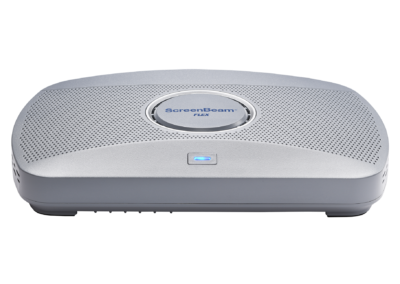
ScreenBeam Flex Wireless Presentation System – CBWD1100F
R28,359.89
4K wireless display receiver for meeting rooms and lecture venues where staff and guests present from their own laptops, tablets and phones.
- Miracast, AirPlay and Google Cast built in; no app or dongle
- HDMI output at up to 4K and 30 Hz; no HDMI input
- Up to four presenters on screen at once
- Touch-back for Windows laptops on interactive displays
- Joins a staff and a guest network at the same time
- Brand :Screenbeam
- SKU :SCREENBEAM-CBWD1100F
- Category :Wireless Presentation Systems
- Availability :Out of Stock
Out of stock
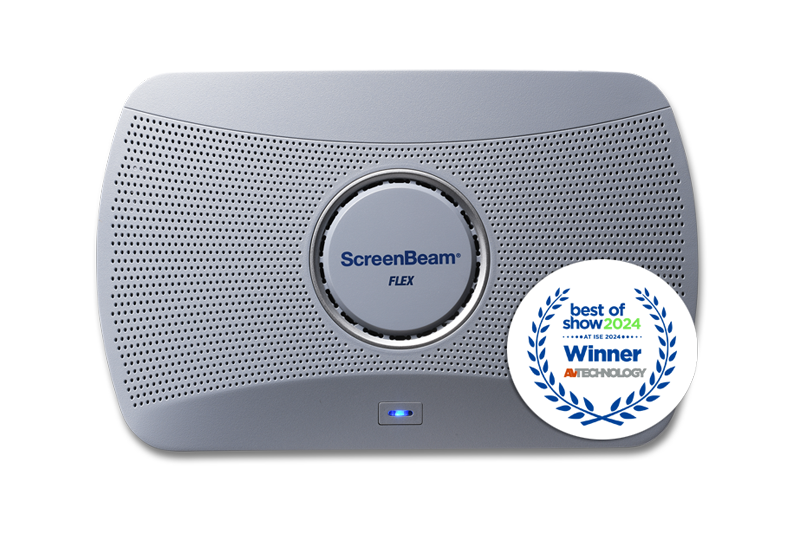
The ScreenBeam FLEX (catalogue number SBWD1100F) is a 4K wireless display receiver that ScreenBeam positions for small businesses and higher education. It connects to the display over HDMI, and laptops, tablets and phones share to it with their built-in casting: Miracast from Windows and Android, AirPlay from Apple devices, Google Cast from Chromebooks.
Up to four presenters can share the screen at once, and one receiver can serve a staff network and a guest network together. Its specification lists an HDMI output and no input, and it cannot run calls through a room camera.
What each device uses to connect
On a Windows 10 or 11 laptop the presenter presses the Windows key and K, picks the receiver name shown on the display and types the PIN if one appears; Android phones offer the same Miracast function under names such as Smart Share or Screen Cast. Miracast devices find the receiver over Wi-Fi Direct from up to about 30 m (100 ft), but ScreenBeam treats the FLEX as an in-room device: presenters should be in the same room, and the manual puts the best working range within about 9 m (30 ft). Macs, iPads and iPhones use Screen Mirroring, and Chromebooks use Cast, either over your network or by joining the FLEX’s own Wi-Fi hotspot. Firmware 11.3.19.0 added BrowserCast, for sharing from Chrome, Edge, Safari or Firefox with no app or extension.
ScreenBeam’s guides flag two Android limits: some devices cannot enter a PIN and fail to connect until PIN enforcement is switched off, and support for Miracast over Wi-Fi Direct varies by phone maker.
Sharing the screen between several presenters
The FLEX has three sharing modes. Single holds the screen for whoever connected first. Quick Switch lets the next person connect and take over without waiting for the current presenter to disconnect. Multi-View divides the display into four quadrants for Miracast and AirPlay sources, with sound only while a single source is showing. A Chromebook on Google Cast cannot take over in Quick Switch or join Multi-View, and one that connects first keeps the screen to itself.
Running staff and guest networks on one receiver
The FLEX can be cabled to the internal network over Gigabit Ethernet while its Wi-Fi joins a guest network, and its hotspot and the Wi-Fi Direct link for Miracast can run at the same time. For presenting over the network, ScreenBeam asks for mDNS to be allowed for discovery and recommends Gigabit Ethernet and 5 GHz Wi-Fi; on managed Windows laptops, Group Policy must permit Wi-Fi Direct for the direct Miracast link. For enterprise Wi-Fi the FLEX supports 802.1X with PEAP-MSCHAPv2 or EAP-TLS, and firmware 11.3.18.3 added WPA3.
Touch-back, whiteboard and annotation on interactive displays
Touch-back is for Windows 10 or 11 (21H2 or later) laptops presenting over Miracast. With the display’s own USB touch cable plugged into the FLEX, the presenter can mark up Office documents on the panel using up to 20 touch points and four passive or two active pens; Ghost Inking hides the wireless lag while writing. The laptop needs at least a 6th-generation Intel Core i-series chip (or AMD’s equivalent) and 4 GB of RAM, according to ScreenBeam. Android, Apple and Chromebook presenters get no touch-back. Firmware 11.3.17.7 added Whiteboard by ScreenBeam for touchscreens, and 11.3.18.3 a Freeze & Annotate beta whose notes cannot yet be saved or shared. Check any panel, including our interactive flat panels, against ScreenBeam’s touch compatibility list first.
Signage, CMS Enterprise and optional licences
When no one is presenting, the built-in signage player can show HTML5 web content such as announcements. ScreenBeam includes CMS Enterprise with the FLEX for monitoring, configuring and updating receivers from a browser console hosted on your own Windows PC or server. The Administrative Tools (Signage+ scheduling, Alert+ emergency alerts and Message Manager) are a separately licensed subscription, and Signage+ also needs ScreenBeam Cloud.
When the 1100 Plus, 1000 EDU Gen 2 or 960 fits better
The ScreenBeam 1100 Plus adds three things the FLEX lacks: an HDMI input for a cabled laptop, ScreenBeam Conference for calls through a USB room camera and speakerphone, and VLAN tagging, which its manual documents and the FLEX manual does not. The ScreenBeam 1000 EDU Gen 2 has the same ports, power and case as the FLEX, adds Orchestrate Lite classroom moderation and is sold only to K-12 schools. The ScreenBeam 960 stops at 1080p and 30 Hz and lists Miracast and AirPlay but not Google Cast.
In the box, power and mounting
ScreenBeam’s 2026 product brief lists the receiver, a power adapter, a 0.9 m (3 ft) HDMI cable and a magnetic mounting kit; network and USB touch cables are not supplied. The FLEX runs from 12 V DC at 3 A and draws 8.4 W typically, 24.8 W at peak. It measures 220 x 144 x 37.5 mm and weighs 453.5 g. Its magnetic kit holds it to a flat metal surface, and for a wall, ScreenBeam’s FLEX page links a template, drawn for the same-sized 1100 Plus, that spaces two #6 screws 105 mm apart.
Key specifications of the ScreenBeam FLEX
| Catalogue number | SBWD1100F |
|---|---|
| Native protocols | Miracast, AirPlay and Google Cast; BrowserCast since firmware 11.3.19.0 |
| Resolution | Up to 4K30 over HDMI, H.264 compression |
| Video | HDMI output only |
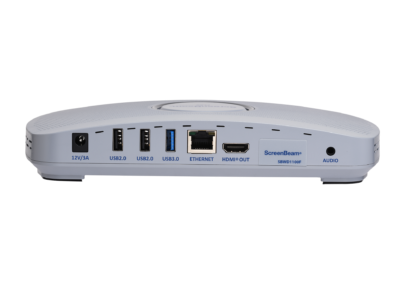
| Other ports | Gigabit Ethernet (RJ-45), USB 3.0 Type-A, two USB 2.0 Type-A, 3.5 mm analogue audio out |
| Presenters on screen | Up to four (Multi-View) |
| Wireless | 802.11ac 3×3 MIMO 5 GHz for Miracast and hotspot; 802.11ac 2×2 MIMO 2.4 and 5 GHz for the network |
| Content protection | HDCP 2.x, Miracast only |
| Touch-back | Windows 10/11 over Miracast, up to 20 touch points |
| Management | ScreenBeam CMS Enterprise included |
| Power | 12 V DC, 3 A; 8.4 W typical, 24.8 W peak |
| Size and weight | 220 x 144 x 37.5 mm; 453.5 g |
Questions about the ScreenBeam FLEX
Does the ScreenBeam FLEX have an HDMI input?
Not according to its specification: ScreenBeam’s 2026 product brief lists one HDMI output and no HDMI input, and the rear panel shows only the output. If a cabled laptop must share the same display, the 1100 Plus is the ScreenBeam receiver whose specification includes an HDMI input.
Can the FLEX run Teams or Zoom calls through the room camera?
No. ScreenBeam Conference, which hands a USB room camera, microphone and speakers to the presenter’s laptop, requires an 1100 Plus. A laptop running a call can still mirror to the FLEX using its own camera and microphone, with the call’s picture and sound on the room display.
Do Chromebooks need an app to present?
No. ChromeOS, or Chrome 98 or later on another computer, casts to the FLEX with its built-in Google Cast. A casting Chromebook has the display to itself, though: Google Cast cannot join Multi-View, and in Quick Switch mode it neither takes over from another presenter nor gives way to one.
Will older laptops connect to the FLEX?
ScreenBeam’s requirements start at client devices made from 2020 onwards, with Windows 10 or 11 at version 21H2 or later, so older laptops fall outside what it supports. Windows laptops also need Wi-Fi adapters and graphics that support Miracast, and ScreenBeam recommends Intel 802.11ac or 802.11ax adapters or an equivalent.
You must be logged in to post a review.
CBWD1100FW Datasheet PDF
You may also like these
 Low stock (1 left)
Wolfvision
Reviews
There are no reviews yet.