All Categories
- ATEN
- EPSON
- HISENSE
-
AV Signal Distribution
In AV Signal Distribution
- JK
-
Screens
In Screens
-
Projector
-
Cables
In Cables
- DTECH
- Business
- VISION
-
Projector Bracket
In Projector Bracket
-
Digital Signage Solutions
In Digital Signage Solutions
Brands
-
Audio
In Audio














All Categories
- ATEN
- EPSON
- HISENSE
-
AV Signal Distribution
In AV Signal Distribution
- JK
-
Screens
In Screens
-
Projector
-
Cables
In Cables
- DTECH
- Business
- VISION
-
Projector Bracket
In Projector Bracket
-
Digital Signage Solutions
In Digital Signage Solutions
Brands
-
Audio
In Audio

BROWSE CATEGORIES
Help
AV Signal Distribution
Dtech Extender, USB, 2.0, Transmitter and Receiver, 50m – 7014A
R2,017.76
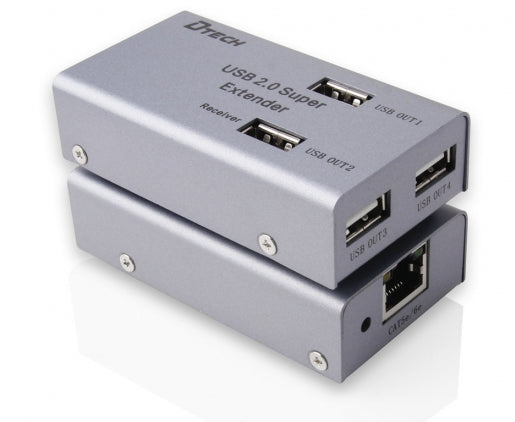
USB 2.0 extender kit whose receiver gives you four USB-A ports as far as 50 m from the computer, for a touch display, webcam, keyboard or printer.
- One Cat5e or Cat 6 cable, up to 50 m
- USB 2.0 High Speed, 480 Mbps, shared by the four ports
- Mains adapter needed at the receiver only
- No drivers on Windows, macOS or Linux
- Brand :Dtech
- SKU :DTECH-7014A
- Category :AV Signal Distribution
- Availability :
 In Stock
27 in stock
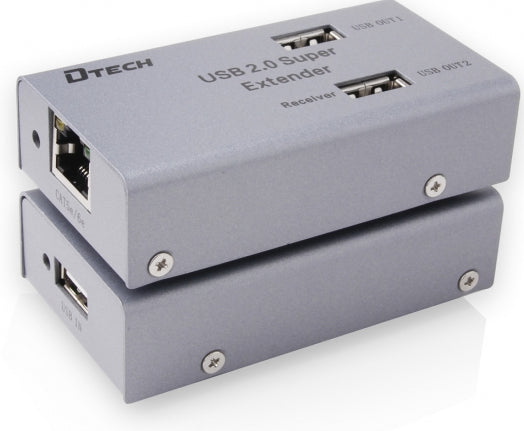
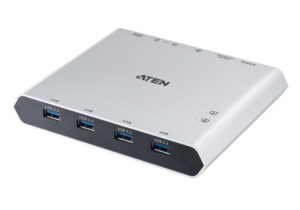
The Dtech DT-7014A (7014A in our catalogue) moves four USB ports up to 50 m away from a computer. A small sender plugs into the computer, one Cat5e or Cat 6 cable runs to the receiver, and the receiver has four USB-A sockets for a display’s touch connection, a webcam, a keyboard and mouse or a printer. Dtech rates the link at USB 2.0 High Speed, and no drivers are needed on Windows, macOS or Linux.
480 Mbps, shared by the four ports
Dtech gives the maximum data rate as 480 Mbps, the USB 2.0 High Speed rate, and the kit also takes older USB 1.1 devices. Its device list names printers, webcams, digital cameras, game controllers, phones and hard drives.
The four sockets share one link back to the computer. A webcam on a video call and a large copy to a USB drive running at the same moment compete for that 480 Mbps, and either can slow the other. For an interactive display, one port brings the USB touch cable back to a PC at a lectern or in a cabinet, and the other three stay free for a camera, keyboard or presenter’s mouse.
Power comes from one adapter at the receiver
The sender needs no adapter: Dtech says it runs from the computer’s USB port. The receiver needs a 5 V supply rated at 1,000 mA, which the datasheet lists as included, and Dtech asks for its own adapter to be used rather than a substitute. Put the power point at the device end of the cable, because that adapter also feeds whatever is plugged into the four ports.
In the box, and what you add
Dtech packs the sender and receiver with a USB A-to-A lead for the short hop from the computer to the sender’s USB IN socket, and the datasheet adds the 5 V adapter for the receiver. The Cat cable is yours to supply: one Cat5e or Cat 6 run of up to 50 m, with an RJ45 plug at each end, going straight from one unit to the other.
A touch display needs its picture too. The Dtech DT-7053 HDMI extender sends 1080p up to 60 m on a second cable, so one kit carries the video out and the other carries touch back. Where only a keyboard and mouse have to travel with the picture, the Dtech DT-7054 KVM extender puts HDMI and both of them on one cable to 50 m; Dtech names only a keyboard and mouse for its USB side, so it does not replace this kit for a touch screen or webcam. More kits are listed under USB extenders.
Key specifications of the Dtech DT-7014A
| Kit | Sender (USB IN) and receiver (USB OUT1 to OUT4) |
|---|---|
| Maximum distance | 50 m |
| Cable between units | One Cat5e or Cat 6 UTP, RJ45 at each end |
| USB standard | USB 2.0, up to 480 Mbps; USB 1.1 compatible |
| Ports at the far end | 4 x USB-A, sharing one link |
| Power | 5 V, 1,000 mA adapter at the receiver; sender powered over USB |
| Drivers | None; Windows, macOS and Linux |
| In the box | Sender, receiver, USB A-to-A lead, 5 V adapter |
Questions about the Dtech DT-7014A
Can a webcam and a USB drive run at the same time?
Yes, both can be connected, but they share the link. Dtech lists webcams and hard drives among supported devices, and every port feeds the same 480 Mbps connection. If a video call has to stay smooth, copy large files while the camera is idle, or plug the drive into the computer itself.
How many bus-powered devices can the receiver run?
That depends on how much current each one draws. A USB 2.0 device may take up to 500 mA, so two devices at that maximum would need the adapter’s full 1,000 mA before the receiver’s own draw. Check the rating of anything bus-powered, and give a portable hard drive or a phone that needs charging its own supply.
My computer has only USB-C ports. Can it connect to the sender?
Yes, through a USB-C to USB-A adapter. The sender’s USB IN is a full-size USB-A socket and the lead Dtech supplies is USB A-to-A, so the adapter goes between that lead and the computer.
Will the DT-7014A reach further than 50 m on Cat 6?
Not within Dtech’s rating, which is 50 m on Cat5e and Cat 6 alike. For 50 to 100 m there is the Dtech DT-7014ACH, but Dtech’s own page gives that model 12 Mbps rather than 480 Mbps: fine for keyboards, mice and printers, too slow for HD webcam modes or large file copies.
You must be logged in to post a review.
Reviews
There are no reviews yet.