All Categories
- ATEN
- EPSON
- HISENSE
-
AV Signal Distribution
In AV Signal Distribution
- JK
-
Screens
In Screens
-
Projector
-
Cables
In Cables
- DTECH
- Business
- VISION
-
Projector Bracket
In Projector Bracket
-
Digital Signage Solutions
In Digital Signage Solutions
Brands
-
Audio
In Audio














All Categories
- ATEN
- EPSON
- HISENSE
-
AV Signal Distribution
In AV Signal Distribution
- JK
-
Screens
In Screens
-
Projector
-
Cables
In Cables
- DTECH
- Business
- VISION
-
Projector Bracket
In Projector Bracket
-
Digital Signage Solutions
In Digital Signage Solutions
Brands
-
Audio
In Audio

BROWSE CATEGORIES
Help
ATEN
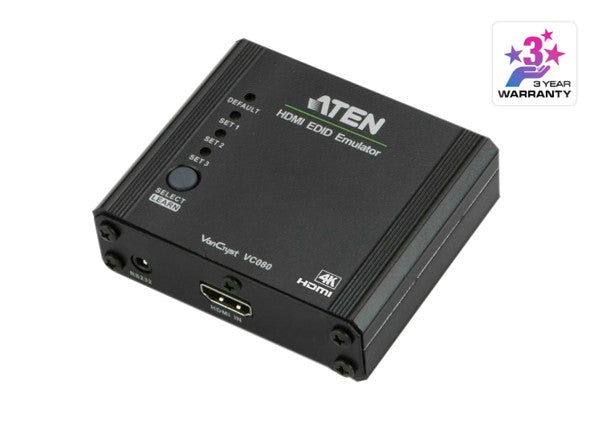
Aten Emulator, HDMI – VC080
R2,186.43
An inline HDMI EDID emulator that holds a source to a fixed resolution and audio format behind projectors, switchers and extenders that upset EDID.
- Stores three EDIDs plus ATEN's default
- Learn with one button or edit in EDID Wizard
- Video up to 4096 x 2160 at 30 Hz, HDMI 1.4
- Powered by the source; USB power cord included
- Brand :Aten
- SKU :ATEN-VC080
- Category :ATEN
- Availability :Out of Stock
Out of stock
The Aten VC080 connects between an HDMI source and its display and hands the source a fixed EDID: the block of data a display uses to tell a computer or media player which resolutions and audio formats it accepts. It stores three EDIDs, learned from real displays or edited in ATEN’s software, alongside ATEN’s own default, and passes video up to 4096 x 2160 at 30 Hz.
Why a source needs a constant EDID
A computer or player reads the EDID when it starts and again each time the HDMI link reconnects. If the display behind a switcher, splitter or extender is off, replaced or a different model, the source may fall back to a low resolution, drop audio or rearrange its desktop. With the VC080 in the line, the source reads the same EDID every time, whatever the display end is doing, and the picture still continues to the display.
Learning, selecting and editing the three EDID sets
Four green LEDs on top mark Default and Sets 1 to 3, and one Select/Learn button steps between them. To learn a display, connect it to the HDMI output, select Set 1, 2 or 3, then hold the button for more than three seconds: the LED flashes while the EDID is captured and stored. Repeat with other displays to fill the other sets, then select the set the installation should present.
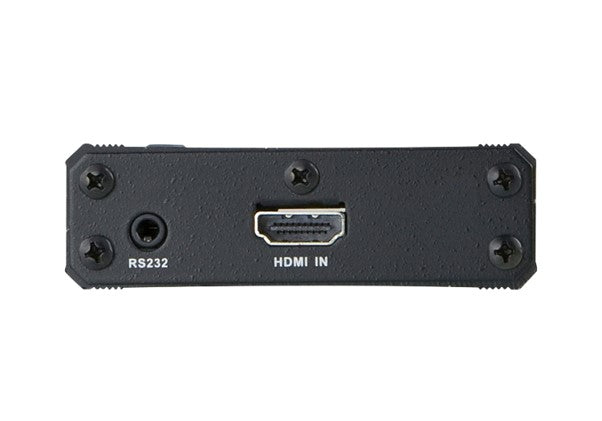
For programming, ATEN’s EDID Wizard connects through the supplied 1.8 m RS-232 configuration cable to the mini-jack port on the front. It reads an EDID from the attached display, from the emulator or from a .bin file, lets you change the timings, audio formats, 3D and 4K entries, and saves the result to the emulator or to a file, so a source can be offered only the formats you want it to use. ATEN’s download page lists the Wizard for Windows, and the cable ends in a PC serial connector, so a computer without one needs a USB-to-serial adapter, which is not supplied. Firmware upgrades also go over the serial link.
Video, audio and HDCP limits
ATEN rates the VC080 at 10.2 Gbps with HDMI 1.4, so 4K signals (4096 x 2160 and 3840 x 2160) are limited to 30 Hz, though with full 4:4:4 colour. It passes 3D, deep colour and CEC, and audio including Dolby TrueHD and DTS-HD Master Audio. HDCP is listed as compatible, without a version, so do not count on it for 4K material that demands HDCP 2.2.
Connections and power
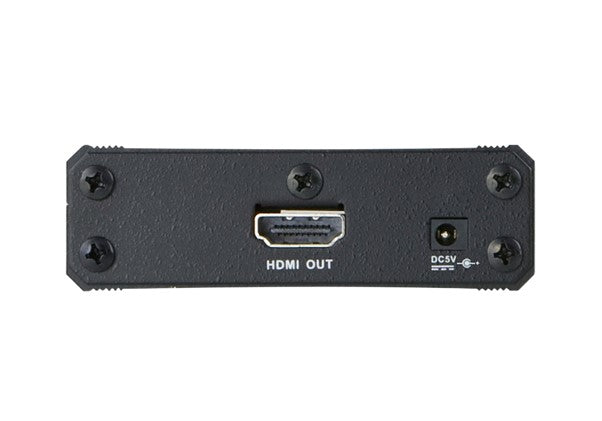
The source connects to HDMI IN on the front, beside the RS-232 jack, and the display to HDMI OUT at the back, next to a 5 V DC socket. The metal box measures 7.90 x 7.76 x 2.45 cm and draws 0.17 W, which normally comes from the source through the HDMI connection.
VC080, VC081A or a dummy plug
The VC080 is the one to choose when an EDID has to be edited, loaded into other units from a file or switched between several displays, and 4K at 30 Hz is enough. The Aten VC081A EDID emulator adapter plugs straight into an HDMI output and learns a single display at the press of a button, with 4K at 60 Hz and HDCP 2.2, but offers no editing and no second memory. A dummy plug such as the Dtech TB0669 is a different tool: it closes off an HDMI output with an EDID of its own, so no picture continues to a screen and no particular display’s EDID can be copied into it.
Key specifications of the Aten VC080
| Connectors | HDMI Type A in (source), HDMI Type A out (display) |
|---|---|
| Bandwidth | 10.2 Gbps, HDMI 1.4 |
| Highest 4K mode | 30 Hz, 4:4:4, at 4096 x 2160 or 3840 x 2160 |
| EDID | ATEN default plus 3 sets; learned by button or edited in EDID Wizard |
| HDCP and control | HDCP compatible (no version stated); 3D, deep colour, CEC |
| Audio | HDMI audio passed, including Dolby TrueHD and DTS-HD Master Audio |
| Configuration | RS-232 mini jack; 1.8 m cable included |
| Power | From the HDMI source; 5 V DC socket with USB cord included; 0.17 W |
| Size and weight | 7.90 x 7.76 x 2.45 cm, 0.15 kg, metal box |
| Operating temperature | 0 to 50 °C |
| In the box | VC080, RS-232 cable, USB to DC power cord, instructions |
Questions about the Aten VC080
Can the VC080 pass 4K at 60 Hz?
No. Its HDMI 1.4 path tops out at 4K and 30 Hz. Run the 4K source at 30 Hz instead, or drop it to 1080p at 60 Hz for smoother motion, and offer only those modes in the stored EDID.
When do I need the USB power cord?
Only when the HDMI source cannot power the emulator by itself. ATEN describes the VC080 as running from the source and says to connect the supplied USB to DC cord if the source is not delivering enough power. The cord’s USB end needs a powered USB port or charger nearby.
Do I need a computer to set up the VC080?
Not for learning, which uses only the button on top. A Windows computer running EDID Wizard over the serial cable is needed to view or edit an EDID, or to save one to a file.
Can I copy one EDID onto several emulators?
Yes. EDID Wizard saves an EDID as a .bin file, which can be loaded into another VC080 and saved to the device, so every room in a project presents the same EDID to its sources even when the displays differ.
| Max. Video Resolution | 4096*2160@30Hz (4:4:4) 3840*2160@30Hz (4:4:4) |
|---|---|
| Data Rate | 10.2 Gbps |
Video Input
| Interfaces | 1 x HDMI Type A Female (Black) |
|---|---|
| Impedance | 100 Ω |
Video Output
| Interfaces | 1 x HDMI Type A Female (Black) |
|---|---|
| Impedance | 100 Ω |
Video
| Compliance | HDMI 1.4 (3D, Deep Colour) HDCP Compatible Consumer Electronic Control (CEC) |
|---|
Audio
| Output | 1 x HDMI Type A Female (Black) |
|---|---|
| EDID Settings | EDID Mode: Default / Learn / Customized (EDID Wizard support) |
Connectors
| Power | 1 x DC Jack |
|---|---|
| Power Consumption | DC5V:0.17W:1BTU/h Note: ● The measurement in Watts indicates the typical power consumption of the device with no external loading. ● The measurement in BTU/h indicates the power consumption of the device when it is fully loaded. |
Environmental
| Operating Temperature | 0 - 50 ºC |
|---|---|
| Storage Temperature | 20 - 60 ºC |
| Humidity | 0 - 80% RH, Non-Condensing |
Physical Properties
| Housing | Metal |
|---|---|
| Weight | 0.15 kg ( 0.33 lb ) |
| Dimensions (L x W x H) | 7.90 x 7.76 x 2.45 cm (3.11 x 3.06 x 0.96 in.) |
| Carton Lot | 5 pcs |
You must be logged in to post a review.
VC080 Datasheet PDF
 In Stock
Reviews
There are no reviews yet.