All Categories
- ATEN
- EPSON
- HISENSE
-
AV Signal Distribution
In AV Signal Distribution
- JK
-
Screens
In Screens
-
Projector
-
Cables
In Cables
- DTECH
- Business
- VISION
-
Projector Bracket
In Projector Bracket
-
Digital Signage Solutions
In Digital Signage Solutions
Brands
-
Audio
In Audio














All Categories
- ATEN
- EPSON
- HISENSE
-
AV Signal Distribution
In AV Signal Distribution
- JK
-
Screens
In Screens
-
Projector
-
Cables
In Cables
- DTECH
- Business
- VISION
-
Projector Bracket
In Projector Bracket
-
Digital Signage Solutions
In Digital Signage Solutions
Brands
-
Audio
In Audio

BROWSE CATEGORIES
Help
AV Signal Distribution
Dtech Converter, VGA to HDMI – 7004B
R366.66
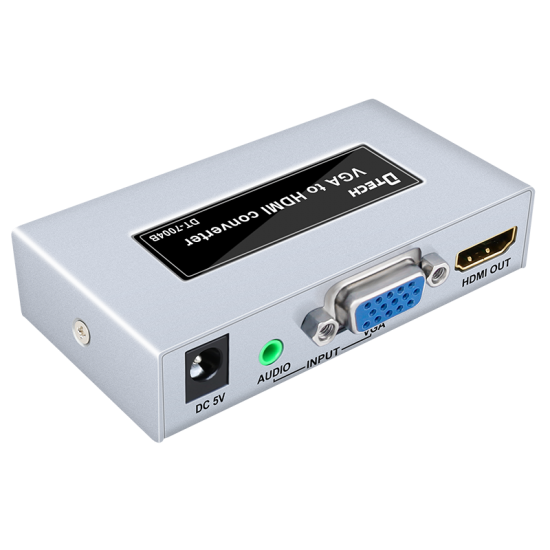
A VGA to HDMI converter with an audio input, for connecting an older VGA PC, laptop or DVR to an HDMI TV, monitor or projector.
- VGA input up to 1920 x 1080, plus 3.5 mm stereo audio input
- HDMI output at 1080p, 50 or 60 Hz
- DC 5 V at 350 mA maximum; Dtech's diagram shows it powered from USB
- 88 x 48.5 x 20 mm
- Brand :Dtech
- SKU :DTECH-7004B
- Category :AV Signal Distribution
- Availability :
 In Stock
9 in stock
The Dtech DT-7004B turns the VGA output of an older PC, laptop or DVR into HDMI, and adds stereo sound from a 3.5 mm input, so a current TV, monitor or projector receives picture and audio on one HDMI cable. It accepts VGA up to 1920 x 1080, outputs HDMI at 1080p (50 or 60 Hz) and draws no more than 350 mA at 5 V, little enough for a USB port.
Inputs and output on the DT-7004B
Every connection is on one face of the grey case: the DC 5 V power socket, a green 3.5 mm AUDIO input, the VGA input and the HDMI OUT socket. Run a VGA cable from the computer’s VGA port to the converter, a 3.5 mm stereo lead from the computer’s headphone or line output to AUDIO, and an HDMI cable from HDMI OUT to the display.
Resolution settings for the source
Dtech gives 1920 x 1080 as the highest VGA input format, with lower formats also accepted, and lists the HDMI output as 1080p at 50 Hz or 60 Hz, again with lower formats supported. Set the computer to 1920 x 1080 or lower before connecting. A computer set to 1920 x 1200 (a 16:10 format) or higher is outside the input rating, and the screen may stay blank until the setting is lowered.
What else you will need
- A VGA cable with a male plug at each end, from the computer to the converter. The Dtech V003 3 m VGA cable reaches from a desk to a converter beside a TV or projector.
- An HDMI cable from HDMI OUT to the display, such as the Dtech H004 2 m HDMI cable. For a projector further away, see HDMI copper cables.
- A 3.5 mm male-to-male stereo lead for the sound.
- A USB port or a 5 V USB power adapter within reach of the converter.
Key specifications of the Dtech DT-7004B
| Video input | VGA socket, up to 1920 x 1080 |
|---|---|
| Audio input | 3.5 mm stereo |
| Output | HDMI, 1080p at 50 or 60 Hz |
| Lower formats | Backward compatible on input and output |
| Signal direction | VGA to HDMI only |
| Power | DC 5 V, 350 mA maximum |
| Dimensions | 88 x 48.5 x 20 mm (L x W x H) |
| Model | DT-7004B, printed on the case (also listed as 7004B) |
Questions about the Dtech DT-7004B
Why does the TV show a picture but play no sound?
Because nothing is reaching the AUDIO input. VGA has no audio channel, so the converter can only add sound from a 3.5 mm lead between the computer’s headphone or line output and the AUDIO socket. With that lead in place and the computer’s volume up, the TV or projector speakers play the sound through HDMI.
Can I power the DT-7004B from a laptop’s USB port?
Yes. It needs at most 350 mA at 5 V, about 1.75 W, and Dtech’s connection diagram shows it fed from a USB port through a lead into the DC 5 V socket. A USB 2.0 port supplies up to 2.5 W. Where the laptop’s ports are all in use, a USB phone charger at the wall can power it instead.
Will the DT-7004B convert HDMI to VGA?
No. Signals go one way only, VGA and 3.5 mm audio in, HDMI out. To feed a VGA projector or monitor from an HDMI laptop, use the Dtech DT-6404 HDMI to VGA converter, which has an HDMI plug on a short lead and a VGA socket with an audio output.
Will the DT-7004B work with a CCTV recorder?
It should, if the recorder has a VGA monitor output: the supplier description lists DVRs among the converter’s sources. Set the recorder to 1920 x 1080 or lower so it stays within the input rating. A recorder that already has an HDMI output can connect to the screen directly.
You must be logged in to post a review.
You may also like these
Aten
Reviews
There are no reviews yet.